Threat Modeling LLM and AI Agent Systems
On this page
Where attacks on LLM systems happen
Microsoft's AI red team, after testing more than 100 generative AI products, reported that simple attacks on how a model is wired into the surrounding system often matter more than clever attacks on the model itself. That's good news. It means the most useful security work on an LLM app looks a lot like classic threat modeling, with one twist.
Adam Shostack's four questions still frame it: what are we working on, what can go wrong, what are we going to do about it, and did we do a good job? The twist is in the first question. In an LLM app, the interesting flows aren't only network requests. They're pieces of text moving into the model's context, and effects coming out of it.
Sources, sinks and the paths between them
Draw the usual data flow diagram: the user, your app, the model provider, the retrieval store, each tool and the systems tools touch. Then add two annotations.
Sources are everything that puts text into the model's context, each with a trust level. The system prompt you wrote is trusted. The user's message, retrieved documents, tool results, emails and web pages are not.
Sinks are everywhere the model's output causes an effect: tool calls, emails, database writes, generated code, and Markdown rendered in a browser.
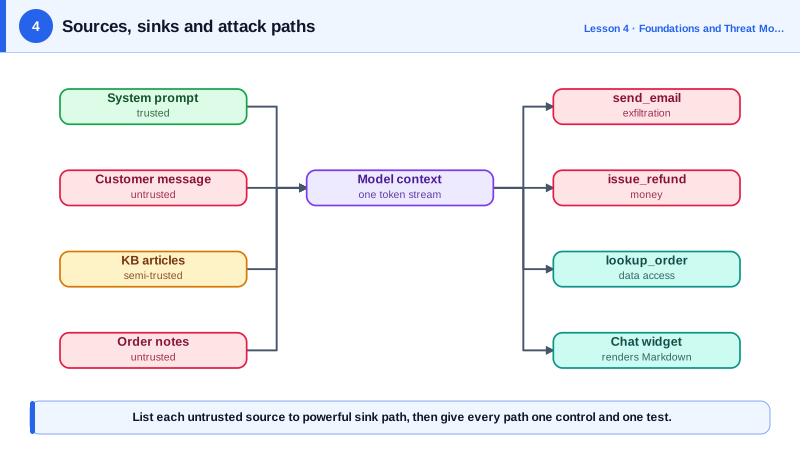
The threats concentrate where an untrusted source and a powerful sink meet in the same context:
- untrusted document to
send_emailis an exfiltration path, - customer message to
issue_refundis an abuse path, - web page to a code execution tool is a remote code execution path.
Listing these paths explicitly is the most valuable output of the whole exercise.
SupportBot's threat model, as data
Keep the model next to the code, so it's reviewed whenever a tool or data source changes:
# security/threat_model.yaml
sources:
  system_prompt:    {trust: trusted}
  customer_message: {trust: untrusted}
  kb_articles:      {trust: semi-trusted, note: "staff-edited, quotes customer text"}
  order_notes:      {trust: untrusted, note: "free text customers write at checkout"}
sinks:
  send_email:   {impact: external communication}
  issue_refund: {impact: money}
  lookup_order: {impact: data access}
  chat_widget:  {impact: renders Markdown in the browser}
paths:
  - id: P1
    from: [kb_articles, order_notes]
    to: send_email
    threat: "Indirect injection makes the bot email order data to an attacker"
    owasp: [LLM01, LLM02]
    atlas: [AML.T0051.001]        # indirect LLM prompt injection
    control: "send_email only to the authenticated customer's address"
  - id: P2
    from: [customer_message]
    to: issue_refund
    threat: "Social engineering or injection triggers large refunds"
    owasp: [LLM03]
    control: "refund only own orders, limit 50 EUR, human approval above"
  - id: P3
    from: [customer_message]
    to: lookup_order
    threat: "Customer requests other customers' orders"
    owasp: [LLM02]
    control: "ownership check in code using the session's customer id"
  - id: P4
    from: [kb_articles, customer_message]
    to: chat_widget
    threat: "Markdown image with data in its URL exfiltrates on render"
    owasp: [LLM10]
    control: "strip images and non-allowlisted links before rendering"
Each path becomes at least one red-team test in Phase 5. And when someone adds a tool or a data source, the review question is short: which new paths did this create?
Applying STRIDE to AI systems
STRIDE still works as a checklist of threat types, with AI-specific readings:
| STRIDE | In an LLM app |
|---|---|
| Spoofing | Text impersonating the system, a developer or an administrator |
| Tampering | Poisoned documents, memories or training data |
| Repudiation | An agent took an action and there's no audit trail of why |
| Information disclosure | Leaked context, personal data or retrieved documents |
| Denial of service | Token floods, huge inputs, runaway agent loops |
| Elevation of privilege | The model uses a tool with more authority than the user has |
MITRE ATLAS gives you shared names for these. It's ATT&CK for AI systems: a catalog of real adversary tactics and techniques, including agent-specific ones added in late 2025 such as tool credential harvesting. Tagging each path with OWASP and ATLAS ids, as in the YAML above, links it to known incidents and mitigations and makes coverage comparable across teams.
Check yourself
Web pages become an untrusted source, so there are new paths from fetched pages to every sink in the same context: send_email, issue_refund, lookup_order and the chat widget. Each needs a control, or the tool needs to run where those sinks aren't available.
The paths. Injection is only dangerous through a specific sink, so each source-to-sink path needs its own control and test, such as recipient restrictions for email and limits and approval for refunds.
The bot can read any order and refund any amount, which is more authority than a customer has. The fix is to make tools act with the customer's permissions, checked in code.
Any place the model's output has an effect: tool calls that change data, messages sent to people, rendered HTML or Markdown, files, and logs. Each sink reachable from untrusted input needs a control.