Axial Coding: Turning Notes into LLM Failure Modes
On this page
From notes to failure modes: axial coding
After yesterday you have a spreadsheet with around 100 notes like "quoted an old price" and "no citation". Individually they're anecdotes. Grouped and counted, they become a list of what's wrong with DocsBot and how often. That grouping step is called axial coding: you find the categories that tie the notes together.
Grouping notes into failure modes
Read through the notes and cluster similar ones. Give each cluster a name that describes the failure, not its cause. Aim for roughly 5 to 10 modes. Fewer usually means categories too broad to act on; many more usually means you're splitting hairs.
DocsBot's notes might cluster like this:
| Failure mode | Example notes | Count |
|---|---|---|
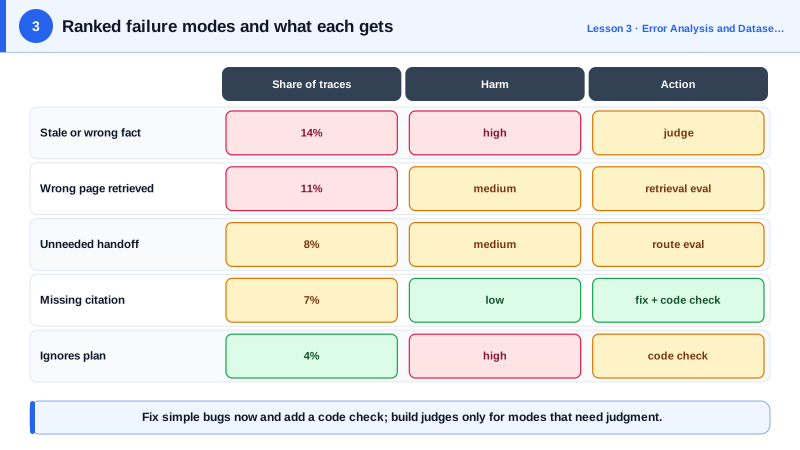
| Stale or wrong fact | "old price", "24 hours instead of 1 hour" | 14 |
| Wrong page retrieved | "2023 pricing page", "admin guide for wrong plan" | 11 |
| Unneeded handoff | "handed off SSO question, page exists" | 8 |
| Missing citation | "answer fine, no link" | 7 |
| Unsupported claim | "says API supports webhooks, docs don't mention" | 5 |
| Ignores plan | "explained Enterprise feature to Starter user" | 4 |
You can ask an LLM to propose clusters from the notes to save time. Review its proposal yourself, though: it doesn't know which distinctions matter to Acme, and merging "stale fact" with "unsupported claim" would hide two different fixes.
Counting failure modes
Add a mode column to the review sheet, assign each failing trace one mode, and count:
# modes.py: count failure modes from the annotated review sheet
import csv
from collections import Counter

rows = list(csv.DictReader(open("review.csv")))
failed = [r for r in rows if r["pass"].strip().lower() == "n"]
counts = Counter(r["mode"] for r in failed)

print(f"{len(failed)} of {len(rows)} traces failed ({len(failed) / len(rows):.0%})")
for mode, n in counts.most_common():
    print(f"  {mode:<22} {n:>3}  {n / len(rows):.0%} of traffic")
The output is your first real eval result, done by hand: an overall failure rate and a ranked list of problems.
Deciding which failure modes need an eval
Not every failure mode needs an automated eval. Sort them into three groups:
- Fix it now, no eval needed. "Missing citation" might be a bug in the prompt template. Fix it, then add a cheap code check (Day 6) so it doesn't come back.
- Needs an automated eval. "Unsupported claim" depends on judgment and will come back as prompts and models change. These get code graders or LLM judges (Days 6 to 11).
- Watch, don't build yet. Rare modes with low impact. Note them and revisit in the next review.
Weigh frequency against harm. "Ignores plan" happens in 4 percent of traces, but telling a Starter customer about an Enterprise feature creates support tickets and angry customers. It may deserve an eval before "missing citation" does.
Keeping the failure taxonomy up to date
Failure modes change. A new feature, a model upgrade or new users bring new failures. Researchers studying LLM-assisted grading found that people refine their criteria as they see more outputs, an effect they call criteria drift. Plan for it: repeat error analysis on a fresh sample after every significant change, and at least monthly once the feature is live.
Check yourself
"Bad answer" is too broad to act on. Split it until each mode points to a specific kind of fix, such as retrieval, prompt or tool logic.
Probably not. Whether a citation is present is checkable with code, and the cause is often a simple bug. Fix it and add a code assertion to catch regressions.
New features, models, prompts and users bring new failure modes that your current evals don't measure, so a green dashboard can hide them. Only reading fresh traces finds them; schedule it, for example after every major change or monthly.
It's specific enough that two people would label the same trace the same way, like "cites a page that doesn't support the claim", and it points toward a fix. Vague names like "bad answer" don't.
By how often they happen and how much harm they cause. A frequent minor issue and a rare but serious one, like leaking another customer's data, can both deserve one.