How to Split a Frontend into Micro-Frontends
On this page
A split that made everything slower
Imagine a team splits its shop into "the header", "the product grid" and "the sidebar", one micro-frontend each. A month later, adding a "recently viewed" feature needs changes in all three, owned by three teams, released in a careful order. The split followed the screen layout instead of the business, so every feature crosses a boundary.
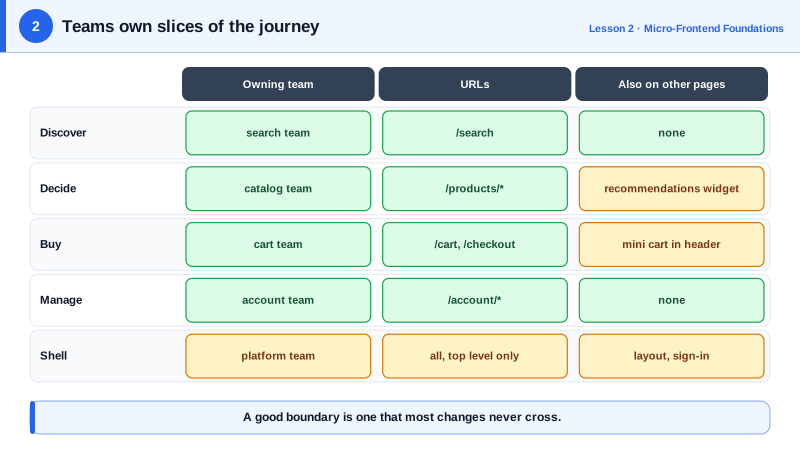
A good boundary is one that most changes don't cross.
Split by business area first
Start from the business, not the page. Each micro-frontend should map to a business capability or a step in the user journey that one team owns:
- Discover: search and product listings.
- Decide: product detail pages, reviews, recommendations.
- Buy: cart and checkout.
- Manage: account, orders, returns.
This is the same idea as a bounded context in domain-driven design: an area where words have one meaning and one team decides how it works. When the catalog team changes how product variants work, only the catalog's frontend and backend change.
Two ways to cut the page
There are two common cuts, and most apps use both.
Vertical split, one micro-frontend per page or route. The search team owns /search, the checkout team owns /checkout. It's the simplest to build and to reason about, because only one team's code runs on most pages.
Horizontal split, several micro-frontends on one page. A product page shows the catalog's details, the cart's "add to basket" button and the recommendations team's carousel. It's more flexible but harder: several teams' code shares one page, its performance and its errors.
Start vertical. Add horizontal pieces only where a page really needs another team's feature, such as a mini cart in the header.
Who owns the shell
Something has to load the micro-frontends, draw the shared layout and handle sign-in. That's the shell, also called the host or container app. Keep it thin:
- Top-level routing: which micro-frontend owns which URL.
- Shared layout: header, navigation and footer.
- Cross-cutting services: authentication state, feature flags, error reporting.
Give the shell a named owner, usually a platform team. A shell that "everyone" owns grows business logic until it becomes the monolith again.
Splits that cause trouble
- By technical layer. A "components team" and a "data team" means every feature needs both.
- Too small. A micro-frontend per widget creates more coordination than it removes. A team usually owns one to three.
- Shared domain models. If the cart and checkout both import one shared
Ordertype package, a change to it forces both to release together.
Check yourself
The split follows page layout instead of business areas. Almost every feature touches the main content and often the menu or header too, so most changes would need several teams to coordinate and release together. Split by business capability or user journey, such as search, checkout and account, so most changes stay inside one team.
With one micro-frontend per route, only one team's code runs on most pages. That's far simpler to build, debug and optimize than several teams' code sharing a page, and it already delivers independent deployment. Mixing several micro-frontends on one page can come later, where it's really needed.
Routing between micro-frontends, the shared layout and cross-cutting services such as sign-in, error reporting and the design system's tokens belong in the shell. Business features and domain logic don't. A shell that grows features turns back into the monolith you were trying to escape.
The boundary is in the wrong place, or the two areas are really one. Look at how changes flow over a few months. If the same pair keeps changing together, merge them or move the boundary so each common change lands in one team's code.
Usually a small platform team, whose customers are the product teams. The shell needs a clear owner because every page depends on it, but it should change rarely and contain no business features, so product teams almost never need to wait for it.