What Is a Backend for Frontend (BFF)?
On this page
One API, many screens
Imagine TaskBoard, a task tracker with a React web app, an iOS app and a public API for partners. Behind them sit several services: tasks, users, billing, recommendations.
At first every client calls the services directly, or one big general-purpose API. Then the problems start:
- The web dashboard needs data from four services, so the browser makes four round trips, each paying for latency and TLS.
- The mobile app wants a smaller payload than the web app, but the shared API returns the same fat objects to everyone.
- Every client team waits on the API team to add one more field.
- The web app has to store OAuth access tokens somewhere in the browser, where any injected script can read them.
A Backend for Frontend (BFF) is a server-side component built for exactly one user experience. The web app gets its own BFF and the iOS app gets its own. Each BFF calls the downstream services and returns exactly what its screens need.
Where the pattern came from
The pattern came out of SoundCloud's move to microservices in the early 2010s. Sam Newman, who wrote it up as "Backends For Frontends" in 2015, describes the core idea plainly: one backend per user experience, owned by the team that builds that experience.
The ownership part matters as much as the code. When the web team owns the web BFF, they can add an endpoint for a new screen the same afternoon, without negotiating with five service teams.
What a BFF does
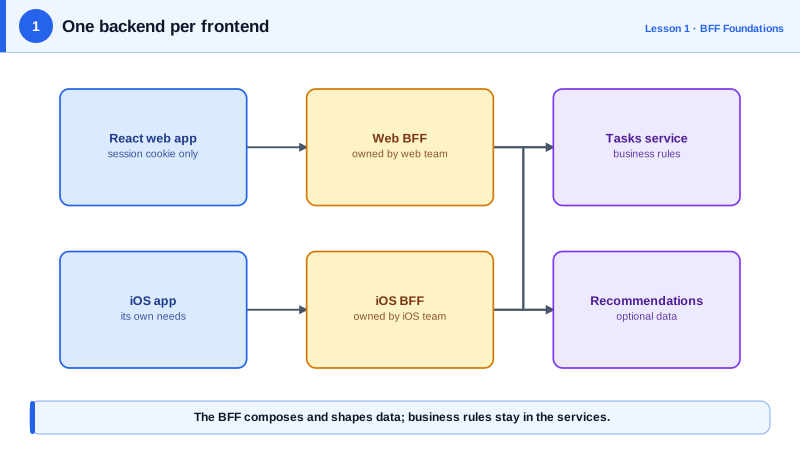
A BFF typically takes on four jobs:
- Aggregation. One call from the browser, several calls from the BFF to services on a fast internal network. The dashboard loads with one round trip instead of four.
- Shaping. The BFF trims and renames fields to fit the screen, so the client doesn't download data it throws away.
- Security. The BFF signs the user in with OpenID Connect, keeps the tokens on the server, and gives the browser only an
HttpOnlysession cookie. Since August 2026 this is the first pattern recommended by RFC 10017, the IETF's best current practice for OAuth in browser-based apps. - Protocol translation. Services may speak gRPC, use internal auth or return awkward formats. The BFF hides all of that behind a simple HTTP and JSON interface for its one client.
How a BFF differs from an API gateway
The two are easy to confuse because both sit in front of services.
An API gateway is shared infrastructure: routing, rate limiting, TLS and API keys for *all* traffic. It's usually configured, not programmed, and owned by a platform team. It shouldn't contain logic for any particular screen.
A BFF is application code for *one* client, owned by that client's team. It's where the logic for "what does the dashboard need" lives.
They often coexist: browser, then the web BFF, then the gateway, then the services. Some gateways can run small per-client routes, which blurs the line, but the question to ask is simple: does this code serve one frontend, or everyone?
When a BFF is worth it
A BFF adds a service you must build, deploy, monitor and keep secure. It pays off when several of these are true:
- Your browser app uses OAuth or OpenID Connect and you want tokens out of the browser.
- Screens need data from several services, and latency matters.
- You have several kinds of client with clearly different needs.
- The frontend team wants to move without waiting on backend teams.
It's probably not worth it for a single app talking to a single backend that already returns what the screens need, using simple cookie sessions. That backend already *is* your BFF in all but name.
Common ways a BFF goes wrong
- The shared BFF. One "BFF" serving web, mobile and partners slowly turns back into the general-purpose API you were escaping.
- Business logic creep. Pricing rules or permissions copied into the BFF end up disagreeing with the services. The BFF should compose and shape data, not own business rules.
- A chain of BFFs. A BFF calling another BFF adds latency and confusion. BFFs call services, never each other.
What you'll build in this course
You'll build the TaskBoard web BFF in TypeScript on Node and Fastify 5:
- serving the React app and proxying API calls,
- signing users in with OpenID Connect using
openid-client, - keeping sessions in Redis with secure cookies,
- refreshing tokens, defending against CSRF,
- aggregating services with timeouts and partial failure, and adding retries, circuit breakers and caching,
- tests and tracing, and the production setup.
Every example was run against a real local OpenID Connect provider, a token-checking API and a real browser while writing the course. The outputs you'll see are from those runs.
web-bff or ios-bff, not after a service. The name reminds everyone who owns it and who it's for.Check yourself
It's built for one user experience and usually owned by that experience's team. It aggregates and shapes data for that client and keeps security concerns like tokens on the server.
A gateway is shared infrastructure for all traffic: routing, TLS, rate limits and API keys, usually configured by a platform team. A BFF is application code for one specific frontend, owned by that frontend's team, and it holds the logic for what that screen needs. They often coexist, with the BFF sitting behind the gateway.
Probably not. A backend that already returns exactly what the screens need, behind a cookie session, is doing the BFF's job in all but name. Adding another service would mean one more thing to deploy, monitor and secure, without solving a real problem.
It stopped being a backend *for a* frontend and became a general-purpose API again, with every client's needs competing in one codebase. Give each experience its own BFF, owned by that experience's team, and move logic that all of them share into the services behind them.
BFFs are meant to call services, not each other. Chaining them adds a network hop and latency, and it couples two frontends' release cycles through code neither team owns. If both need the same data or logic, it belongs in a service or a shared library.