OpenID Connect Login in a BFF with PKCE
On this page
The flow in one picture
OpenID Connect (OIDC) is the sign-in layer on top of OAuth 2.0. Your identity provider might be Microsoft Entra ID, Okta, Auth0, Keycloak or Google. The BFF uses the authorization code flow, and it's a confidential client, which means it has its own secret and can prove who it is to the provider.
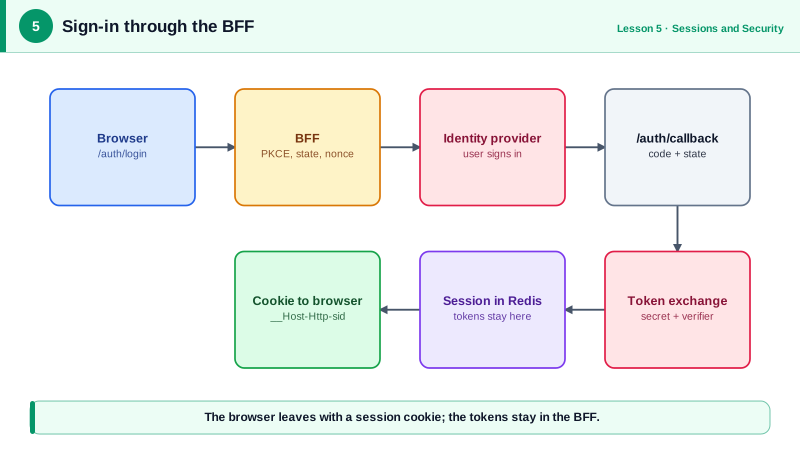
- The browser visits
/auth/loginon the BFF. - The BFF creates three random values (a PKCE verifier, a
stateand anonce), remembers them, and redirects the browser to the identity provider. - The user signs in there. The BFF never sees their password.
- The provider redirects back to
/auth/callback?code=...&state=.... - The BFF exchanges the code, its secret and the PKCE verifier for tokens, over a direct server-to-server call.
- The BFF creates a session, sets the session cookie and redirects into the app.
Set up openid-client
openid-client is a certified OpenID Connect client library for Node. Version 6 uses plain functions and a configuration object:
npm i openid-client @fastify/cookieimport * as oidc from 'openid-client';
const config = await oidc.discovery(
new URL(process.env.OIDC_ISSUER!), // e.g. https://login.example.com
process.env.OIDC_CLIENT_ID!,
process.env.OIDC_CLIENT_SECRET!,
);discovery fetches the provider's /.well-known/openid-configuration document, which lists its endpoints and signing keys, so you don't hard-code any URLs.
openid-client refuses plain http issuers. The lab ran a local provider on http://127.0.0.1:4800, so it passed { execute: [oidc.allowInsecureRequests] } as a fifth argument. That option is for local testing only. Never ship it.
The login route
const BASE = process.env.PUBLIC_URL!;                 // https://app.taskboard.dev
const logins = new Map<string, LoginTx>();            // Redis on Day 6

app.get<{ Querystring: { returnTo?: string } }>('/auth/login', async (req, reply) => {
  const verifier = oidc.randomPKCECodeVerifier();
  const state = oidc.randomState();
  const nonce = oidc.randomNonce();
  const returnTo = safeReturnTo(req.query.returnTo);

  const txId = randomBytes(32).toString('base64url');
  logins.set(txId, { verifier, state, nonce, returnTo, createdAt: Date.now() });

  const url = oidc.buildAuthorizationUrl(config, {
    redirect_uri: `${BASE}/auth/callback`,
    scope: 'openid profile email offline_access tasks:read tasks:write',
    code_challenge: await oidc.calculatePKCECodeChallenge(verifier),
    code_challenge_method: 'S256',
    state,
    nonce,
  });

  reply.setCookie('__Host-Http-login', txId, { path: '/', httpOnly: true, secure: true, sameSite: 'lax', maxAge: 600 });
  return reply.redirect(url.href);
});
What each random value does:
- PKCE (Proof Key for Code Exchange): the provider receives a hash of the verifier now and the verifier itself at the token exchange. A stolen authorization code is useless without the verifier, which never leaves the BFF. Current OAuth guidance asks for PKCE even for confidential clients.
stateties the callback to *this* browser's login attempt, which stops an attacker from completing a login with their own code in your browser.noncegoes into the ID token, so a replayed ID token from an older login is rejected.
offline_access asks for a refresh token, which the BFF will use on Day 7. The tasks:read tasks:write scopes are for the tasks API.
Don't build an open redirect
returnTo lets the app send users back where they were. Left unchecked, /auth/login?returnTo=https://evil.example turns your login page into a redirect to a phishing site, with your domain in the link. Only accept local paths:
function safeReturnTo(value?: string) {
  return value?.startsWith('/') && !value.startsWith('//') && !value.includes('\\') ? value : '/';
}
The // check matters, because //evil.example is a valid URL that browsers treat as another host. Backslashes need the same care: browsers read /\evil.example as //evil.example, so the function rejects any value containing one.
The callback route
app.get('/auth/callback', async (req, reply) => {
  const txId = req.cookies['__Host-Http-login'];
  const tx = txId ? logins.get(txId) : undefined;
  if (!tx) return reply.code(400).send({ error: 'Login expired. Please start again.' });
  logins.delete(txId!);                       // one use only
  reply.clearCookie('__Host-Http-login', { path: '/', httpOnly: true, secure: true, sameSite: 'lax' });

  const tokens = await oidc.authorizationCodeGrant(config, new URL(req.url, BASE), {
    pkceCodeVerifier: tx.verifier,
    expectedState: tx.state,
    expectedNonce: tx.nonce,
  });

  const claims = tokens.claims()!;            // validated ID token claims
  const sessionId = await sessions.create({
    user: { sub: claims.sub, name: claims.name as string, email: claims.email as string },
    tokens: {
      accessToken: tokens.access_token,
      refreshToken: tokens.refresh_token,
      idToken: tokens.id_token,
      expiresAt: Date.now() + (tokens.expiresIn() ?? 300) * 1000,
    },
    createdAt: Date.now(),
  });

  reply.setCookie('__Host-Http-sid', sessionId, { path: '/', httpOnly: true, secure: true, sameSite: 'lax' });
  return reply.redirect(tx.returnTo);
});
authorizationCodeGrant does a lot of checking for you. It verifies that state matches, sends the code with the verifier and client secret, and validates the ID token's signature, issuer, audience, expiry and nonce. If anything is off, it throws, and you show a "please sign in again" page.
Notice that a new session id is created after login, never an id the browser already had. Reusing a pre-login id would allow session fixation: an attacker plants a known id in the victim's browser, waits for them to sign in, then uses the same id.
Tell the app who's signed in
The React app needs the user's name, not their tokens. A small endpoint returns only that:
app.get('/bff/user', async (req, reply) => {
  const session = await sessions.get(req.cookies['__Host-Http-sid'] ?? '');
  if (!session) return reply.code(401).send({ authenticated: false });
  return { authenticated: true, user: session.user };
});
// {"authenticated":true,"user":{"sub":"ada","name":"Ada Lovelace","email":"ada@example.com"}}
The app calls it on startup. A 401 means "show the sign-in button", which sends the browser to /auth/login?returnTo= plus the current path. That's a full page navigation, not a fetch, because the user has to visit the identity provider's own site.
https://app.taskboard.dev/auth/callback. Exact matching, with no wildcards, stops anyone from steering codes to a URL you don't control.Check yourself
PKCE makes a stolen authorization code useless, because exchanging it needs the verifier that never left the BFF. state ties the callback to this browser's login attempt, so an attacker can't complete a login with their own code in your browser. nonce goes into the ID token, so an old ID token can't be replayed into a new login.
Unchecked, it turns your login page into an open redirect: a link on your trusted domain that sends users to a phishing site after they sign in. Accept only local paths that start with a single /, and reject // and anything containing a backslash, because browsers read /\evil.example as another host.
To prevent session fixation. If the BFF kept a session id the browser had before login, an attacker who planted that id in the victim's browser could wait for the victim to sign in and then use the same id as an authenticated session. A fresh id after login makes the planted one worthless.
Probably nothing in production. The lab passed allowInsecureRequests because its local provider used plain http. If production fails, check that the issuer URL in configuration is the real https URL. And never ship allowInsecureRequests, which would let tokens travel without TLS.
The provider only sends codes to registered redirect URIs. A wildcard could let an attacker steer a code to a URL they control on a matching host or path. Exact matching guarantees codes only ever reach your own callback.