gRPC Client Streaming Explained
On this page
Client streaming: many messages in, one response out
Uploading a large file, sending a batch of sensor readings, or submitting hundreds of line items: the client has many messages to send and needs one answer when it's done. Client streaming sends them over one stream without waiting for a response to each.
rpc UploadItems(stream UploadItemsRequest) returns (UploadItemsResponse);Writing a client-streaming handler in Go
The server reads until the client signals it's finished (io.EOF), then sends one response:
func (s *server) UploadItems(stream grpc.ClientStreamingServer[shopv1.UploadItemsRequest, shopv1.UploadItemsResponse]) error {
	var count int32
	var total int64
	for {
		req, err := stream.Recv()
		if errors.Is(err, io.EOF) {               // client finished sending
			return stream.SendAndClose(&shopv1.UploadItemsResponse{ItemCount: count, TotalCents: total})
		}
		if err != nil {
			return err
		}
		count++
		total += int64(req.GetItem().GetQuantity()) * req.GetItem().GetUnitPriceCents()
	}
}
Sending a client stream
up, err := client.UploadItems(ctx)
if err != nil {
	return err
}
for _, it := range items {
	if err := up.Send(&shopv1.UploadItemsRequest{Item: it}); err != nil {
		break                       // the server ended the stream early: CloseAndRecv reports why
	}
}
summary, err := up.CloseAndRecv()   // half-close, then wait for the single response
Sending three items (1 × 1000, 3 × 250 and 2 × 5000 cents) in the lab:
client stream: items=3 total_cents=11750 err=<nil>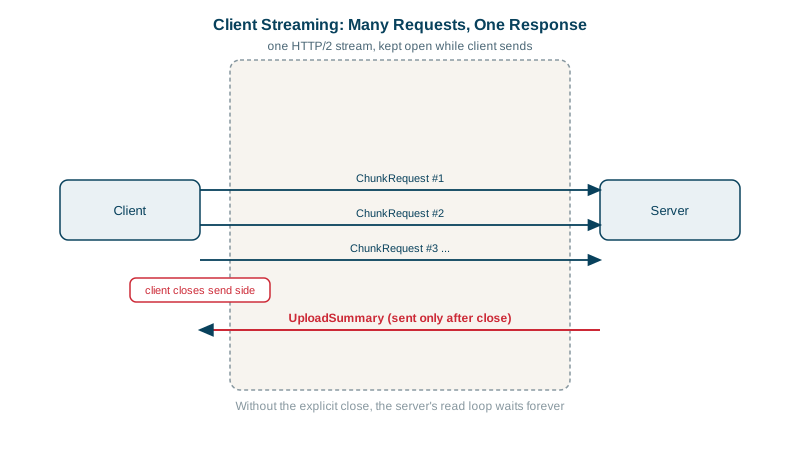
Handling failure mid-stream
- The server can stop early by returning an error, for example
InvalidArgumentat item 37. The client's nextSendfails withio.EOF, andCloseAndRecvreturns the real status. Always get the status fromCloseAndRecvrather than theSenderror. - Partial success needs a design decision: reject the whole batch (simplest, retry everything), or accept good items and report bad ones in the response (
repeated ItemError errors). - Retries are tricky: a stream that failed halfway may have been partly processed. Make the operation idempotent (an upload ID plus item sequence numbers, Day 22), or resume from the last acknowledged position.
Large uploads with client streaming
For files, send chunks (64 KB to 1 MB each) with metadata in the first message:
message UploadFileRequest {
  oneof data {
    FileInfo info = 1;     // first message: name, size, content type
    bytes chunk = 2;       // following messages
  }
}
The server writes chunks as they arrive, never holding the whole file in memory. For very large files used by many services, consider uploading to object storage with a presigned URL (see the AWS course) and sending only the reference over gRPC.
When to use client streaming
| Use client streaming for | Prefer something else when |
|---|---|
| Uploads and data that's naturally a sequence | Items are independent and each needs its own result: use unary calls, perhaps in parallel |
| High-volume telemetry from a client | The client needs feedback during the upload: bidirectional streaming (Day 10) |
Check yourself
Recv returns io.EOF after the client half-closes the stream, which CloseAndRecv does. The server then computes and sends its single response with SendAndClose.
From CloseAndRecv, which returns the status the server ended the stream with. Send typically returns only io.EOF once the stream is broken, without the reason.
Chunks let the file stream without loading it all in memory on either side and stay below the message size limit. The oneof lets the first message carry metadata, like file name and size, and every later message carry data.
4 MB for received messages in most implementations. Large payloads should be chunked over a stream rather than raising the limit far.
When a client uploads many records or a large file and the server replies once, such as batched telemetry, log shipping or file uploads. The server can process data as it arrives instead of waiting for one giant message.