Your First tRPC Router, Server and Typed Client
On this page
Set up the project
Start with an empty folder and install the packages. @trpc/server runs on the server, @trpc/client runs anywhere, and Zod validates input.
npm init -y
npm i @trpc/server @trpc/client zod
npm i -D typescript tsx @types/node
Use "strict": true in tsconfig.json. The examples run with npx tsx file.ts, which runs TypeScript directly without a separate build.
Initialize tRPC once
Every tRPC app starts with initTRPC. You call it once per backend and export the pieces you need. Keeping this in its own file avoids circular imports later.
// src/trpc.ts
import { initTRPC } from '@trpc/server';

const t = initTRPC.create();

export const router = t.router;
export const publicProcedure = t.procedure;
The object t holds your configuration: the context type, error formatting and data transformers. You'll add all three in the next few days. Exporting router and publicProcedure instead of t itself keeps the rest of the code from depending on setup details.
Define a router with queries and mutations
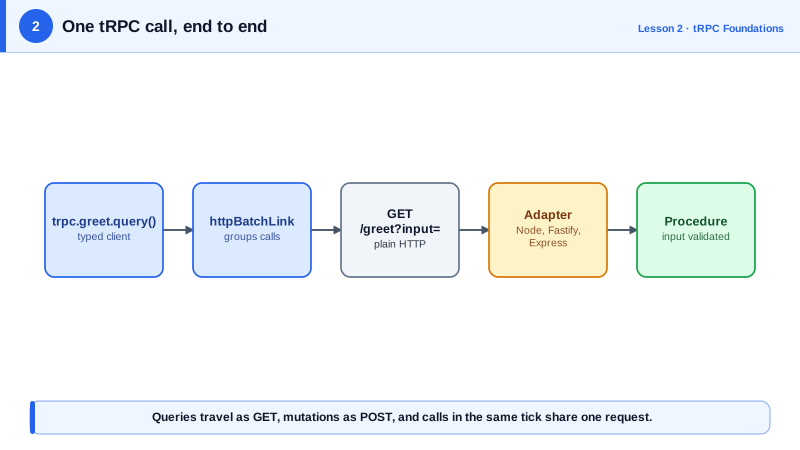
A procedure is either a query, for reading data, or a mutation, for changing it. (There's a third kind, the subscription, for streaming data, on Day 11.) The difference matters on the wire: queries use GET and mutations use POST.
// src/router.ts
import { z } from 'zod';
import { router, publicProcedure } from './trpc';

type Task = { id: string; title: string; done: boolean };
const tasks = new Map<string, Task>();
let seq = 0;

export const appRouter = router({
  health: publicProcedure.query(() => 'ok' as const),

  greet: publicProcedure
    .input(z.object({ name: z.string().min(1) }))
    .query(({ input }) => `Hello, ${input.name}`),

  createTask: publicProcedure
    .input(z.object({ title: z.string().min(1) }))
    .mutation(({ input }) => {
      const task: Task = { id: `t${++seq}`, title: input.title, done: false };
      tasks.set(task.id, task);
      return task;
    }),
});

export type AppRouter = typeof appRouter;
The last line is the most important one in the file. AppRouter is the type the client will import. It carries every procedure's path, input and output.
Start a server
tRPC ships adapters for different servers. The simplest is the standalone adapter, which wraps Node's built-in http module.
// src/server.ts
import { createHTTPServer } from '@trpc/server/adapters/standalone';
import { appRouter } from './router';

createHTTPServer({ router: appRouter }).listen(3000);
console.log('tRPC on http://localhost:3000');
Call it from a typed client
The client needs a link, which decides how calls reach the server. httpBatchLink sends calls over HTTP and groups calls made at the same moment into one request.
// src/client.ts
import { createTRPCClient, httpBatchLink } from '@trpc/client';
import type { AppRouter } from './router';

const trpc = createTRPCClient<AppRouter>({
  links: [httpBatchLink({ url: 'http://localhost:3000' })],
});

const greeting = await trpc.greet.query({ name: 'Ada' });
const task = await trpc.createTask.mutate({ title: 'Write lesson' });
console.log(greeting, task);
// Hello, Ada { id: 't1', title: 'Write lesson', done: false }
Hover over task in your editor and you'll see { id: string; title: string; done: boolean }. You never wrote that type on the client. Try trpc.createTask.query(...) and TypeScript refuses, because createTask is a mutation.
Note import type. It tells TypeScript to erase the import at build time, so none of the server code ends up in your client bundle.
What goes over the wire
tRPC is plain HTTP, so you can call it with curl or fetch. The path is the procedure name, and the input is JSON.
# a query is a GET, with the input as URL-encoded JSON
curl 'http://localhost:3000/greet?input=%7B%22name%22%3A%22curl%22%7D'
# {"result":{"data":"Hello, curl"}}

# a mutation is a POST with a JSON body
curl -X POST http://localhost:3000/createTask \
  -H 'content-type: application/json' -d '{"title":"via curl"}'
# {"result":{"data":{"id":"t2","title":"via curl","done":false}}}
Calling a mutation with GET returns 405 Method Not Allowed, and posting with a non-JSON content type returns 415 Unsupported Media Type.
How batching works
When the client makes several calls in the same tick of the event loop, httpBatchLink joins them into one request. The paths are comma-separated, and the inputs are keyed by position.
const [h, g] = await Promise.all([trpc.health.query(), trpc.greet.query({ name: 'Ada' })]);
// one request: GET /health,greet?batch=1&input={"1":{"name":"Ada"}}
// response:    [{"result":{"data":"ok"}},{"result":{"data":"Hello, Ada"}}]
In a test, three parallel calls produced exactly one HTTP request. When every call in a batch succeeds the status is 200. If some succeed and some fail, the server answers 207 Multi-Status, and each result carries its own error. A React page that renders five components, each fetching its own data, gets one round trip instead of five.
task.create or task.list, not by HTTP verbs. The verb is already decided by whether the procedure is a query or a mutation.Check yourself
A type-only import is erased at build time, so the client gets full inference without bundling any server code, database clients or secrets.
A query is a GET with its input URL-encoded in the input query parameter, and a mutation is a POST with a JSON body. Calling a mutation with GET returns 405 Method Not Allowed. Keeping reads on GET also means queries can be cached by URL when that's useful.
Usually one. httpBatchLink collects every call made in the same tick of the event loop and sends them as a single request, with the procedure names joined by commas in the path and the inputs keyed by position. In the lesson's test, three parallel calls produced exactly one HTTP request.
The request has no content-type: application/json header, and curl's -d defaults to application/x-www-form-urlencoded. tRPC only accepts JSON for mutations unless you opt into other formats, so it rejects the body before your procedure runs. Add -H 'content-type: application/json'.
It keeps setup details in one file. Route files only need a way to build routers and procedures, so they never depend on how t was configured, and adding a transformer, an error formatter or a context type later changes one file. It also avoids circular imports, since trpc.ts imports nothing from the routers.