tRPC Links, Batching and superjson Transformers
On this page
The link chain
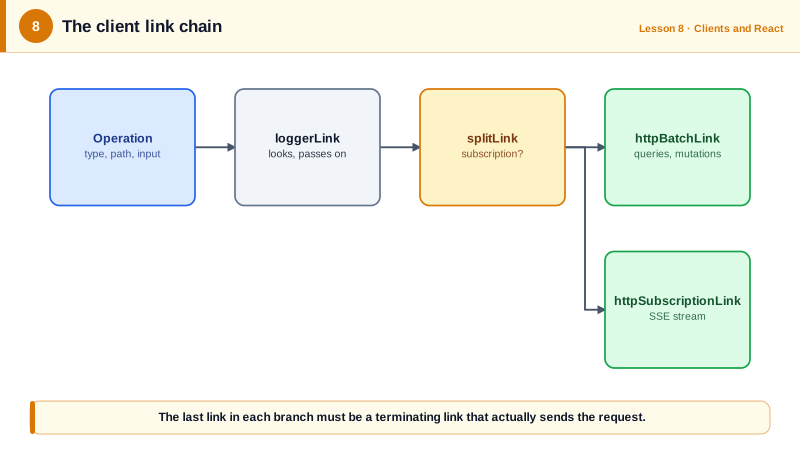
When you call trpc.task.list.query(), the client creates an operation: its type, path, input and a context object. The operation then flows through the links array in order. Each link can look at it, change it, log it or route it, and then pass it on. The last link must be a terminating link, which actually sends the request and returns the result.
const trpc = createTRPCClient<AppRouter>({
  links: [
    loggerLink(),                          // looks, then passes on
    httpBatchLink({ url: '/trpc' }),       // terminating: sends HTTP
  ],
});
Choose a terminating link
tRPC ships three HTTP terminating links. Pick by how you want calls grouped:
httpLinksends one HTTP request per call. Simple, easy to read in network tools, and easy to cache per URL.httpBatchLinkgroups calls made in the same tick into one request and returns all results together. The default choice for most apps.httpBatchStreamLinkalso batches, but streams each result back as soon as it's ready.
The difference between the last two shows up when one call is slow. Two queries, one taking 600 ms and one taking 50 ms, sent together:
httpBatchLink:        600@606  50@606     (the fast one waits for the slow one)
httpBatchStreamLink:  50@58    600@609    (each arrives when ready)
The streaming link has a catch. It sends the response headers before any procedure finishes, so a procedure can't set cookies or change the status code. If a mutation sets a session cookie, send it through a non-streaming link. You'll see how to route calls next.
There are also wsLink for WebSockets and httpSubscriptionLink for Server-Sent Events, both for subscriptions (Day 11).
Route calls with splitLink
splitLink sends each operation down one of two paths based on a condition. A common setup sends subscriptions over Server-Sent Events and everything else in batches:
splitLink({
  condition: (op) => op.type === 'subscription',
  true: httpSubscriptionLink({ url: '/trpc' }),
  false: httpBatchLink({ url: '/trpc' }),
});
The condition can also read the operation's context, which callers set per call. That lets a single slow query opt out of batching:
splitLink({
  condition: (op) => op.context.skipBatch === true,
  true: httpLink({ url: '/trpc' }),
  false: httpBatchLink({ url: '/trpc' }),
});

await trpc.report.build.query(input, { context: { skipBatch: true } });
Send auth headers
The headers option accepts a function, called before each request, so it always sends the current token. It can be async, which helps when the token needs refreshing first:
httpBatchLink({
  url: '/trpc',
  headers: async () => ({ authorization: `Bearer ${await getFreshToken()}` }),
});
In testing, changing the token between calls changed the header on the very next request, with no need to rebuild the client.
In a browser app that talks to its own backend, you may not need tokens at all. A BFF keeps tokens on the server and the browser sends an HttpOnly session cookie automatically. The BFF course covers that setup, which is the one current OAuth guidance for browser apps recommends.
Keep URLs short
Batched queries are GET requests with every input in the URL. Large inputs can push the URL past what proxies accept, often around 8 KB. maxURLLength makes the batch link split a batch before it gets too long:
httpBatchLink({ url: '/trpc', maxURLLength: 2083 });In a test with a 200-character limit, three parallel calls went out as two requests instead of one. Combine this with maxItems from Day 7.
Write a custom link
A link is a function that returns another function receiving { op, next }, and returns an observable of results. Here's one that times every call:
import type { TRPCLink } from '@trpc/client';
import { observable } from '@trpc/server/observable';
import type { AppRouter } from '../server/router';

export const timingLink: TRPCLink<AppRouter> = () => ({ op, next }) =>
  observable((observer) => {
    const start = Date.now();
    return next(op).subscribe({
      next: (value) => observer.next(value),
      error: (err) => { report(op.path, Date.now() - start, 'error'); observer.error(err); },
      complete: () => { report(op.path, Date.now() - start, 'ok'); observer.complete(); },
    });
  });
Put it before the terminating link. Custom links are a good home for tracing headers, metrics and dev-only logging.
For retries there's a built-in retryLink. This one retries failed queries, but never mutations, which might not be safe to repeat:
retryLink({
  retry: ({ op, attempts }) => op.type === 'query' && attempts <= 3,
  retryDelayMs: (attempt) => attempt * 200,
}),
If you use TanStack Query, it already retries queries, so don't stack both.
Send dates and more with superjson
JSON has no Date, Map, Set or BigInt. Without help, a Date becomes an ISO string and a Set becomes {}. tRPC is honest about this: with no transformer, a procedure that returns a Date is typed as returning a string on the client.
no transformer:  typeof createdAt === 'string'   tags: {}
superjson:       createdAt instanceof Date       tags instanceof Set
A data transformer fixes this by encoding extra type information alongside the JSON. superjson is the common choice. Configure it in both places:
// server: src/trpc.ts
import superjson from 'superjson';
const t = initTRPC.context<Context>().create({ transformer: superjson });

// client: on each terminating link
httpBatchLink({ url: '/trpc', transformer: superjson });
TypeScript helps here: when the server's router uses a transformer, the link's options *require* a transformer property, so forgetting it is a compile error. If the types get bypassed, for example by a client built against an old router type, calls fail at run time with Unable to transform response from server.
On the wire, superjson wraps the payload as {"json": ..., "meta": ...}. That matters if anything other than your tRPC client calls these endpoints, like the curl commands from Day 2, which now need the json wrapper.
Check yourself
Both send batched calls in one request. The batch link returns all results when the slowest one finishes, while the stream link sends each result as soon as it's ready, but can't set cookies or status codes from procedures.
TypeScript flags the link, because it requires a transformer when the server has one. If that's bypassed, calls fail with "Unable to transform response from server". The transformer must be set on both sides.
A mutation might have succeeded on the server even though the client saw an error, for example when the response was lost on the way back. Retrying would then create a duplicate task or charge a card twice. Retry queries, which are safe to repeat, and make mutations idempotent with a key if they must be retried.
With httpBatchLink every result in a batch waits for the slowest one. Switch to httpBatchStreamLink so each result arrives as soon as it's ready, or route that one slow query through a plain httpLink with splitLink and a context flag. The streaming option can't set cookies or status codes, so keep cookie-setting mutations on a non-streaming link.
A string. JSON has no date type, so the value arrives as an ISO string, and tRPC types it honestly as a string on the client. Add superjson on both the server and the links if you want a real Date, or keep sending ISO strings and parse them where needed.