CORS Headers Explained: Access-Control-Allow-Origin
On this page
Learning Objective
Describe precisely what each CORS response header controls, including the often-overlooked Access-Control-Expose-Headers, and explain which headers apply to the preflight, which to the actual response, and which to both.
Concept Explanation
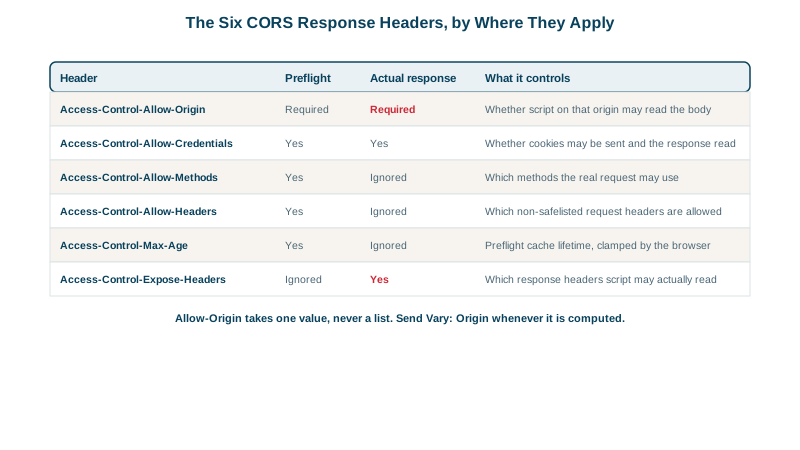
There are six CORS response headers and they divide cleanly by where they apply. Access-Control-Allow-Origin applies to both the preflight and the actual response and must be present on both; forgetting it on the actual response after correctly answering the preflight is a common and confusing bug. Access-Control-Allow-Credentials also applies to both. Access-Control-Allow-Methods, Access-Control-Allow-Headers, and Access-Control-Max-Age apply only to the preflight and are ignored on an actual response. Access-Control-Expose-Headers applies only to the actual response and is meaningless on a preflight.
Access-Control-Allow-Origin takes exactly one value: a single serialized origin, or the wildcard. It is not a list. A server that needs to support several origins must inspect the incoming Origin header, decide whether it is on its own allowlist, and echo that single value back, which is why dynamic reflection is so common and why the next lesson is devoted to the ways it goes wrong. The null value is also possible, and is specifically hazardous because sandboxed iframes, some redirect chains, and data URLs all present a null origin, so allowing null effectively allows any attacker willing to put their payload in a sandboxed frame.
Access-Control-Expose-Headers is the header most teams discover late and by accident. By default, script reading a cross-origin response can see only a small safelist of response headers: Cache-Control, Content-Language, Content-Length, Content-Type, Expires, Last-Modified, and Pragma. Everything else, a pagination header, a rate limit header, a request id used for support tickets, a Location header after a create, is invisible to the calling script even though the response contains it and the browser received it. Naming those headers in Access-Control-Expose-Headers is what makes them readable, and its absence produces the classic "the header is right there in the network tab but my code sees undefined."
Access-Control-Allow-Methods and Access-Control-Allow-Headers each accept a comma-separated list, and each accepts a wildcard, but the wildcard only works for requests without credentials. When Access-Control-Allow-Credentials is true, the wildcard loses its special meaning in all of these headers and is treated as the literal string asterisk, which will match no real method or header name. This is a deliberate spec decision that prevents a server from accidentally granting blanket credentialed access, and it is why a policy that works for public endpoints suddenly stops working the moment credentials are added.
One more subtlety worth knowing: Access-Control-Allow-Headers must cover every non-safelisted header the client will send, and the matching is case-insensitive but the coverage must be complete. If the client sends Authorization, Content-Type, and X-Request-Id, and the server approves only the first two, the entire preflight fails; there is no partial approval in which the third header is simply dropped. Libraries that add a tracing or correlation header automatically are a frequent cause of a preflight that used to pass and now does not.
| Header | Applies to | Value | Controls |
|---|---|---|---|
| Access-Control-Allow-Origin | Preflight and actual response | One origin, or a wildcard, or null | Whether script on that origin may read the response |
| Access-Control-Allow-Credentials | Preflight and actual response | The literal string true, or absent | Whether cookies and auth may be sent and the response read |
| Access-Control-Allow-Methods | Preflight only | Comma-separated method list, or a wildcard | Which methods the real request may use |
| Access-Control-Allow-Headers | Preflight only | Comma-separated header list, or a wildcard | Which non-safelisted request headers are permitted |
| Access-Control-Max-Age | Preflight only | Seconds, clamped by the browser | How long the preflight result may be cached |
| Access-Control-Expose-Headers | Actual response only | Comma-separated header list, or a wildcard | Which response headers script is allowed to read |
Worked Example: A Correct Multi-Origin CORS Implementation
The implementation below handles the three things a hand-written CORS layer most often gets wrong: an exact allowlist rather than a pattern match, Vary: Origin so caches key correctly, and exposing the specific headers the front end actually needs to read.
const ALLOWED_ORIGINS = new Set([
  'https://app.example.com',
  'https://admin.example.com',
]);

app.use((req, res, next) => {
  const origin = req.headers.origin;

  // Always vary on Origin, even when we do not allow this one, so that a
  // shared cache never serves one origin's decision to another.
  res.setHeader('Vary', 'Origin');

  if (origin && ALLOWED_ORIGINS.has(origin)) {   // exact match, no regex
    res.setHeader('Access-Control-Allow-Origin', origin);
    res.setHeader('Access-Control-Allow-Credentials', 'true');
    // Without this line, script sees undefined for these headers even
    // though the browser received them.
    res.setHeader('Access-Control-Expose-Headers',
      'X-Request-Id, X-Total-Count, X-RateLimit-Remaining');
  }

  if (req.method === 'OPTIONS') {
    if (!origin || !ALLOWED_ORIGINS.has(origin)) return res.status(403).end();
    res.setHeader('Access-Control-Allow-Methods', 'GET, POST, PUT, PATCH, DELETE');
    res.setHeader('Access-Control-Allow-Headers', 'Authorization, Content-Type, X-Request-Id');
    res.setHeader('Access-Control-Max-Age', '7200');
    return res.status(204).end();   // answered BEFORE any auth middleware
  }

  next();
});
Real-World Examples
- The wildcard losing its meaning when credentials are enabled is specified in the WHATWG Fetch Standard and implemented uniformly across browsers, which is why teams routinely report that a CORS configuration working fine for a public API breaks the moment they add cookie authentication; the fix is not a browser workaround but echoing a specific allowlisted origin, because the specification deliberately forbids combining blanket permission with ambient credentials.
- Access-Control-Expose-Headers is the reason rate-limit headers from public APIs such as GitHub's X-RateLimit-Remaining are readable from browser clients at all: an API that returns operational headers but does not expose them leaves browser consumers unable to read values that are plainly visible in developer tools, a mismatch that generates a steady stream of confused issue reports against API client libraries.
Review Questions & Answers
Access-Control-Expose-Headers on the actual response. By default, script reading a cross-origin response may access only the seven safelisted response headers: Cache-Control, Content-Language, Content-Length, Content-Type, Expires, Last-Modified, and Pragma. The browser received X-Request-Id and shows it in developer tools, but it will not expose it to script until the server explicitly names it, which is a read permission distinct from the one granted by Access-Control-Allow-Origin.
The Fetch Standard removes the wildcard's special meaning entirely for credentialed requests, in every CORS header that accepts one, and treats it as the literal character. The rule prevents a server from accidentally granting blanket permission for requests carrying a user's ambient credentials, since that combination is precisely the dangerous one. A credentialed policy must therefore enumerate its allowed origins, methods, and headers explicitly.
Because null is not a specific trusted party; it is the serialization of an opaque origin, and an attacker can obtain one trivially by placing their payload inside a sandboxed iframe without allow-same-origin, or by routing through a data URL or certain redirect chains. A policy that allows null therefore grants read access to anyone willing to arrange one of those, which in practice means everyone, while looking in configuration like a narrow exception for an unusual case.
The preflight fails and the real request is never sent. The browser compares the full set of non-safelisted headers the request will carry against the approved list and requires complete coverage, because the alternative, silently dropping unapproved headers, would let a server receive a request that differs from the one the client believed it was making. This is a common regression when a tracing or correlation library starts adding a header automatically.