CSP Report-Only: Deploy CSP Without Breaking
On this page
Learning Objective
Use Content-Security-Policy-Report-Only together with report-to and the Reporting API to observe violations before enforcing, interpret a violation report, and plan a staged rollout that does not get rolled back.
Concept Explanation
Content-Security-Policy-Report-Only is an identical header that evaluates the policy and reports violations without blocking anything. It exists because the failure mode of an over-tight enforced policy is uniquely bad: resources silently do not load, handlers silently do not fire, and the user sees a page that looks correct but does not work, with no error visible to anyone who is not watching the console. Discovering that in production is how CSP rollouts get abandoned.
Both headers can be sent simultaneously and are evaluated independently, which is the key to a safe rollout. Enforce a policy you are confident in while simultaneously observing a stricter candidate in report-only mode. When the reports for the candidate go quiet, promote it to the enforced header and start report-only on the next tightening. This gives a ratchet rather than a leap, and it means the enforced policy is always one that has already been validated against real traffic.
Reports are delivered in one of two ways. The older report-uri directive posts a JSON document with a csp-report envelope directly to a URL you specify; it is deprecated but still the most widely supported and is worth keeping as a fallback. The newer mechanism is the Reporting API: a Reporting-Endpoints response header names one or more endpoints, and the report-to directive selects one by name. Reports are then batched and delivered out of band, which is more efficient and survives page unload better. The practical recommendation today is to send both directives, since browser support differs.
Reading reports requires knowing their limits. The blocked-uri field is deliberately truncated to the origin for cross-origin resources, so you learn that something from a given host was blocked, not the exact path. For violations originating in a browser extension or injected by a proxy, the document-uri and source-file fields often point at extension schemes or unrelated hosts, and the resulting noise can easily be the majority of your report volume. Reports are also unauthenticated and sent by clients, so the endpoint must be treated as an untrusted, rate-limited, publicly writable ingestion point that anyone can flood.
A realistic staged rollout looks like this. Start with a report-only policy that is deliberately loose, for example default-src 'self' with generous script-src, purely to enumerate what the application actually loads. Triage the reports: separate legitimate first-party and vendor resources from extension noise from genuinely suspicious entries, and note that the suspicious ones are already valuable, since a violation report for a script source you have never heard of is evidence of an injection or a compromised dependency. Fix the legitimate violations by adding sources or refactoring inline script to nonces. Tighten the report-only policy, repeat, and only enforce once the report stream for that candidate is quiet. Then start the next candidate in report-only.
| Report field | Meaning | Caveat |
|---|---|---|
| document-uri | The page where the violation occurred | May be an extension URL for injected content |
| violated-directive | The directive that rejected the resource | Reported as the effective directive, which may be default-src |
| blocked-uri | What was blocked | Truncated to the origin cross-origin; may read inline or eval |
| source-file, line-number | Where in the code the load originated | Often absent or pointing at a bundled file |
| disposition | enforce or report | Distinguishes which of the two headers fired |
Worked Example: Running Enforce and Report-Only Side by Side
The configuration below enforces a policy the team trusts while measuring a stricter candidate. The report body underneath is what an actual violation looks like when it arrives at the endpoint.
# Enforced: already validated against real traffic
Content-Security-Policy:
  default-src 'self'; script-src 'self' https://cdn.example.com 'unsafe-inline';
  object-src 'none'; base-uri 'none'; frame-ancestors 'none';
  report-uri /csp-report; report-to csp-endpoint

# Candidate under observation: strict, blocking nothing yet
Content-Security-Policy-Report-Only:
  default-src 'self'; script-src 'nonce-9pQx1L2mR8vT' 'strict-dynamic';
  object-src 'none'; base-uri 'none'; frame-ancestors 'none';
  report-uri /csp-report; report-to csp-endpoint

# Reporting API endpoint declaration
Reporting-Endpoints: csp-endpoint="https://example.com/csp-report"

# ---- What arrives at /csp-report ----
POST /csp-report HTTP/1.1
Content-Type: application/csp-report

{
  "csp-report": {
    "document-uri": "https://example.com/account",
    "referrer": "",
    "violated-directive": "script-src-elem",
    "effective-directive": "script-src-elem",
    "original-policy": "default-src 'self'; script-src 'nonce-9pQx1L2mR8vT' ...",
    "disposition": "report",
    "blocked-uri": "https://analytics.vendor.example",
    "status-code": 200
  }
}

# Triage: a known vendor -> add the source, or move it behind strict-dynamic.
# An unknown host -> investigate as a possible injection or supply chain event.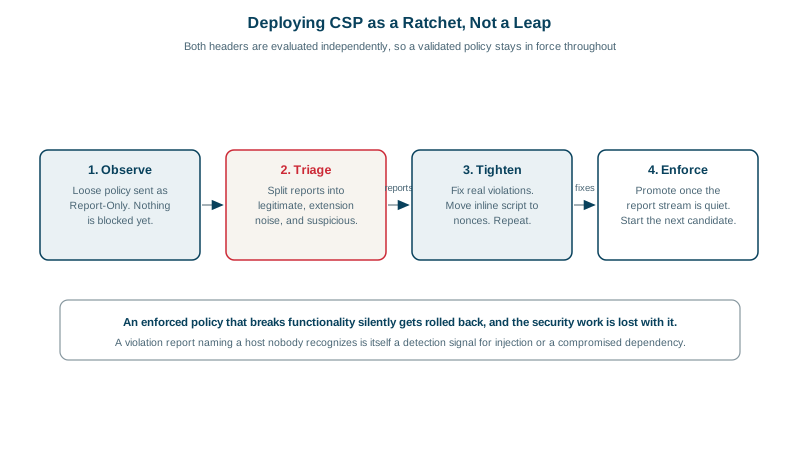
Real-World Examples
- GitHub's published account of its CSP rollout describes running report-only policies alongside enforced ones for extended periods and treating the violation stream as an operational signal rather than a one-time migration task, including using reports to detect content injected by browser extensions and by network intermediaries on customer connections, which is the same noise every team encounters on first deployment.
- Dropbox's engineering blog published a detailed multi-part series on its CSP deployment describing the same staged approach, and specifically documenting that a large fraction of the violation reports they received came from browser extensions and injected third-party content rather than from their own application, which is why triage tooling to separate real violations from ambient noise was a prerequisite for making the reports actionable.
Review Questions & Answers
Because it fails silently and partially. Resources simply do not load and handlers simply do not fire, so the page renders but behaves incorrectly, with no error surfaced to the user and nothing in server logs. The breakage is often discovered only through customer reports days later, and the organizational response is usually to roll the policy back entirely, which means the security work is lost along with the bug.
They are evaluated completely independently. The enforced header blocks resources and reports them with a disposition of enforce; the report-only header blocks nothing and reports with a disposition of report. This independence is what makes a ratchet rollout possible: the team keeps a validated policy in force while measuring a stricter candidate against real traffic, then promotes the candidate once its reports go quiet.
It could be a browser extension injecting content, a network intermediary rewriting the page, a third-party tag added by another team without coordination, a compromised dependency loading additional script, or an active injection attack. All five are worth knowing about, and the last two are exactly the events CSP reporting is uniquely positioned to detect, since a compromised script loading from an unexpected host produces a violation report before anyone notices anything else.
Because it is an unauthenticated, publicly reachable POST endpoint whose contents are entirely controlled by clients. Anyone can send fabricated reports in any volume, so it can be used to flood your storage, poison your metrics, or inject content into whatever dashboard renders the reports. Treat incoming reports as untrusted input, cap the ingestion rate, and sanitize fields before displaying them.