Clickjacking: X-Frame-Options vs frame-ancestors
On this page
Learning Objective
Explain how a UI redress attack works, compare X-Frame-Options with the CSP frame-ancestors directive that supersedes it, and choose the correct framing policy for a page that must be embeddable by specific partners.
Concept Explanation
Clickjacking, more formally a UI redress attack, works by loading a legitimate target page inside a frame on an attacker's page, making that frame effectively invisible through CSS opacity or precise overlay positioning, and then arranging attractive decoy content so that the victim's click lands on a control inside the hidden frame. The victim believes they clicked a button on the attacker's page; the browser delivers the click to the framed application, with the victim's session fully authenticated. Nothing about the request is forged, which is why server-side request inspection cannot detect it.
The reason this works is that the Same-Origin Policy governs reading, not rendering. An attacker page cannot read the contents of a cross-origin frame, and it does not need to: it only needs to know where a button is, which it can determine once by loading the target itself. Variants extend the same idea to other input: likejacking harvests social media engagement, cursorjacking displaces the visual cursor from the real pointer position, and drag-and-drop variants have been used to move data out of a framed document.
The first defense was framebusting JavaScript, which checked whether the page was the top-level window and navigated away if not. It was comprehensively defeated: the sandbox attribute on an iframe can disable script or block top-level navigation, onbeforeunload handlers can cancel the navigation, and double-framing defeats naive parent checks. A 2010 Stanford study examined framebusting on the Alexa top 500 sites and found essentially all of the deployed implementations bypassable. Framebusting is not a defense; the browser must enforce it.
X-Frame-Options was the browser-enforced answer and takes one of two meaningful values today: DENY, forbidding framing entirely, and SAMEORIGIN, permitting only same-origin framing. A third value, ALLOW-FROM with a URI, was never supported by Chrome or Safari and is obsolete. The header has real limitations: it expresses at most one allowed origin, it is inconsistently implemented, and its behavior with nested frames varies between browsers. It is still worth sending purely for legacy browser support.
The CSP frame-ancestors directive supersedes it completely and should be the primary control. It accepts a full source list, so a page can permit framing by several named origins, by a wildcard subdomain, by self, or by none. Where both headers are present, browsers supporting CSP ignore X-Frame-Options entirely, which is the intended migration path. Two points to remember: frame-ancestors does not fall back to default-src, so it must be stated explicitly, and it cannot be delivered through a meta tag, so it requires a real response header. For pages that must be embeddable, name the exact partner origins rather than using a wildcard, and pair it with SameSite=Strict on any cookie whose use inside a frame would be dangerous.
| Control | Expressiveness | Status |
|---|---|---|
| Framebusting JavaScript | None reliable | Defeated by sandbox, onbeforeunload, and double framing |
| X-Frame-Options: DENY | No framing at all | Legacy; keep only for old browser support |
| X-Frame-Options: SAMEORIGIN | Same-origin framing only | Legacy; inconsistent with nested frames |
| X-Frame-Options: ALLOW-FROM | One origin | Obsolete; never supported in Chrome or Safari |
| CSP frame-ancestors | A full source list of origins | The current control; overrides X-Frame-Options where supported |
Worked Example: An Attack Page and the Header That Stops It
The attack below is the entire technique in a dozen lines of CSS. The header configurations underneath show the three policies most applications need.
<!-- Attacker page: the target is framed, invisible, and positioned so the
     decoy button sits exactly over the real one. -->
<style>
  iframe { position: absolute; top: -320px; left: -180px;
           width: 1000px; height: 800px; opacity: 0.0001; z-index: 2; }
  #decoy { position: absolute; top: 200px; left: 240px; z-index: 1; }
</style>
<button id="decoy">Claim your free prize</button>
<iframe src="https://app.example.com/settings/delete-account"></iframe>
<!-- The click lands on the framed Delete Account button, fully authenticated. -->

# ---- DEFENSE 1: a page nobody should ever frame (most applications) ----
Content-Security-Policy: frame-ancestors 'none'
X-Frame-Options: DENY                      # legacy browsers only

# ---- DEFENSE 2: framing allowed only by the application itself ----
Content-Security-Policy: frame-ancestors 'self'
X-Frame-Options: SAMEORIGIN

# ---- DEFENSE 3: an embeddable widget with named partners ----
Content-Security-Policy:
  frame-ancestors 'self' https://partner-a.example https://*.partner-b.example
# X-Frame-Options cannot express this at all; omit it rather than send
# a value that contradicts the CSP for legacy clients.

# Remember: frame-ancestors does NOT fall back to default-src, and cannot
# be delivered via a <meta> tag. It must be a real response header.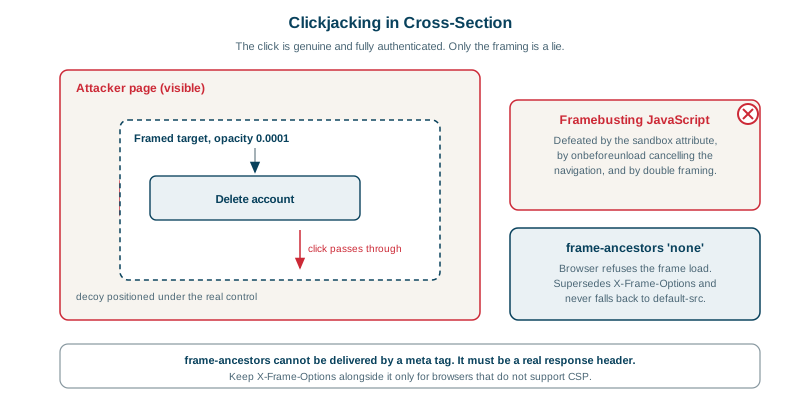
Real-World Examples
- Clickjacking was named and publicly demonstrated by Jeremiah Grossman and Robert Hansen in 2008, with a demonstration against the Adobe Flash Player settings manager in which a framed, invisible settings page let an attacker's decoy clicks grant a website access to the victim's webcam and microphone; Adobe responded by adding framebusting to the settings page, and the disclosure established UI redress as a distinct attack class.
- The "Don't Click" worm spread across Twitter in February 2009 using clickjacking: users were shown a button that, when clicked, actually clicked a hidden framed Twitter control that posted the same lure from the victim's own account, propagating it further; the same technique was widely used against Facebook as likejacking, and the incidents drove broad adoption of X-Frame-Options across major social platforms.
Review Questions & Answers
Because the attack needs only input, not output. The attacker loads the target once themselves to learn where a control sits, then positions an invisible frame so that a click on their decoy lands on that control. The victim's browser delivers a completely genuine, fully authenticated click to the application. There is nothing anomalous about the resulting request, which is why the defense has to prevent the framing itself rather than inspect the request.
Because the framing page controls the environment the script runs in. The iframe sandbox attribute can disable script or forbid top-level navigation, an onbeforeunload handler can cancel the escape, and double framing defeats naive checks of the immediate parent. A 2010 Stanford study of the Alexa top 500 found essentially every deployed framebusting implementation bypassable, which is why the enforcement had to move into the browser through a response header.
A full source list. frame-ancestors can name several specific origins, use a wildcard for subdomains, or combine self with named partners, while X-Frame-Options can only say deny or same-origin, since its ALLOW-FROM value was never supported in Chrome or Safari and is obsolete. For a widget that must be embeddable by a defined set of customers, frame-ancestors is the only header that can state the policy correctly.
It ignores X-Frame-Options entirely and enforces frame-ancestors, which is the specified behavior and the intended migration path. That is why sending a contradictory X-Frame-Options value is only a problem for legacy browsers that do not support CSP, where it will block partners the CSP intends to allow. In that situation the right choice is to omit X-Frame-Options rather than send a value that contradicts the real policy.