Design a Chat System Like WhatsApp
On this page
The problem: design a chat app like WhatsApp
"Design a chat app like WhatsApp: one-to-one and group messages." The interviewer will care most about one thing: a message must never silently disappear. Keep that in mind as you work through it.
Chat system requirements and capacity estimate
Functional: send messages to a user or a group of up to a few hundred; connected recipients see them instantly; offline recipients get a notification and see messages when they open the app; message history; online status.
Non-functional: no lost messages; low latency for online users; presence can be a few seconds stale.
Estimate. 500 million daily users sending 40 messages a day:
Messages     500M × 40 ÷ 100,000 s          ≈ 200,000 per second average
Storage      20 billion/day × 200 bytes     ≈ 4 TB per day of text
Connections  tens of millions open at once  -> many connection servers
200,000 writes per second and terabytes a day mean the message store must scale writes horizontally, which points to a partitioned store such as Cassandra or a sharded database.
Real-time delivery with WebSockets
Chat needs the server to push messages to clients. A WebSocket keeps one long-lived, two-way connection per device, so the server can send a message the moment it arrives. Long polling works as a fallback for networks that block WebSockets.
Connections are stateful, so you need many connection servers, each holding many sockets, plus a registry that maps "user 42" to "connected to server 17". Redis is a common choice for that registry, updated on connect and disconnect.
How a group message is sent and delivered
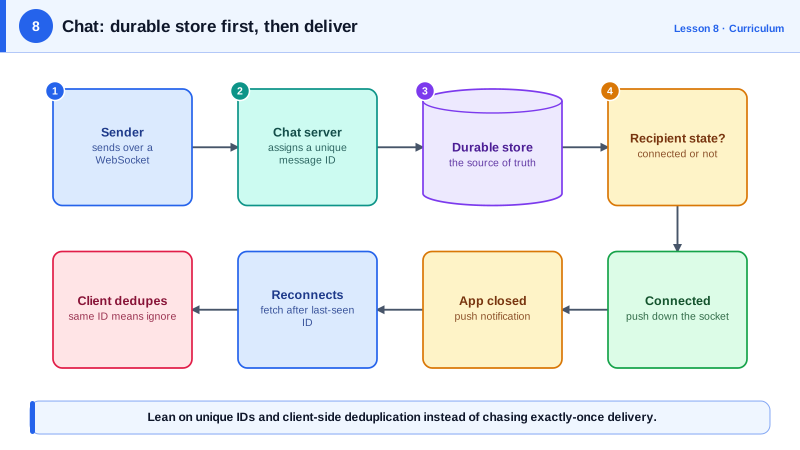
- The sender's app creates a unique message id on the device and sends the message over its WebSocket.
- The chat service writes it to the message store first. Only then does it acknowledge the sender ("sent", one tick). If a server crashes after this, the message is safe.
- It looks up the group's members and, for each, where they're connected.
- Connected members get the message pushed through their connection server. Each recipient's app acknowledges receipt ("delivered", two ticks).
- Members without a connection get a push notification through Apple's or Google's push service.
- When an offline member opens the app, it asks for every message newer than the last id it has, and the store returns them.
In a group of a few hundred, step 3 is a short loop. In much larger groups or broadcast channels it becomes the fan-out problem from Day 7, so hand it to a queue and workers instead of doing it inside the send request.
| Recipient state | Delivery path |
|---|---|
| Connected | Pushed down the WebSocket, acknowledged by the app |
| App closed or in background | Push notification, then catch-up on open |
| Reconnecting | Fetch everything after the last message id it has |
Delivery guarantees: at-least-once with deduplication
The server retries delivery until a recipient acknowledges. If the acknowledgment is lost, the message arrives twice. Trying to guarantee exactly-once delivery across flaky mobile networks is a trap. Instead, the app keeps the ids it has seen and drops duplicates. The same id also makes a sender's retry harmless: if the send times out and the app resends, the server recognizes the id and doesn't store it twice.
Message storage and ordering
Partition messages by conversation id, ordered by time within a conversation, so opening a chat is one range read of the latest messages. Order within a conversation matters; global order doesn't. A per-conversation sequence number, assigned when the message is stored, gives every member the same order even when clocks on phones disagree.
Ask one product question before sizing the store: does the server keep history at all? WhatsApp's messages are end-to-end encrypted, and its privacy policy says delivered messages are deleted from its servers, while undelivered ones are kept, encrypted, for up to 30 days (WhatsApp Privacy Policy). That makes the store a delivery buffer rather than an archive, with history living on the devices, and it rules out server-side search. A workplace chat tool that keeps full searchable history needs the archive, and the storage estimate above becomes permanent.
Presence: showing who's online
Each connected app sends a heartbeat every few seconds. Miss a few and the user shows as offline. Don't broadcast every presence change to every contact; send presence for the people on the screen the user is looking at.
Check yourself
The store is what you recover from. If a server crashes mid-delivery, the message still exists and offline or reconnecting clients can fetch it.
Delivery is at-least-once: when an acknowledgment is lost, the server resends the message, so duplicates are expected. Give every message a unique id generated by the sender, and have the client ignore any id it already has. That makes duplicates invisible to users without needing exactly-once delivery.
When it reconnects, it sends the id of the last message it stored for each conversation, and the server returns everything newer from the message store, which is partitioned by conversation. Push notifications may have shown previews meanwhile, but this sync is what fills in the actual history.
A session service, often backed by Redis, maps each online user to the server holding their WebSocket. The sender's server looks up the recipient and forwards the message there, or queues a push notification if they're offline.
Clients send periodic heartbeats, and the server marks a user offline after several are missed. Presence changes are published only to friends who are currently online, and updates are batched or rate-limited, since presence is high-volume and tolerates slight delay.