Broken Access Control (OWASP A01:2025)
On this page
Change one number, read someone else's invoice
Alice is logged in to an invoicing app. Her browser asks for /v1/invoices/1042, her invoice. She edits the URL to 1043:
curl -H 'Authorization: Bearer tok-alice' localhost:3300/v1/invoices/1043{"id":1043,"owner_id":2,"amount":9500}That's Bob's invoice. No tools, no exploit, just a different number. This is why broken access control has been first in the OWASP Top 10 since 2021. TLS gets written once by experts and shared by everyone, but authorization rules are custom to every app, so every team writes them again, and every endpoint is a chance to forget one.
BOLA and BFLA: two shapes of broken access control
BOLA (Broken Object Level Authorization), also called IDOR (Insecure Direct Object Reference): the server checks that you're logged in, but not that this particular object is yours. The vulnerable handler:
app.get('/v1/invoices/:id', requireAuth, (req, res) => {
  const inv = db.prepare('SELECT * FROM invoices WHERE id = ?').get(req.params.id);
  inv ? res.json(inv) : res.status(404).json({ error: 'Not found' });
});
The fix is one condition: scope the query to the caller.
const inv = db.prepare('SELECT * FROM invoices WHERE id = ? AND owner_id = ?')
.get(req.params.id, req.user.id);GET /v2/invoices/1043 as alice -> 404 {"error":"Not found"}
GET /v2/invoices/1042 as alice -> 200 {"id":1042,"owner_id":1,"amount":80}Return 404, not 403, for objects the caller can't see. A 403 confirms the object exists.
BFLA (Broken Function Level Authorization): a normal user can call an admin action. Usually the admin button is hidden in the UI, and the API behind it only checks for a session:
DELETE /v1/users/2 as alice -> 200 {"deleted":"2"}Hiding a button stops nobody with curl. The fix is a role check on the server, on the route itself:
const requireRole = r => (req, res, next) =>
  req.user.role === r ? next() : res.status(403).json({ error: 'forbidden' });

app.delete('/v2/users/:id', requireAuth, requireRole('admin'), deleteUser);DELETE /v2/users/2 as alice -> 403 {"error":"forbidden"}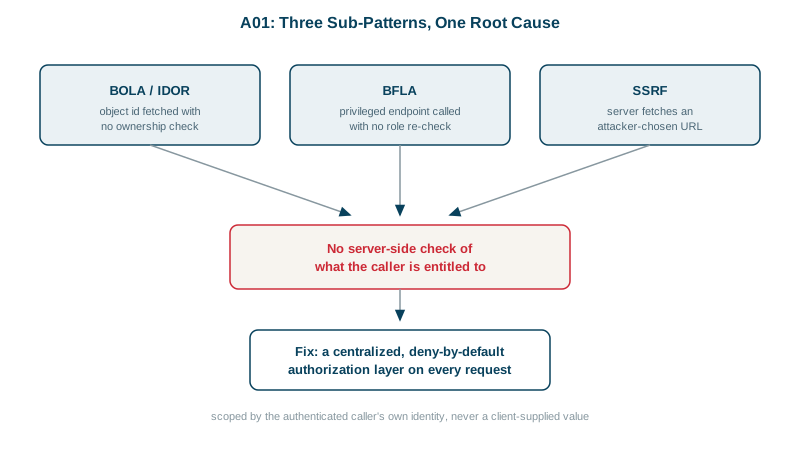
The same fixes in ASP.NET Core
ASP.NET Core has both fixes built in, plus a third that makes "deny by default" automatic. Tested on .NET 8 with the same invoices:
// every endpoint requires a signed-in user unless it's explicitly marked AllowAnonymous
builder.Services.AddAuthorizationBuilder()
    .SetFallbackPolicy(new AuthorizationPolicyBuilder().RequireAuthenticatedUser().Build());

// BOLA fix: scope the lookup to the caller
app.MapGet("/v2/invoices/{id:int}", async (int id, ClaimsPrincipal user, AppDb db) =>
{
    var userId = user.FindFirstValue(ClaimTypes.NameIdentifier);
    var inv = await db.Invoices.SingleOrDefaultAsync(i => i.Id == id && i.OwnerId == userId);
    return inv is null ? Results.NotFound() : Results.Ok(inv);
});

// BFLA fix: the role requirement lives on the endpoint, not in the UI
app.MapDelete("/v2/users/{id}", DeleteUser).RequireAuthorization(p => p.RequireRole("admin"));GET /v2/invoices/1043 as alice -> 404
GET /v2/invoices/1042 as alice -> 200
DELETE /v2/users/2 as alice -> 403
DELETE /v2/users/2 as admin -> 200
GET /v2/invoices/1042, no login -> 401 (fallback policy)The fallback policy is the piece most teams miss. Without it, a new endpoint someone forgets to annotate is open to anyone; with it, forgetting means "signed-in users only" until someone deliberately writes AllowAnonymous().
Why SSRF moved into this category
Server-Side Request Forgery (SSRF) happens when your server fetches a URL the user supplied, such as a webhook or an image link. The user points it at something only the server can reach: an internal admin panel, or the cloud metadata address 169.254.169.254, which hands out credentials.
The 2025 list treats this as access control: the attacker uses your trusted server to reach what they can't reach themselves. That's what happened at Capital One in 2019. An attacker used SSRF through a misconfigured web application firewall to read credentials from the AWS metadata service, then copied more than 100 million credit applications (KrebsOnSecurity).
The fix: allow-list the hosts you'll call, resolve the name, reject private and metadata addresses, and require IMDSv2 on AWS. The Security Fundamentals course builds and tests an SSRF guard step by step.
How to prevent broken access control
- Deny by default. Every route needs authentication unless it's on a short public list.
- One authorization layer, called the same way everywhere, instead of checks scattered through handlers.
- Scope queries by the caller's identity, never by a client-supplied ID alone.
- Test as the wrong user. For each endpoint, an automated test logs in as someone else and expects 403 or 404.
- Log denials so a run of 404s across sequential IDs raises an alert (A09).
The scale this can reach: in 2019 First American Financial exposed about 885 million mortgage documents because anyone could change a number in a document URL (KrebsOnSecurity).
Check yourself
BOLA: any logged-in user can read any order by changing the ID. Add the caller's user ID to the query's WHERE clause and return 404 when nothing matches.
No. Hiding the button only changes the interface; anyone can send the same DELETE request directly with curl or a browser's developer tools. The API endpoint itself must check on the server that the caller has the admin role, for every request. That's function-level access control, the BFLA half of this category.
The attacker gets the server to reach internal resources, like a metadata endpoint, that they aren't allowed to reach directly. It's an access decision the server failed to make.
Broken object level authorization lets a user access an object they don't own, such as another customer's invoice, by changing an id. Broken function level authorization lets a user call a function they shouldn't, such as an admin endpoint. Both come from missing server-side checks.
Scope every data query by the current user or tenant, for example WHERE id = $1 AND tenant_id = $2, ideally through a shared repository or global filter, and add tests where user A tries to read user B's objects. Relying on each developer to remember a manual check doesn't scale.