Software Supply Chain Failures (OWASP A03:2025)
On this page
The chalk and debug npm compromise of September 2025
On 8 September 2025, the maintainer of chalk and debug got an email that looked like npm support. It warned that the account would be locked unless its two-factor settings were updated. The site it linked to was a look-alike. The attackers took the credentials and published malicious versions of at least 18 widely used packages, debug alone being downloaded hundreds of millions of times a week. The injected code targeted cryptocurrency wallets and transactions. The bad versions were live for about two hours (Endor Labs).
Nobody who installed them had a bug in their own code. That's the point of this category: a typical app ships hundreds of transitive dependencies, so most of its attack surface is code the team never wrote or read.
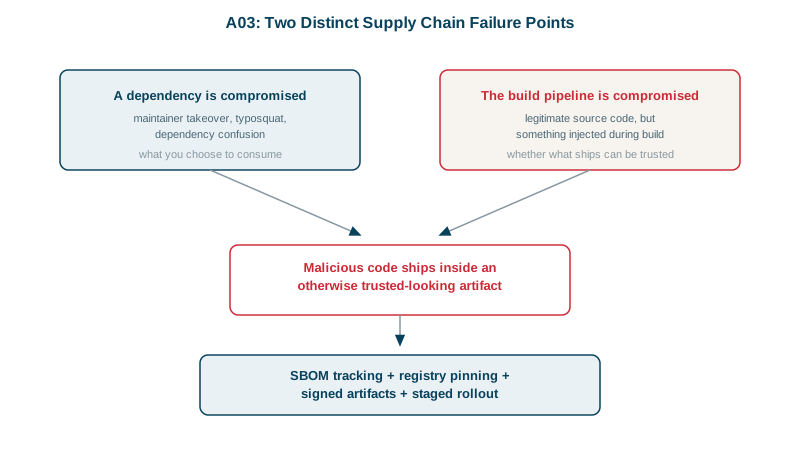
Supply chain attacks: takeover, typosquatting and dependency confusion
| Attack | How it works | Main defence |
|---|---|---|
| Maintainer takeover | Attacker phishes or buys a publisher's account and ships a "routine" update | Lockfiles, delayed or reviewed upgrades, 2FA for publishers |
| Typosquatting | A malicious package named one letter off a popular one | Check names before adding a dependency; review new additions |
| Dependency confusion | A public package uses your internal package's name with a higher version | Scope internal names to your private registry |
| Compromised build system | Clean source, but the build adds something on the way out | Hardened CI, signed artifacts, provenance (Day 9) |
This category replaced 2021's "Vulnerable and Outdated Components" and widened it. Outdated packages with known CVEs (Common Vulnerabilities and Exposures) still count. Malicious packages count too, and they usually never get a CVE, because nobody "discovers" a flaw in code written to be malicious. OWASP says A03 has the fewest occurrences in the test data but the highest average exploit and impact scores. Scanners built around CVE lists see only part of it.
npm defences: lockfiles, signatures, scopes and SBOMs
Commit the lockfile, and install with npm ci. The lockfile records an integrity hash for every package. To see it work, I changed one character of the ms package's hash in package-lock.json, deleted node_modules and the npm cache, and ran npm ci:
npm error code EINTEGRITY
npm error sha512-6FlzubTLZG3J2A/NVC... integrity checksum failed when using sha512:
  wanted sha512-6FlzubTLZG3J2A/NVC... but got sha512-6FlzubTLZG3J2a/NVC...
The install stops. A lockfile doesn't protect you from a bad version you choose to upgrade to. It does stop a package from silently changing under a version you've already reviewed.
Verify registry signatures:
npm audit signaturesaudited 1 package in 0s
1 package has a verified registry signaturePut internal packages under a scope your registry owns, so the public registry can never answer for them. In .npmrc:
@acme-internal:registry=https://npm.internal.acme.example/$ npm config get @acme-internal:registry
https://npm.internal.acme.example/
$ npm config get registry
https://registry.npmjs.org/@acme-internal/billing-utils now resolves only from the internal registry. An unscoped billing-utils would still go to the public one, which is exactly what dependency confusion relies on.
Know what you ship. A Software Bill of Materials (SBOM) lists every component. npm builds one itself:
npm sbom --sbom-format cyclonedx > sbom.json{"name":"ms","version":"2.1.3","purl":"pkg:npm/ms@2.1.3"}Feed the SBOM to a scanner that watches vulnerability feeds such as OSV, so a new advisory tells you which services are affected within hours.
The same defences for NuGet
.NET has an equivalent for each npm defence above:
- Lockfile: set
<RestorePackagesWithLockFile>true</RestorePackagesWithLockFile>so restore writespackages.lock.jsonwith a hash per package, commit it, and restore in CI withdotnet restore --locked-mode, which fails if anything would change. - Dependency confusion: package source mapping (NuGet 6.0 and later) pins package IDs to sources. Once it's configured, every package, transitive ones included, must match a pattern, so
Acme.*can never come from nuget.org (Microsoft docs):
<packageSourceMapping>
  <packageSource key="nuget.org">
    <package pattern="*" />
  </packageSource>
  <packageSource key="acme-internal">
    <package pattern="Acme.*" />
  </packageSource>
</packageSourceMapping>- Known vulnerabilities: NuGet audits packages on every restore by default, but only direct dependencies unless the project targets .NET 10 or later. Set
<NuGetAuditMode>all</NuGetAuditMode>to include transitive ones, anddotnet list package --vulnerable --include-transitivelists them on demand (Microsoft docs). - Signatures:
dotnet nuget verify --all <package>checks a package's signatures, andtrustedSignersinnuget.configcan require them.
Habits beyond the tooling
- Remove dependencies you don't use. Each one is code you trust.
- Treat an abandoned package as a risk, even with no known CVE. The 2018
event-streamincident began when a tired maintainer handed publishing rights to a stranger, who added a dependency that stole cryptocurrency wallet keys. - Don't take a new release the moment it's published. Many attacks, like the chalk one, are caught within hours.
- Require 2FA and least privilege for anyone who can publish packages or change CI.
Check yourself
If the build checks the public registry, it may prefer the higher public version: dependency confusion. Moving the package to a scope such as @acme-internal, mapped to your private registry, means the public one is never consulted.
Malicious packages are built to be malicious, so they rarely get a CVE. You also need lockfiles, signature checks, delayed upgrades and monitoring of what you install.
It rejects any package whose contents don't match the recorded hash. It doesn't help if you upgrade to a version that was malicious when published.
Attackers publish packages with names close to popular ones, such as expres instead of express, hoping developers mistype them. Review new dependencies before adding them, use lockfiles so installs are deterministic, and consider tools that flag newly published or suspicious packages.
A software bill of materials lists every component and version in a build. When a compromised or vulnerable package is announced, you can search your SBOMs to know within minutes which services include it, instead of inspecting each repository by hand.