Security Logging and Alerting Failures (OWASP A09)
On this page
Logged but not acted on: Target and Marriott
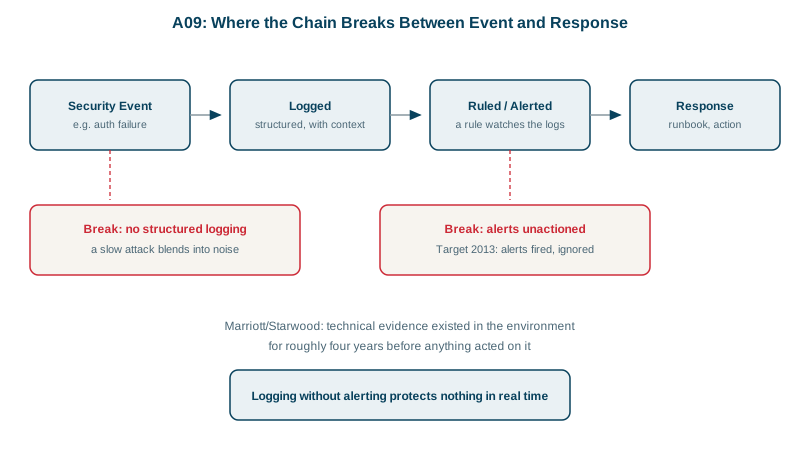
In late 2013 Target's malware detection system flagged the attack on its payment systems and raised alerts. They weren't acted on in time, and card data for about 40 million customers was stolen. At Marriott, attackers were inside the Starwood guest reservation database from 2014 until a security tool flagged a suspicious query in September 2018.
In both cases, evidence existed. What failed was turning it into action. That's why the 2025 list renamed this category from "Security Logging and Monitoring Failures" to Security Logging and Alerting Failures: collecting logs is necessary, but someone has to be told, and has to know what to do.
Structured security logging
This line is almost useless for detection:
console.log('login failed for ' + email);A structured event can be counted, grouped and alerted on. In Node with a JSON logger:
logger.warn({ event: 'auth.login_failed', email, sourceIp: req.ip, reason: 'bad_password' });{"ts":"2026-10-15T09:00:00.000Z","event":"auth.login_failed","email":"user0@example.com","sourceIp":"203.0.113.7","reason":"bad_password"}In .NET, ILogger gives you the same thing through message templates, as long as you don't pre-build the string. Tested with the JSON console logger:
logger.LogWarning("Login failed for {Email} from {SourceIp}", email, ip);   // structured
logger.LogWarning($"Login failed for {email} from {ip}"); // just a sentence{"Message":"Login failed for user0@example.com from 203.0.113.7","State":{"Email":"user0@example.com","SourceIp":"203.0.113.7",...}}
{"Message":"Login failed for user0@example.com from 203.0.113.7","State":{"{OriginalFormat}":"Login failed for user0@example.com from 203.0.113.7"}}Both lines read the same, but only the first carries Email and SourceIp as fields that an alert rule can count. The interpolated version is the console.log sentence again.
Log at least: logins (success and failure), MFA changes, password resets, access denials, input validation failures, admin actions, and changes to permissions or keys. Never log passwords, tokens or full card numbers.
Detecting credential stuffing from login events
I generated a simulated two-minute log: one address trying many accounts, plus a real user mistyping a password three times. The questions an alert rule asks, answered with jq:
jq -r 'select(.event=="auth.login_failed") | .sourceIp' auth.log | sort | uniq -c 3 198.51.100.23
60 203.0.113.7How many different accounts did each address try?
jq -r 'select(.event=="auth.login_failed") | "\(.sourceIp) \(.email)"' auth.log \
| sort -u | awk '{print $1}' | uniq -c 1 198.51.100.23
40 203.0.113.7One address, 40 accounts in two minutes: credential stuffing (Day 8). The other is a person who forgot their password. Then the event that matters most:
jq -c 'select(.event=="auth.login_succeeded" and .sourceIp=="203.0.113.7")' auth.log{"ts":"2026-10-15T09:02:10.000Z","event":"auth.login_succeeded","email":"user17@example.com","sourceIp":"203.0.113.7"}A success from the stuffing address means one account is probably taken over. That deserves a page to a person, not a dashboard tile. In production these become rules in your log platform or SIEM (security information and event management system), such as "one source failing against more than 20 accounts in 5 minutes".
Making alerts lead to action
- Each alert has a runbook: what it means, how to check it, and the first steps, such as locking the account and forcing a reset.
- Few, high-signal alerts. A team drowning in noise ignores the one that matters, as Target's did.
- Ship logs off the host to append-only or write-once storage, so an attacker with a foothold can't erase their tracks.
- Honeytokens: fake credentials or records nobody should ever use. Any use is a near-certain sign of compromise.
- A practiced incident response plan. NIST SP 800-61 (Revision 3, 2025) is a common basis. Rehearse it before you need it.
- Alert on the absence of logs too. A service that stops logging may be broken or tampered with.
Check yourself
How many different accounts were targeted, since many accounts from one source points to credential stuffing, and whether any login from that source then succeeded.
Many breaches were logged, and some were even detected, without anyone acting. The new name stresses that events must reach people with a clear response.
An attacker who gains control of a server will often edit or delete its local logs to hide what they did. Shipping security events promptly to a separate system with write-once or append-only storage, under different credentials, keeps the evidence intact for detection and investigation.
Sign-ins and failures, password and MFA changes, permission and role changes, access-denied events, high-value transactions, and admin actions, each with who, what, when, from where and the outcome. Never log the passwords, tokens or full card numbers themselves.
A clear threshold tied to a real threat, such as many failed logins across many accounts from one source, an owner who receives it, and a documented response. Alerts nobody acts on, as in the Target breach, are just noise.