REST API URL Naming Conventions
On this page
Why URL design matters
Before reading any docs, a developer sees your URLs. Consistent ones let them guess the next endpoint correctly. Inconsistent ones (/getOrder, /order/create, /Order_List) make every call a lookup.
REST URL naming conventions
- Nouns, not verbs: the HTTP method is the verb.
GET /orders, notGET /getOrders. - Plural collections:
/ordersand/orders/482, so the collection and its items share a prefix. - Lowercase, hyphenated words:
/shipping-addresses, not/shippingAddressesor/Shipping_Addresses. (JSON field names are a separate choice; camelCase is common there.) - Stable identifiers: use IDs that never change, not names or emails that can.
- No file extensions or implementation details: no
.php,.jsonor/api/v1/db/. - Query parameters for filtering, sorting and paging:
/orders?status=paid&sort=-createdAt(Day 7), never encoded into the path.
A simple test for path versus query: the path says which thing, the query says how you want to see it. /orders/482 names one order. ?status=paid or ?sort=-createdAt changes the view of a list without naming a different thing.
Example: cleaning up inconsistent endpoints
Before                              After
GET  /getOrder?id=482               GET    /orders/482
POST /order/create                  POST   /orders
GET  /Order_List?status=paid        GET    /orders?status=paid
POST /orders/482/doCancel           POST   /orders/482/cancellation
POST /updateOrderAddress            PATCH  /orders/482
GET  /customer/7/getAllOrders       GET    /customers/7/orders
Every "after" URL follows one pattern, so a developer who knows GET /orders/482 can guess GET /customers/7.
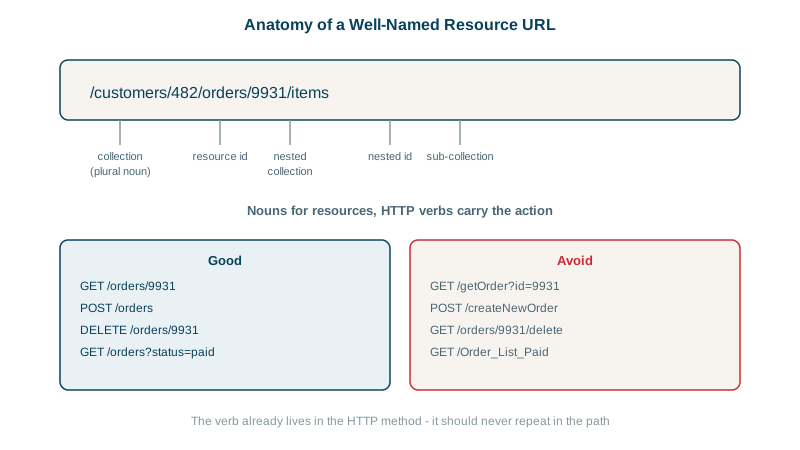
When to nest resources in URLs
Nest when a resource belongs to another and is usually accessed through it:
GET /orders/482/items          items exist only within an order
GET /customers/7/orders        a customer's orders, a common view
Keep it shallow. /customers/7/orders/482/items/3/discounts is long, brittle, and forces clients to know the whole chain. Once a resource has its own global ID, give it a top-level URL (/orders/482) and offer the nested path as a filtered view. A rule of thumb: no more than one or two levels.
How to model actions that aren't CRUD
Some operations don't map to create, read, update or delete: cancel, refund, publish, archive. Options, in rough order of preference:
- Model the result as a resource:
POST /orders/482/cancellation,POST /payments/91/refunds. You can thenGETit, and it has its own state. - Change a field:
PATCH /posts/12 {"status": "published"}, when it really is just a state change with no extra side effects. - An action sub-path:
POST /orders/482:cancelorPOST /orders/482/actions/cancel. Google's API guidelines use the:verbstyle for custom methods. It's explicit and acceptable when the first two don't fit.
Whichever you choose, use it everywhere.
Check yourself
The collection and its items then share one plural prefix, /orders and /orders/482, so URLs are predictable and clients can guess them. Mixing singular and plural forms across an API forces people to check the docs for every endpoint.
When it belongs to the parent and is mostly accessed through it, such as an order's items, and the nesting stays shallow.
As creating a refund resource: POST /payments/91/refunds. The refund gets its own id and status, can be read and listed later, and fits REST's resource model better than a verb endpoint like /refundPayment.
/orders?status=unpaid. The path names the collection; the query parameter changes how you view it, and it combines with other filters, sorting and paging.
URLs should name resources, while HTTP methods express actions and the Accept header the format. /getUsers.json mixes all three into the path.