REST API Error Handling Best Practices
On this page
Why inconsistent errors hurt clients
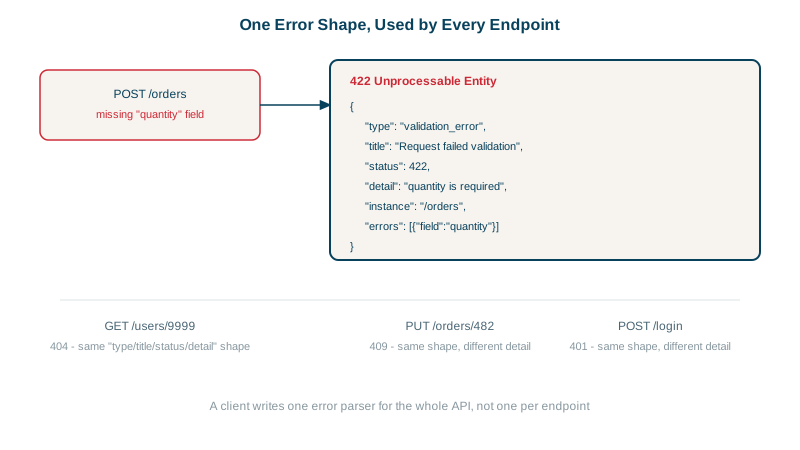
One endpoint returns {"error": "bad input"}, another {"message": "...", "code": 17}, a third an HTML stack trace. Client developers end up writing a special parser for each, and users see "Something went wrong" because nobody could extract a useful message.
RFC 9457 problem details: one error format
An RFC is a published internet standard, the same kind of document that defines HTTP itself. RFC 9457 (which replaced RFC 7807 in 2023) defines a standard JSON error body, served as application/problem+json:
| Field | Meaning |
|---|---|
type | A URI identifying the error type; ideally links to documentation |
title | A short, human-readable summary of the type, the same for every occurrence |
status | The HTTP status code, repeated for convenience |
detail | An explanation specific to this occurrence |
instance | A URI identifying this occurrence, such as a request ID |
You can add your own fields (extensions), like a list of field errors.
How to return validation errors
Report all problems at once, each tied to a field, so a form can highlight them together:
POST /checkout
{ "quantity": -3, "shippingAddress": null }

422 Unprocessable Content
Content-Type: application/problem+json

{
  "type": "https://api.example.com/errors/validation-error",
  "title": "Request failed validation",
  "status": 422,
  "instance": "/requests/req_8f2a91",
  "errors": [
    { "field": "quantity", "code": "min", "message": "must be at least 1" },
    { "field": "shippingAddress", "code": "required", "message": "is required" }
  ]
}- Machine-readable codes (
min,required) let clients localize messages and react programmatically; themessageis for developers. fielduses a path for nested data (items[2].quantity).- The request ID lets support find the exact request in logs.
A catch-all error handler in Express
Frameworks have default error pages that bypass your format. In the Express API from Day 4, a request with broken JSON originally got Express's default HTML response. A final error handler fixes that:
// Malformed JSON and other uncaught errors still answer with problem details
app.use((err, req, res, _next) => {
  if (err.type === 'entity.parse.failed')
    return problem(res, 400, 'malformed-json', 'Request body is not valid JSON');
  console.error(err);                          // full details go to logs only
  problem(res, 500, 'internal', 'Internal server error');
});POST /users {bad json
HTTP/1.1 400 Bad Request
Content-Type: application/problem+json; charset=utf-8
{"type":"https://api.example.com/errors/malformed-json","title":"Request body is not valid JSON","status":400}What never to put in an error response
- Stack traces, SQL, file paths or internal hostnames. They help attackers far more than users. Log them server-side, keyed by the request ID.
- Hints that confirm sensitive facts: "password incorrect for this email" tells an attacker the account exists. Prefer "invalid email or password".
- Different errors for "doesn't exist" and "not yours" where existence is sensitive (Day 13).
What the client does with it
Because every error has the same shape, the client handles them in one place instead of per endpoint:
async function callApi(url, options) {
  const res = await fetch(url, options);
  if (res.ok) return res.json();
  const problem = await res.json();              // always problem details
  switch (problem.type) {                       // FormErrors etc. are your app's own error classes
    case 'https://api.example.com/errors/validation-error':
      throw new FormErrors(problem.errors);      // highlight each field
    case 'https://api.example.com/errors/conflict':
      throw new UserMessage(problem.title);      // show it to the user
    default:
      throw new ApiError(problem.status, problem.instance);   // log the request ID for support
  }
}
The type decides the reaction, and instance gives support something to search for when a user reports a problem.
Helping clients recover from errors
- Use the right status code (Day 4), so clients can decide whether to fix, retry or give up.
- For retryable errors (429, 503), include
Retry-After. - Document every
typeURI with causes and fixes. Treat error types as part of the API contract: renaming one is a breaking change.
Check yourself
The client can show every problem at once, next to each field, instead of the user fixing one error, resubmitting, and discovering the next. Each error should name the field it belongs to.
Clients can react programmatically, for example showing a specific screen for card_declined, and translate messages into the user's language, without parsing English text that might change in the next release.
The client gets a consistent 500 problem response with a request ID; the logs get the stack trace and details under that ID.
The standard problem details format for HTTP API errors: a JSON object with type, title, status, detail and instance, plus your own extension fields, served as application/problem+json.
Users and client developers can quote it in support tickets, and you can find the exact request in your logs immediately.