GraphQL Authorization and Field-Level Security
On this page
Why GraphQL authorization is different
A REST API can put an authorization check on each route. GraphQL has one endpoint, and a single query can walk from a post to its author to the author's email to their other posts. Any path through the graph is a way in, so authorization can't live at the endpoint.
Authorize in the business logic layer
The GraphQL documentation recommends putting authorization in the business logic layer that resolvers call, not in each resolver ad hoc, so the same rules apply whether data is reached via GraphQL, REST or a background job. At minimum:
- Authenticate once per request and put the viewer in the context.
- Check object access wherever objects are loaded (the ownership checks from Day 13 apply to GraphQL too).
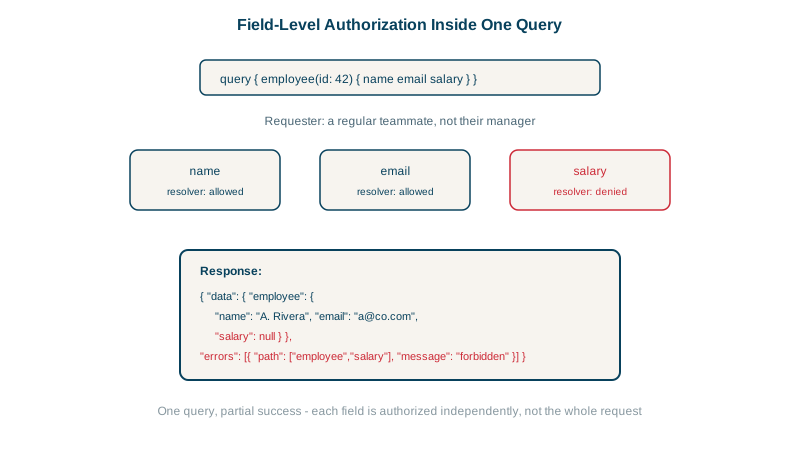
- Check sensitive fields individually.
Field-level authorization with tested results
email should be visible only to the user themselves or an admin:
User: {
  email: (user, _, ctx) => {
    const viewer = ctx.viewer;
    if (!viewer) throw new GraphQLError('Not authenticated',
      { extensions: { code: 'UNAUTHENTICATED' } });
    if (viewer.id !== user.id && viewer.role !== 'admin') return null;  // hide rather than fail the whole query
    return user.email;
  },
},
The same query, { user(id: "3") { name email } }, run by different viewers against a GraphQL Yoga server:
as user 3:   {"data":{"user":{"name":"User 3","email":"u3@example.com"}}}
as user 4:   {"data":{"user":{"name":"User 3","email":null}}}
as admin 1:  {"data":{"user":{"name":"User 3","email":"u3@example.com"}}}
anonymous:   {"errors":[{"message":"Not authenticated","path":["user","email"],
              "extensions":{"code":"UNAUTHENTICATED"}}],
              "data":{"user":{"name":"User 3","email":null}}}
Returning null for an unauthorized field lets the rest of the query succeed; that's why email is nullable in the schema (Day 15). Throwing an error is clearer when the client needs to know why, and the path shows exactly which field was refused.
Schema directives (@auth(requires: ADMIN)) or libraries like GraphQL Shield can declare rules next to the schema, but they should call the same central authorization logic.
Query depth limits, cost analysis and persisted queries
GraphQL's flexibility lets one request ask for an enormous amount of work:
{ posts(first: 50) { edges { node { author { posts(first: 50) { edges { node {
    author { posts(first: 50) { edges { node { title } } } } } } } } } } } }
That's 50 × 50 × 50 = 125,000 posts from one request. Defenses:
- Maximum depth (for example 7 to 10 levels).
- Cost analysis: assign a cost per field, multiply by list sizes (
first), and reject queries over a budget before executing them. For the query above: 50 posts, each with an author whose 50 posts each have an author with 50 posts, fetches 50 + 2,500 + 125,000 = 127,550 posts, plus thousands of authors in between. With a budget of, say, 5,000, it's rejected before a single resolver runs, while a normal screen query costing 30 or 40 passes. - Caps on list arguments like
first(Day 17). - Timeouts and per-client rate limits based on query cost, not request count (GitHub's GraphQL API does this with points).
- Persisted queries (an allowlist): in production, accept only queries your own clients registered at build time. This removes the attack surface for first-party apps.
- Introspection: consider disabling it in production for private APIs, though it's not a security boundary on its own.
Check yourself
A single query can traverse many objects and fields, so each object and sensitive field needs its own authorization check.
The rest of the data can still be returned; only the protected field is withheld, which suits screens showing mixed data.
Arbitrary, possibly abusive queries: the server only executes queries registered in advance by trusted clients, identified by a hash. Attackers can't send deeply nested or expensive queries the clients never use.
It estimates a query's cost before running it, from field weights and list sizes, and rejects queries over a budget. It's more accurate than depth limits alone.
It reduces how easily outsiders map the schema. It's not a security boundary, so authorization is still required, but it removes an easy reconnaissance tool.