API Rate Limiting and Throttling Explained
On this page
Why APIs need rate limiting
A customer's script has a bug and calls your search endpoint in a tight loop: 2,000 requests a second. Without limits, the database saturates and every other customer's requests slow to a crawl. Rate limiting caps how much each client can use, so one misbehaving client hurts only itself.
What to rate limit, and per what
- Per client identity: API key, account or token subject. IP addresses are a weak fallback, since many users can share one and attackers can rotate them.
- Per endpoint cost: expensive operations (search, exports, login) get lower limits than cheap reads.
- Per tier: paid plans get higher limits.
- Globally: a total cap that protects the system even when every client stays within its own limit.
Rate limiting algorithms: fixed window, sliding window, token bucket
| Algorithm | How it works | Trade-off |
|---|---|---|
| Fixed window | Count requests per calendar window (per minute) | Simple; allows bursts of up to 2× at window boundaries |
| Sliding window | Weight the previous window's count by how much of it overlaps | Smoother; still cheap |
| Token bucket | Tokens refill at a steady rate up to a capacity; each request spends one | Allows short bursts, enforces an average rate; widely used |
| Leaky bucket / queue | Requests drain at a fixed rate | Smooths traffic; adds latency |
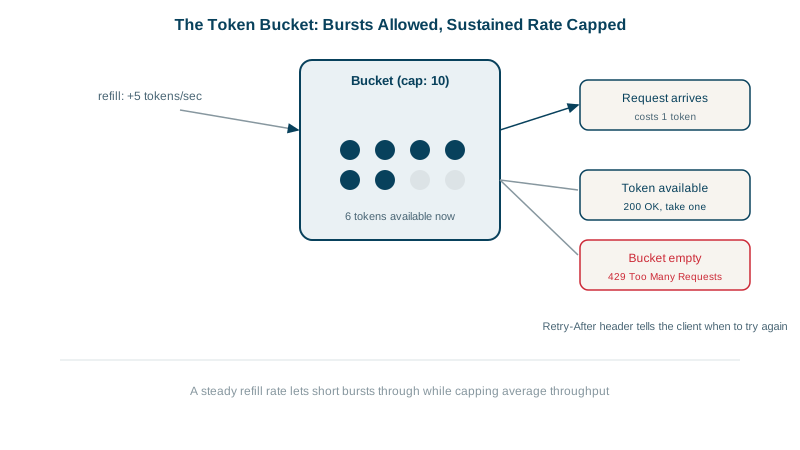
The token bucket is easiest to understand with numbers. Picture a bucket that holds 5 tokens and gets 1 new token every second. Each request takes a token; an empty bucket means 429. Running a small implementation:
function makeBucket(capacity, refillPerSec) {
  let tokens = capacity, last = 0;
  return (now) => {                                   // now in seconds
    tokens = Math.min(capacity, tokens + (now - last) * refillPerSec);
    last = now;
    if (tokens >= 1) { tokens -= 1; return { allowed: true }; }
    return { allowed: false, retryAfter: Math.ceil((1 - tokens) / refillPerSec) };
  };
}t=0 five requests at once 200 200 200 200 200 (the burst empties the bucket)
t=0 sixth request 429 Retry-After 1
t=0.5 one more 429 Retry-After 1 (only half a token so far)
t=2 three requests 200 200 429 (2 tokens had refilled)
t=10 one request 200 (the bucket refilled to 5 and stopped there)So a client can burst up to 5 requests, but over time it averages at most 1 per second. Capacity sets the burst; the refill rate sets the long-run limit.
In a cluster, counters must be shared: usually in Redis with atomic increments or a Lua script, or enforced at the API gateway (Day 21).
The 429 response and rate limit headers
Return 429 Too Many Requests with a Retry-After header, and tell clients where they stand on every response. A small Express API with a limit of 5 requests per minute per client:
GET /search  X-Client-Id: app-42  -> 200  X-RateLimit-Remaining: 4
GET /search  X-Client-Id: app-42  -> 200  X-RateLimit-Remaining: 3
GET /search  X-Client-Id: app-42  -> 200  X-RateLimit-Remaining: 2
GET /search  X-Client-Id: app-42  -> 200  X-RateLimit-Remaining: 1
GET /search  X-Client-Id: app-42  -> 200  X-RateLimit-Remaining: 0
GET /search  X-Client-Id: app-42  -> 429  X-RateLimit-Remaining: 0  Retry-After: 11
The 429 body is a problem details object (Day 8). X-RateLimit-Limit, X-RateLimit-Remaining and X-RateLimit-Reset are the widely used conventions (GitHub uses this family); the IETF is standardizing RateLimit and RateLimit-Policy headers to replace them. Whichever you use, document it.
How clients should handle rate limits
- Respect
Retry-Afterand back off; don't retry immediately. - Exponential backoff with jitter for retries, so thousands of clients don't retry in sync.
- Watch the remaining count and slow down before hitting zero.
Quotas, concurrency limits and load shedding
- Quotas: monthly allowances tied to billing plans, separate from per-second limits.
- Concurrency limits: cap simultaneous in-flight requests for slow operations.
- Load shedding: when the whole service is overloaded, reject low-priority traffic first, with 503 (see the distributed systems course).
- Abuse protection at the edge (WAF, bot detection) for traffic that isn't a legitimate client.
Check yourself
Keys identify the client application reliably. Many legitimate users can share one IP behind corporate NAT or a mobile carrier, and attackers can rotate IP addresses cheaply. IP limits still help for unauthenticated endpoints like login.
A client can send a full window's quota at the end of one window and again at the start of the next, briefly doubling the allowed rate.
Wait at least 11 seconds before retrying that request, and slow its overall request rate, rather than retrying immediately in a loop, which only extends the throttling.
Bursts of up to 100 requests at once, but no more than about 10 requests per second averaged over time.