API Request and Response Design: Payloads, Headers
On this page
Why payload design matters
Every field name, type and format in a response becomes something clients depend on. Getting a few rules right at the start saves years of compatibility workarounds.
JSON payload conventions: casing, dates, money, IDs
- One casing style for JSON fields, everywhere. camelCase (
createdAt) is common for JavaScript-heavy consumers; snake_case (created_at) is also widely used. Mixing them is the real problem. - Dates as ISO 8601 strings in UTC:
"2026-10-11T14:30:00Z". Never local times without an offset, and avoid numeric timestamps whose unit (seconds? milliseconds?) clients must guess. - Money as integer minor units plus a currency:
{"amount": 48200, "currency": "USD"}for $482.00. Floating-point numbers lose precision, and some JSON tools drop trailing zeros, as the test below shows. - IDs as strings when they may exceed 2^53 or might change format; JavaScript can't represent large integers exactly.
- Enums as lowercase strings (
"pending","paid"), never numeric codes. - Objects at the top level,
{"items": [...]}rather than a bare array, so you can add fields likenextCursorlater without breaking clients. - Consistent null handling: decide whether absent values are omitted or
null, and document it.
Which HTTP headers to use for metadata
Use headers for things about the request or response, not the resource itself:
Content-TypeandAcceptfor formats.Authorizationfor credentials.Idempotency-Keyfor safe retries (Day 10).ETag,If-None-Match,If-Matchfor caching and concurrency.Locationon 201 responses,Retry-Afteron 429 and 503.- A request ID (
X-Request-Idor a W3Ctraceparent) echoed back, so support can find a request in the logs.
Content negotiation with the Accept header
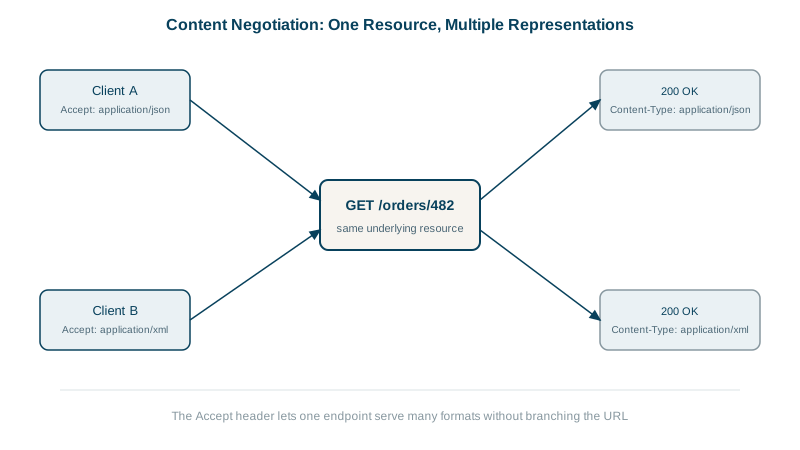
In plain words: the client lists the formats it can read in the Accept header, like telling a waiter which languages you speak, and the server answers in one of them. If it speaks none of them, it answers 406 Not Acceptable. An Express handler using res.format:
Accept: application/json
200 application/json; charset=utf-8 | Vary: Accept
{"id":9931,"total":482,"currency":"USD"}

Accept: text/csv
200 text/csv; charset=utf-8 | Vary: Accept
id,total,currency
9931,482.00,USD

Accept: application/xml
406 application/problem+json; charset=utf-8 | Vary: Accept
{"title":"Not Acceptable","status":406,"supported":["application/json","text/csv"]}
Vary: Accept tells caches that the response depends on the Accept header, so a cached CSV isn't served to a JSON client. Notice "total": 482: the value 482.0 lost its decimal point in JSON, a small example of why money belongs in integer minor units.
ETags, Cache-Control and safe concurrent updates
An ETag is a version identifier for a representation, often a hash of the content. It does two jobs, both tested here:
Conditional GET (saves bandwidth):
GET /users/1                                   -> 200, ETag: "WQ88FKudhtAY0DFk"
GET /users/1   If-None-Match: "WQ88FKudhtAY0DFk" -> 304 Not Modified (no body)
Cache-Control (decides who may keep a copy, and for how long): an ETag lets a client check whether its copy is still current, while Cache-Control says whether it may keep a copy at all:
Cache-Control: public, max-age=300     anyone, including a CDN, may reuse it for 5 minutes
Cache-Control: private, max-age=60     only the user's own browser or app may keep it
Cache-Control: no-store                never keep a copy (tokens, bank balances)
A product catalog fits the first, a user's own profile the second, and anything with secrets the third. Without the header, caches guess, so always set it on GET responses.
Optimistic concurrency (prevents lost updates): two people edit the same record. Each sends the ETag they read with If-Match; the second one, now stale, is rejected instead of silently overwriting the first:
PATCH /users/1   If-Match: "stale"   {"name":"Ana B"}
HTTP/1.1 412 Precondition Failed
{"title":"Resource changed since you read it","status":412}
The client re-reads the resource, merges, and tries again. Think of the ETag as the version number written on a shared document: you may save only if nobody has saved a newer version since you opened it.
Check yourself
Integers in minor units avoid floating-point rounding errors and lost decimal places when amounts are parsed and added in different languages. The currency code makes the amount unambiguous, since 48200 means something different in yen.
It tells caches that the response depends on the Accept request header, so a JSON response and a CSV response for the same URL are cached separately, and nobody receives the wrong format from a shared cache.
The update only applies if the resource's current ETag matches the one the client read; otherwise the server returns 412 and the client must re-read.
no-store, so no browser, proxy or CDN keeps any copy of a secret on disk or in memory. private alone still allows the browser to cache it.