API Authentication: API Keys vs OAuth 2.0 vs JWT
On this page
API authentication: who is calling?
Every protected request must answer one question first: who is this? The answer shapes everything else: rate limits, permissions, audit logs. Three mechanisms cover most APIs, and they solve different problems.
API keys: identifying applications
A long random string identifying an application, sent in a header (Authorization: Bearer sk_live_... or X-API-Key).
- Good for: server-to-server integrations, developer accounts, usage tracking.
- Limits: a key identifies an app, not a user; anyone holding it has its full access until it's revoked.
- Handling: show it once, store only a hash, allow multiple keys per account for rotation, add prefixes (
sk_live_) so leaked keys can be spotted by scanners, and never accept keys in URLs (they end up in logs).
OAuth 2.0 flows: authorization code with PKCE, client credentials, device code
OAuth lets a user grant an application limited access to their data without giving it their password. The classic picture is a hotel key card: the front desk (the authorization server) checks who you are and gives you a card that opens your room and the gym, for a few days only. The card isn't your identity, it can't open other rooms, and it can be cancelled without changing your passport. An OAuth access token is that card: limited in what it opens (scopes) and in how long it works.
The main flows today:
- Authorization code with PKCE: for web, mobile and single-page apps acting for a user. The user signs in at the authorization server, which redirects back with a code; the app exchanges it for tokens. PKCE (pronounced "pixie") protects the code from interception: the app makes up a random secret, sends only its hash when the flow starts, and must show the original secret when exchanging the code. A stolen code is useless without that secret.
- Client credentials: for service-to-service calls with no user involved.
- Device code: for TVs and CLIs without a browser.
The older implicit and password flows should no longer be used: the OAuth 2.0 Security Best Current Practice (RFC 9700, January 2025) says so, and the OAuth 2.1 draft drops them. Access is limited by scopes (orders:read). OpenID Connect adds a standard layer for signing users in (an ID token describing who they are).
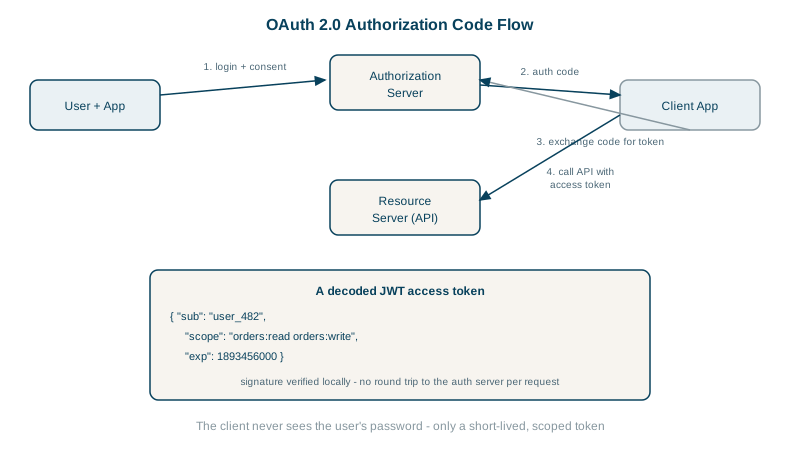
How JWTs work and how to validate them
A JWT (JSON Web Token) is a signed set of claims, often used as an OAuth access token. Three base64url parts: header, payload, signature. A token issued by the test API decodes to:
{'scope': 'reports:read', 'sub': 'user_7', 'iss': 'https://auth.example.com',
 'aud': 'https://api.example.com', 'iat': 1791735722, 'exp': 1791736622}
The API verifies it locally, with no database lookup, using the jose library:
const { payload } = await jwtVerify(token, key, {
  issuer: 'https://auth.example.com',
  audience: 'https://api.example.com',
});   // also checks the signature and exp
What happened when the test API received bad tokens:
payload edited to "sub":"user_8" -> 401 ERR_JWS_SIGNATURE_VERIFICATION_FAILED
token 1 second past expiry      -> 401 ERR_JWT_EXPIRED
no token                        -> 401 Missing bearer token
valid token, wrong scope        -> 403 Token lacks reports:read
Rules for JWTs:
- Always verify signature,
iss,audandexp, and pin the allowed algorithms. Never trust a decoded payload you haven't verified. - The payload is readable by anyone, just base64. Never put secrets in it.
- Keep access tokens short-lived (5 to 15 minutes), because a JWT can't easily be revoked before it expires. Use refresh tokens to get new ones. A refresh token is a longer-lived credential the app sends only to the authorization server, never to APIs, to get a fresh access token without asking the user to sign in again. Revoking it is how you cut off an app or a lost phone.
- Use asymmetric signatures (RS256, ES256, EdDSA) when many services verify tokens, publishing public keys at a JWKS endpoint; the test uses HS256 with a shared secret for simplicity.
API keys vs OAuth vs JWT: which to use
| Need | Use |
|---|---|
| A partner's server calls your API | API key, or OAuth client credentials |
| Your app acts on behalf of a signed-in user | OAuth authorization code + PKCE, often via an identity provider |
| Internal services verify callers cheaply | Short-lived JWTs or mTLS |
| Third parties access users' data | OAuth with scopes and a consent screen |
Don't build your own authorization server; use a proven identity provider (Auth0, Okta, Cognito, Keycloak, Entra ID).
Check yourself
The signature covers the header and payload, so any change to the claims makes signature verification fail, as the tampered token test showed. Without the signing key, the attacker can't produce a valid signature for the edited token.
They're verified without a database lookup, so they can't easily be revoked; a short lifetime limits damage if one leaks.
When an application acts for individual users, since a key identifies only the application and grants its full access to whoever holds it.
An attacker who intercepts the authorization code. Exchanging the code also requires the random secret the app created at the start, which the attacker doesn't have.
The client credentials flow: the service authenticates with its own client id and secret, or a signed assertion, and receives a token for its own permissions.