Why Is Redis Single-Threaded? Architecture Explained
On this page
Why Redis is fast: RAM and a single thread
Redis usually answers in well under a millisecond. Two design choices explain most of that speed, and one of them explains Redis's most common production outage.
The first choice: Redis keeps all its data in RAM. Reading memory takes on the order of 100 nanoseconds. A disk seek takes milliseconds. Persistence to disk exists, but it's a background job (Day 5), not part of answering your request.
The second choice: Redis runs commands on one thread. It takes one command, runs it to completion, sends the reply, then takes the next. Picture a supermarket with one very fast cashier. Nobody fights over the till, so Redis needs no locks around its data. Two INCR calls on the same key can never collide, because they never run at the same time.
The event loop: how one thread serves thousands of clients
A single thread can still handle thousands of connections because it never waits on any one of them. Redis uses the operating system's event notification (epoll on Linux, kqueue on macOS) to learn which sockets have a complete command ready. It serves those, then asks again. This loop is called the event loop.
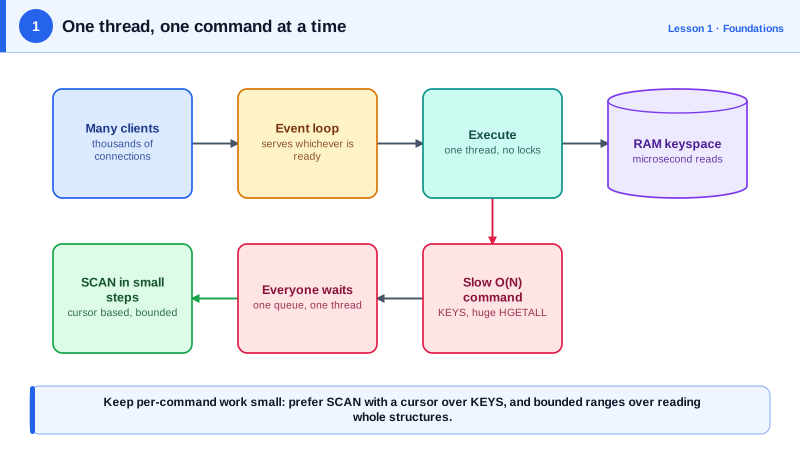
"Single-threaded" needs two qualifications. Since Redis 6.0 you can enable I/O threads (io-threads in the config) to spread the work of reading and writing bytes on sockets across cores. Redis 8 reworked this, but the rule hasn't changed: commands still execute against your data on one main thread. I/O threads help with many busy connections. They don't add concurrency to your data, and they're off by default.
The second: Redis also runs a few background threads for slow housekeeping that doesn't touch live data, such as closing files, flushing the AOF to disk and freeing the memory of keys removed with UNLINK. Persistence uses a forked child process (Day 5). None of these run your commands.
Why one slow command blocks every client: KEYS vs SCAN
If one customer pays in pennies, the whole line waits. In Redis, that customer is a command that does a lot of work in one go. The classic one is KEYS, which walks every key in the database before replying.
I loaded 5 million keys into a local Redis 8.10 instance and checked the slow log:
KEYS user:1234567*                  419,843 microseconds   (0.42 s)
SCAN 0 MATCH user:* COUNT 100            32 microseconds
For those 0.42 seconds, every other client's GET sat in the queue. On a larger dataset or a slower machine it's seconds. That's how a single admin command freezes a whole application.
SCAN avoids this by doing a small, bounded amount of work per call and returning a cursor for the next call:
redis-cli SCAN 0 MATCH 'user:*' COUNT 100
# 1) "688128"          <- cursor for the next call; 0 means you're done
# 2) 1) "user:4574533"
#    2) "user:4034920"
#    ...
Other clients get served between calls. The trade-off is that SCAN isn't a snapshot: if keys change during the iteration, you can see a key twice or miss one that was added mid-scan. For admin scripts and cleanup jobs, that's almost always fine.
The same reasoning applies to other commands whose cost grows with data size: HGETALL on a huge hash, SMEMBERS on a set with millions of members, DEL on a giant key. Day 14 shows how to find them with the slow log.
Redis vs a disk-based database like PostgreSQL
| Disk-based database (e.g. PostgreSQL) | Redis | |
|---|---|---|
| Primary storage | Disk, with a RAM cache | RAM, with optional snapshots or a log on disk |
| Typical latency | Sub-millisecond to several ms | Tens of microseconds to sub-millisecond |
| Concurrency | Many workers, locks and transactions | One command at a time, no data locks |
| Data model | Tables and SQL | Typed values under keys: strings, hashes, lists, sets, sorted sets, streams |
Redis usually sits next to a primary database, not instead of it: caching (Day 9), sessions, rate limits and locks (Day 10), queues and streams (Day 11). The next two days cover the data types that make those patterns work.
Redis, Valkey and managed services
In March 2024 Redis moved from the BSD license to RSALv2 and SSPLv1, which aren't open-source licenses. Within days the Linux Foundation announced Valkey, a fork of the last BSD-licensed version, backed by AWS, Google Cloud, Oracle and others (The New Stack, 2024). Redis 8, released in May 2025, added AGPLv3 as a license option and folded the former Redis Stack features, such as JSON, time series and probabilistic types, into the main distribution (The New Stack, 2025).
For this course the difference is small: Valkey and Redis share the commands and protocol covered here, apart from features added after the split. Managed services such as Amazon ElastiCache, Azure's Redis offerings and Google Memorystore run one or the other and handle replication, failover and persistence for you. They often restrict admin commands like CONFIG SET, so some settings in later lessons are changed through the provider's console or parameter groups instead.
Check yourself
A slow command blocking the single execution thread, such as a cleanup job using KEYS or deleting a huge key. Check the slow log and replace it with SCAN-based iteration or UNLINK.
No. Commands run one at a time, so the second INCR starts only after the first has finished and written its result.
No. I/O threads only parallelize socket reads and writes. Command and script execution still happens on one thread, so the script still blocks everyone.
No. Managed services such as ElastiCache, Azure Cache for Redis and Memorystore block many admin commands, including most CONFIG SET calls, so the provider controls the configuration. Change the setting through the service's parameter group, console or API, then confirm it with CONFIG GET if allowed or in the service's settings.
Mostly no. Command execution happens on a single thread. Redis is fast because data lives in memory, its data structures are efficient, and one thread avoids locking overhead. Newer versions can use extra threads for network I/O and background work like freeing memory, but commands still run one at a time.