Redis Replication Explained
On this page
Why a confirmed Redis write can disappear
A client sets a value and gets OK. A moment later the primary's host dies, a replica takes over, and the value isn't there. Nobody did anything wrong. That's how Redis replication works by default, and once you see why, you can decide where it matters.
How Redis replication works
One primary accepts writes. Any number of replicas copy it:
- A new replica connects and asks to sync.
- The primary sends a full snapshot of its data. Recent versions stream it straight over the socket instead of writing a file first (
repl-diskless-sync yes). - From then on, the primary streams every write command to the replica, in order.
If a replica disconnects briefly, it can usually catch up with a partial resync from the primary's replication backlog, a buffer of recent writes (1 MB by default, repl-backlog-size). If it was gone too long and the backlog has moved on, it needs a full resync again. On busy primaries, raise the backlog so short network blips don't trigger full copies.
Setting it up is one line on the replica:
redis-server --port 6391 --replicaof 127.0.0.1 6390
redis-cli -p 6391 INFO replication     # role:slave  master_link_status:up
redis-cli -p 6391 SET k2 x             # READONLY You can't write against a read only replica.
Asynchronous replication and the WAIT command
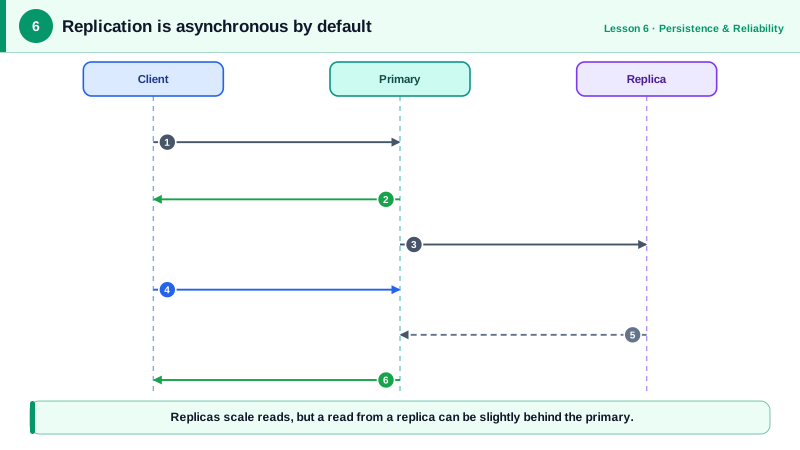
The primary replies OK to the client before any replica has the write. Normally the gap is a millisecond or less. If the primary crashes inside it, that write exists nowhere, even though the client was told it succeeded.
WAIT lets a client choose to wait for replicas on a specific write:
SET order:991:status paid
WAIT 1 1000         # block up to 1000 ms until 1 replica has acknowledged; returns the count
# (integer) 1
Use it for the few writes where loss would really hurt. It narrows the window but doesn't make Redis a strongly consistent database: a replica acknowledges receiving the write, not that it's on disk, and a failover can still pick a replica that missed it. WAITAOF (Redis 7.2 and later) can additionally wait until the write has been fsynced to the AOF locally or on replicas.
There's also a server-side guard: min-replicas-to-write 1 with min-replicas-max-lag 10 makes the primary refuse writes when no replica is connected and current. That limits how much a primary cut off from its replicas can accept and later lose.
Reading from replicas: scaling reads, stale data
Replicas are a cheap way to scale reads: send leaderboard or catalog reads to replicas and keep writes on the primary. The cost is staleness. A user who updates their profile and immediately reloads the page may read the old value from a replica that hasn't caught up.
The usual fix is to read your own writes from the primary: for a few seconds after a user changes something, route that user's reads to the primary, or read that one key from the primary.
Why replicas aren't backups or automatic failover
Two misunderstandings cause real damage:
- A bad write replicates too.
FLUSHALLby mistake, or a bug that corrupts keys, reaches every replica within milliseconds. Keep RDB backups off the host (Day 5). - An empty primary wipes its replicas. If the primary runs without persistence and a supervisor restarts it automatically, it comes back empty, and the replicas resync from it and throw away their copies. Redis's documentation warns about exactly this: turn on persistence for the primary, or disable automatic restarts (Redis docs).
- Nothing promotes a replica on its own. If the primary dies, replicas keep serving reads, but writes fail until someone promotes a replica with
REPLICAOF NO ONEand repoints the others. Doing that by hand at 3 a.m. is slow. Day 7 automates it with Sentinel.
Check yourself
Follow the write with WAIT 1 <timeout> (or WAITAOF) and check the returned count. That narrows the loss window, but Redis replication is still not a strongly consistent commit; the most critical records belong in a database.
Replication is asynchronous, so a replica can lag a little behind the primary, and a read sent there right after a write may return the old value. Use read-your-writes routing: for that user or key, read from the primary for a short time after a write, or send reads that must be current to the primary.
No. Replication copies every command, so the flush reached every replica within moments, and they're now empty too. Replicas protect against hardware failure, not against mistakes. You need an RDB or AOF backup taken before the flush, which is why backups and restricting dangerous commands with ACLs both matter.
A partial resync works only if the commands the replica missed are still in the primary's replication backlog. If the backlog was too small for the outage, the replica must reload a full snapshot, which is slow and costly. Increase repl-backlog-size so short disconnections can be caught up incrementally.
No. A replica mirrors the primary almost instantly, including deletions, bad writes and FLUSHALL. It protects you from losing the machine, not from losing data through mistakes or bugs. Keep real backups, such as regular RDB files copied off the host.