Redis Eviction Policies and maxmemory
On this page
"OOM command not allowed": writes fail, reads work
The alert says OOM command not allowed when used memory > 'maxmemory'. Every SET fails, every GET still works, and the application's login flow is broken because it can't store new sessions. All the data on this instance is sessions and cache entries with TTLs, data that would be fine to throw away.
maxmemory and maxmemory-policy: what happens when Redis is full
Two settings decide it. maxmemory caps memory use. maxmemory-policy decides what happens at the cap:
CONFIG GET maxmemory              # e.g. 4gb
CONFIG GET maxmemory-policy       # "noeviction", the default
INFO memory                       # used_memory_human, maxmemory_human, mem_fragmentation_ratio
INFO stats                        # evicted_keys
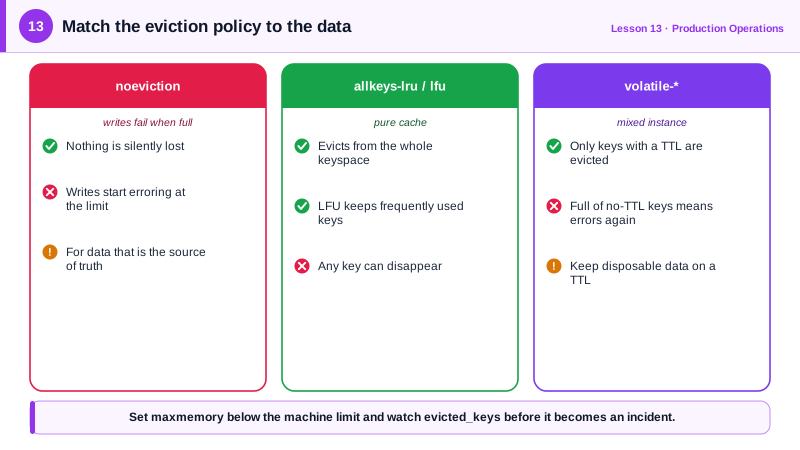
With noeviction, Redis refuses any write that needs more memory and keeps everything it has. That's right for data that must never silently disappear. For a cache, it's the wrong choice: it turns "full" into an outage instead of quietly dropping old entries.
Check maxmemory too. On 64-bit systems its default is 0, meaning no limit, so the policy never applies: Redis keeps growing until the host starts swapping or the operating system's out-of-memory killer ends the process. That's worse than either eviction or an OOM error. Managed services set a limit for you.
How to choose a Redis eviction policy
| Policy | Evicts | Use for |
|---|---|---|
noeviction | Nothing; writes fail when full | Data with no other copy: queues, primary-store data |
allkeys-lru | Any key, least recently used first | A pure cache |
allkeys-lfu | Any key, least frequently used first | A pure cache with lasting popular keys |
volatile-lru, volatile-lfu, volatile-ttl, volatile-random | Only keys with a TTL | An instance mixing disposable and permanent data |
allkeys-random | Any key at random | Rarely the best choice |
For the session instance above:
CONFIG SET maxmemory-policy volatile-lru # evict only keys that have a TTLPut it in the config file too, or it's gone after a restart. If everything on the instance is cache, allkeys-lfu or allkeys-lru is simpler. With a volatile-* policy, a key without a TTL is never evicted, so a bug that forgets the TTL slowly fills the instance until you're back at OOM errors.
Redis 8.6 added LRM policies (allkeys-lrm, volatile-lrm), which evict the least recently modified keys: reads don't count as use. They fit data that's read often but should be dropped if nobody has updated it in a while (Redis docs).
LRU vs LFU eviction
Neither is exact. Keeping every key in perfect order would cost too much, so Redis samples a few keys (maxmemory-samples, default 5) and evicts the best candidate among them.
The difference is what counts as valuable:
- LRU keeps what was touched recently. A one-off batch job that reads a million cold keys pushes your hot product pages toward eviction.
- LFU keeps what's touched often, with counts that decay over time. A product that's popular all week survives a burst of one-time reads.
For caches with a stable set of popular items, LFU often gives a better hit rate. Measure it: compare keyspace_hits and keyspace_misses in INFO stats before and after the change.
How to monitor memory and prevent OOM errors
- Alert before the cap. Alert at around 80 percent of
maxmemory, and on a risingevicted_keysrate for instances that shouldn't evict. - Find the big keys.
redis-cli --bigkeysandredis-cli --memkeysscan the keyspace withSCANand report the largest keys per type. One forgotten giant key is a common culprit. - Ask Redis.
MEMORY DOCTORgives a plain-language report, for example on fragmentation after a memory peak. - Separate by purpose. Run a cache instance with
allkeys-lfuand a separate instance withnoevictionfor queues and data that must stay. One policy can't serve both well. - Leave headroom. Replication buffers and forks (Day 5) need memory outside your dataset, so set
maxmemorywell below the machine's RAM.
Check yourself
Switch to allkeys-lfu or allkeys-lru, in the running config and the config file, so Redis evicts old entries instead of failing writes.
Only sessions are evicted, so the queue is safe. The risk is that the queue, or any key missing a TTL, can grow until nothing evictable is left and writes fail.
Switch from LRU to LFU. The export made every product "recently used", pushing out the popular ones; LFU keeps items that are used often.
LRU evicts whatever was used least recently, so a one-off scan of every product pushes out the popular items. LFU tracks how often keys are used and keeps the frequently read ones, so popular products survive a scan and the hit rate stays high.
Memory fragmentation: the allocator holds memory that Redis has freed but can't return to the operating system in usable blocks. Check mem_fragmentation_ratio in INFO memory. Active defragmentation (activedefrag yes) can reclaim much of it without a restart.