Redis Cluster: Sharding and Scaling Explained
On this page
Redis Cluster vs Sentinel: do you need sharding?
Sentinel (Day 7) keeps one primary available. It doesn't help when the data no longer fits in one machine's memory, or when one primary can't keep up with the writes. Redis Cluster solves that by splitting the keys across several primaries, each with its own replicas, and failing over each part on its own.
It also brings real complexity. So the first question isn't how Cluster works, but whether you need it.
| Question | Primary + replicas + Sentinel | Redis Cluster |
|---|---|---|
| Automatic failover | Yes | Yes, per shard, no Sentinel needed |
| Data larger than one node's RAM | No | Yes |
| Write throughput beyond one node | No | Yes |
| Multi-key commands and transactions | Work on any keys | Only when all keys are in the same slot |
| Operational effort | Lower | Higher: slots, resharding, cluster-aware clients |
A dataset of a few gigabytes with moderate traffic almost never needs Cluster. A 300 GB working set or a write load that saturates one core does.
Hash slots: how a key finds its node
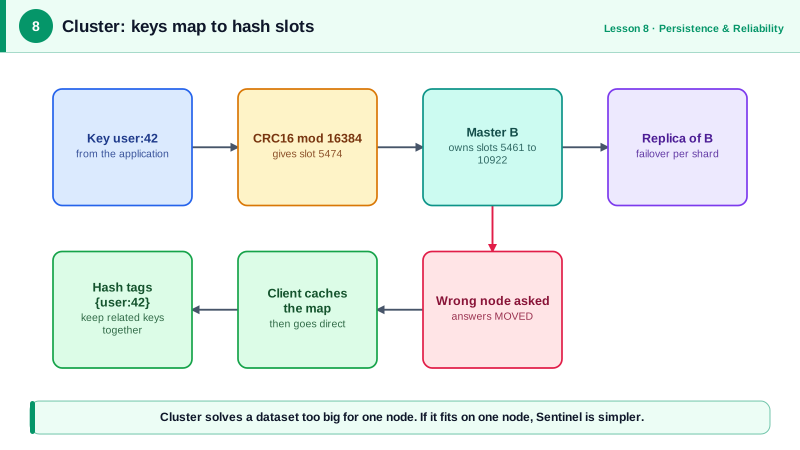
Cluster divides the key space into 16,384 hash slots. Each key maps to one slot with CRC16(key) mod 16384, and each primary owns a range of slots. Creating a three-node cluster locally shows the split:
redis-cli --cluster create 127.0.0.1:7001 127.0.0.1:7002 127.0.0.1:7003
   slots:[0-5460] (5461 slots) master
   slots:[5461-10922] (5462 slots) master
   slots:[10923-16383] (5461 slots) master
A client that sends a command to the wrong node gets a redirect instead of an answer:
redis-cli -p 7001 SET foo bar
# MOVED 12182 127.0.0.1:7003
redis-cli -c -p 7001 SET foo bar      # -c follows redirects
# OK
Cluster-aware client libraries fetch the slot map once, send each command straight to the right node, and refresh the map when they see MOVED. Make sure your client supports Cluster mode; a plain client will just report errors.
Why fixed slots instead of hashing straight to nodes? Adding a node means moving some slots to it, not rehashing every key. redis-cli --cluster reshard moves slots, and the keys in them, while the cluster keeps serving traffic.
CROSSSLOT errors and hash tags
Commands touching several keys only work if all the keys live in the same slot:
redis-cli -c -p 7001 MSET a 1 b 2
# CROSSSLOT Keys in request don't hash to the same slot
The same rule applies to MULTI transactions, Lua scripts and commands like SINTER. The fix is a hash tag: if a key contains {...}, only the part inside the braces is hashed. Keys that share a tag share a slot:
CLUSTER KEYSLOT {user:1042}:profile     # (integer) 10999
CLUSTER KEYSLOT {user:1042}:sessions    # (integer) 10999
MSET {user:1042}:a 1 {user:1042}:b 2    # OK
Design key names with this in mind before you need Cluster. Group the keys one operation touches under one tag, usually the entity id. Don't overdo it: if every key shares one tag, everything lands in one slot on one node, and you've lost the point of sharding.
Other Redis Cluster limitations
- One database only. Cluster supports only database 0, so
SELECT 1doesn't work. - Hot keys stay hot. Sharding spreads keys, not load on one key. A single very popular key still lives on one primary.
- Replicas per shard. Run at least one replica per primary, or losing one node loses its slots.
- ASK during resharding. While a slot is moving, some of its keys are already on the new node. The old node answers
ASKinstead ofMOVED, meaning "try the other node for this one command", without changing the slot map. Cluster-aware clients handle both. - Two ports per node. Nodes talk to each other on a cluster bus port, by default the client port plus 10,000 (6379 and 16379), so open both in firewalls. Cluster doesn't support NAT or remapped ports, which rules out Docker's default port mapping; the docs recommend host networking (Redis docs).
Check yourself
Sentinel with a primary and a replica or two. The data fits on one node and the load is modest, so Cluster adds complexity with no benefit.
Make the keys share a slot with hash tags, if they're always used together, or split the script into separate per-key operations and handle consistency in the application.
A hot key or a hash tag that groups too much data into one slot. Sharding can't split the load of a single key; consider client-side caching or splitting that key.
It hashes the key with CRC16, takes the result modulo 16,384 to get a hash slot, and each primary owns a range of slots. Clients cache the slot map and send each command straight to the right node. If a slot has moved, the node answers with a MOVED redirect.
Only the part inside the braces is hashed, so {user:42}:cart and {user:42}:profile land in the same slot and can be used together in multi-key commands and scripts. The risk is overuse: if many keys share one tag, they all land on one node, creating a hot spot.