Redis Persistence: RDB vs AOF
On this page
How much data can you lose? Choosing Redis persistence
"If this Redis crashes right now, how much data do we lose?" Your answer decides the configuration. For a cache in front of PostgreSQL, the answer might be "all of it, who cares, it refills". For a job queue that exists nowhere else, it's "as close to nothing as possible".
That amount of acceptable loss is called the recovery point objective (RPO). Redis gives you two mechanisms to hit it, and you can combine them.
| Setup | Worst-case loss on a crash | Fits |
|---|---|---|
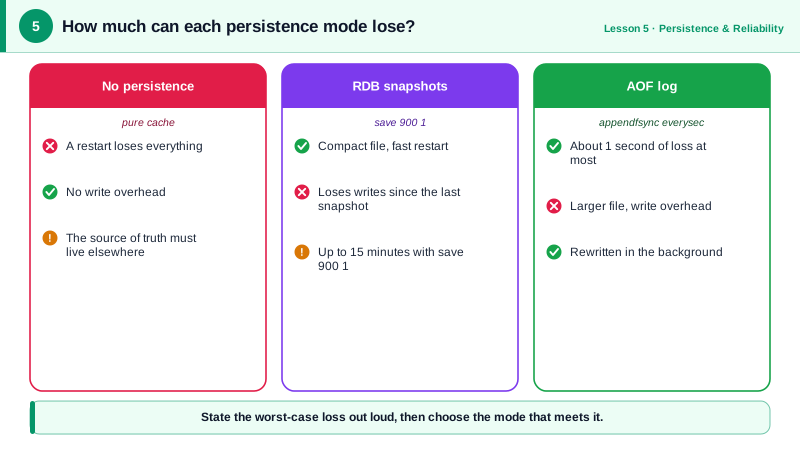
| No persistence | Everything | A pure cache that can be rebuilt from the database |
| RDB snapshots | Everything since the last snapshot, often minutes | Caches you'd like to restart warm, analytics counters |
AOF with appendfsync everysec | About one second of writes | Queues, rate limits, any data with no other copy |
AOF with appendfsync always | Close to nothing, at a large write cost | Rare; consider a database instead |
| RDB + AOF | About one second, with faster restarts | Most setups where Redis holds real data |
RDB snapshots: point-in-time copies
An RDB file (dump.rdb) is a compact, point-in-time copy of the whole dataset. Redis makes it by forking a child process. The child sees a frozen view of memory through copy-on-write, writes it to disk, then swaps the new file in. The main process keeps serving clients the whole time.
Snapshots trigger on save points. Recent Redis versions ship with this default:
save 3600 1 300 100 60 10000
# snapshot after 3600 s if at least 1 key changed,
# after 300 s if at least 100 changed, after 60 s if at least 10,000 changed
RDB restarts are fast, because loading one binary file is quicker than replaying a log. RDB files also make good backups: copy them off the host on a schedule. The downside is the gap: a crash loses every write since the last completed snapshot.
AOF: the append-only file and fsync policies
The append-only file (AOF) records each write as it happens. On restart, Redis replays it to rebuild the data. How often the log is flushed to disk with fsync decides the loss window:
always: fsync after every write. Safest, and much slower.everysec(the default): fsync once per second. A crash loses about a second.no: let the operating system decide, typically up to 30 seconds.
A log of every write grows forever, so Redis periodically rewrites it into the minimal set of commands that recreates the current state. With aof-use-rdb-preamble yes, the default, the rewritten base is in RDB format and only new writes are appended as commands. Since Redis 7, the AOF is a directory of files plus a manifest:
redis-cli CONFIG SET appendonly yes
ls appendonlydir/
# appendonly.aof.1.base.rdb   appendonly.aof.1.incr.aof   appendonly.aof.manifest
Set appendonly yes in the config file too, or the setting is gone after a restart. The order matters. If you only edit the config file and restart, Redis can start from a new, empty AOF instead of your dump.rdb, and the data is gone. Turn AOF on with CONFIG SET on the running server first, wait until INFO persistence shows the rewrite has finished (aof_rewrite_in_progress:0), then update the config file (Redis docs).
If a crash cuts the last command in the AOF in half, Redis loads the file anyway and drops the broken command, because aof-load-truncated is on by default.
Fork pauses and memory headroom
Both RDB snapshots and AOF rewrites fork. Forking a process with a large dataset has two costs:
- A pause. Copying the page tables of a 25 GB process can take tens to hundreds of milliseconds, depending on the host.
INFO persistencereports it aslatest_fork_usec. - Extra memory. Every page the main process changes during the snapshot gets copied. Under heavy writes, memory use can grow by a large fraction of the dataset. On a host with no headroom, the operating system's out-of-memory killer may kill Redis in the middle of saving.
So leave memory headroom on hosts that persist, watch latest_fork_usec, and on Linux follow the Redis guidance on vm.overcommit_memory = 1 so forks don't fail.
Recommended persistence settings
If Redis holds data that exists nowhere else, turn on AOF with everysec, keep RDB snapshots for backups, and copy the RDB files off the machine. If it's a pure cache, consider turning persistence off entirely: no forks, no pauses, and a cold cache after a restart.
Persistence protects against a process or host restart. It doesn't keep the service up while the host is down. That's replication and failover, covered on Days 6 and 7.
Check yourself
Enable AOF with appendfsync everysec. Redis then writes every change to the log and syncs it to disk once a second, so a crash loses at most about one second of updates, which matches the requirement. Keep RDB snapshots as well, because they make restarts and backups faster.
Whether a snapshot or AOF rewrite is forking at that time. latest_fork_usec in INFO persistence shows how long the fork took.
Every entry can be rebuilt from the database, so durability adds nothing, and turning it off removes fork pauses and memory spikes.
Redis started from the new, empty AOF instead of the RDB file. Enable AOF with CONFIG SET on the running server first, let the rewrite finish, then update the config file.
RDB takes periodic point-in-time snapshots, so a crash loses everything since the last snapshot, but restarts are fast and files are compact for backups. AOF logs every write, so with everysec you lose at most about a second, at the cost of larger files and periodic rewrites. Many deployments use both.