Redis Key Expiration (TTL) and Memory Basics
On this page
Three habits that prevent most Redis key problems
Redis has no tables, no schema and no automatic cleanup unless you ask for it. That freedom causes three common problems: keys nobody can identify six months later, data that never goes away, and a server that runs out of memory sooner than anyone estimated. One habit fixes each.
Habit 1: Redis key naming conventions
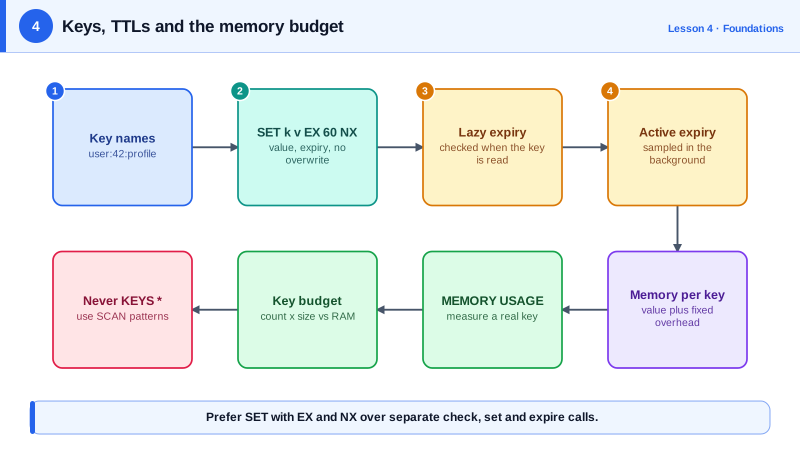
All keys live in one flat namespace. The convention is to build structure into the name with colons: type:id or type:id:part.
user:1042                 hash with the user's profile
session:9f3a2c7e41b8      hash for one login session
rate:api:1042:202610101530 counter for one user in one minute
Redis doesn't enforce this. It's worth it anyway: SCAN 0 MATCH session:* becomes predictable, tools like RedisInsight group keys by prefix, and anyone can tell what a key is. It also makes the key's type obvious, which avoids the WRONGTYPE errors from Day 2.
Habit 2: set the value and its TTL in one command
Sessions, cache entries, one-time codes and rate-limit counters should disappear on their own. Set the value and its time-to-live (TTL) together:
SET session:tok123 '{"user":42}' EX 1800     # expires in 30 minutes
TTL session:tok123                           # (integer) 1800
PERSIST session:tok123                       # remove the expiry
TTL session:tok123                           # (integer) -1, no expiry
Add NX and the set only happens if the key doesn't exist yet. That one command is the basis of the simple lock and rate limiter on Day 10:
SET lock:job1 worker-a EX 30 NX              # OK, worker-a holds the lock
SET lock:job1 worker-b EX 30 NX              # (nil), already taken
Doing the same thing as three commands, check if it exists, set it, then EXPIRE it, leaves gaps where another client can slip in, or where a crash leaves a key with no expiry forever.
The opposite mistake is just as common: a plain SET on an existing key removes its TTL. A cache refresh that rewrites a value with SET key value and no EX turns a temporary key into a permanent one. Pass the expiry again, or use SET key value KEEPTTL (Redis 6.0 and later) to keep the old one. Commands that change a value in place, such as INCR or HSET, keep the TTL. TTL returns -1 for a key with no expiry and -2 for a key that doesn't exist.
Since Redis 7.4 you can also expire individual hash fields with HEXPIRE, for example dropping a session's cached IP after a minute while the session lives on.
How Redis expires keys: lazy and active expiry
Expired keys aren't deleted at the exact millisecond. Redis combines two mechanisms:
- Lazy expiry: when a client touches a key, Redis checks its TTL and treats it as missing if it has passed.
- Active expiry: a background cycle samples keys that have a TTL and deletes the expired ones, so keys nobody reads still get cleaned up.
The guarantee you can rely on: an expired key is never returned. The memory may be freed a little later.
Habit 3: measure memory per key before sizing a server
Every key costs more than its value: the key name, the entry in Redis's main hash table and per-object metadata all add up. Measure a realistic key instead of guessing:
HSET session:9f3a2c7e41b8 user_id 1048576 login_at 1791608337 ip 203.0.113.42 device ios login_count 17
MEMORY USAGE session:9f3a2c7e41b8           # (integer) 122
MEMORY USAGE reports the key and value, but not the main table's share. So also load a sample and compare used_memory in INFO memory before and after. On my test, 100,000 such sessions added about 15.9 MB, roughly 159 bytes each. For 50 million sessions that's around 8 GB before replication buffers and fragmentation, so you'd provision a 12 to 16 GB instance, not an 8 GB one. Numbers vary with the memory allocator and Redis version, which is exactly why you measure.
Small structures are stored in compact encodings. A hash stays in the compact listpack form until it has more than hash-max-listpack-entries fields or a value longer than hash-max-listpack-value bytes; then it converts to a regular hash table:
OBJECT ENCODING user:1042                    # "listpack"  (2 fields)
OBJECT ENCODING big                          # "hashtable" (600 fields)
That's why grouping a user's fields in one small hash usually uses less memory than one string key per field. On my test, a two-field hash used 61 bytes; the same data as two string keys used 96.
Check yourself
The key exists with no expiry and never goes away. Use SET key value EX seconds so the value and TTL are written in one atomic command.
A plain SET discards the existing TTL. Reset with SET key 0 EX 60, or add KEEPTTL if the original expiry should stay.
No. Redis never returns a key whose TTL has passed, even if it hasn't been deleted yet. Expired keys are removed lazily when accessed and actively by a background sampling process, so memory is freed shortly afterwards rather than at the exact moment of expiry. A large backlog can take a little time to clear.
Load a few thousand realistic profiles, measure memory per key from INFO memory, multiply by 20 million, and add headroom for replication buffers, fragmentation and growth.
-1 means the key exists but has no expiry, while -2 means it doesn't exist. For a session key, -1 usually signals a bug, such as a plain SET that overwrote the TTL, so the key will stay forever and memory will slowly grow.