Elasticsearch Architecture: Nodes, Clusters, Shards
On this page
Nodes, clusters and shards
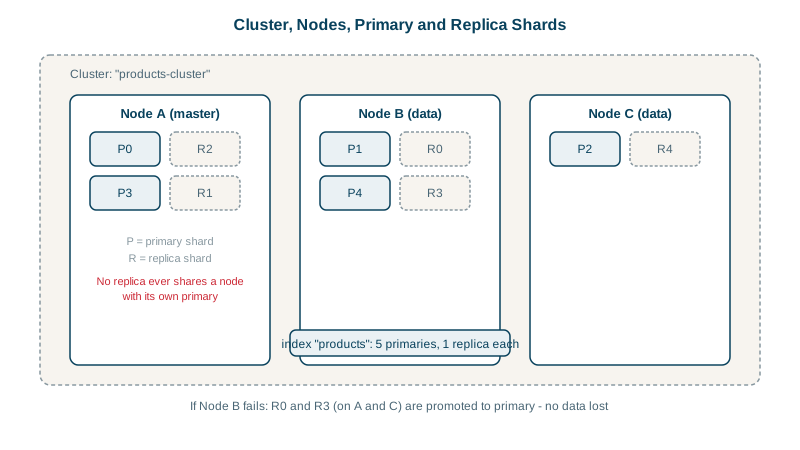
A single Elasticsearch process is a node. Several nodes with the same cluster name form a cluster. An index is split into shards that are spread across those nodes, so an index can grow beyond one machine and searches run on many machines in parallel.
Picture an encyclopedia too big for one shelf. You split it into volumes (shards) and spread them across several shelves (nodes), so several people can look things up at once. Then you keep a photocopy of each volume on a different shelf (replicas), so losing one shelf loses no volume.
Primary shards and replica shards
- A primary shard holds a slice of the index's documents. Each shard is a complete Lucene index.
- A replica shard is a copy of a primary on a different node. It serves searches and takes over if the primary's node fails.
- The number of primaries is fixed when the index is created (changing it means splitting, shrinking or reindexing, Day 19). Replicas can be changed at any time.
PUT /orders
{ "settings": { "number_of_shards": 3, "number_of_replicas": 1 } }
Three primaries and three replicas: six shards in total, needing at least two nodes.
Why a single-node cluster turns yellow
Created on the course's one-node lab cluster:
{'status': 'yellow', 'active_primary_shards': 3, 'active_shards': 3, 'unassigned_shards': 3}

index  shard prirep state      node
orders 0     p      STARTED    node-1
orders 0     r      UNASSIGNED
orders 1     p      STARTED    node-1
orders 1     r      UNASSIGNED
...
The cluster refuses to put a replica on the same node as its primary, since a copy on the same machine protects against nothing. Asking why with the allocation explain API:
node-1 same_shard - a copy of this shard is already allocated to this nodeCluster health summarizes this:
| Status | Meaning |
|---|---|
| Green | All primaries and replicas assigned |
| Yellow | All primaries assigned, some replicas not: data is searchable but not fully protected |
| Red | At least one primary unassigned: some data is unavailable |
Setting number_of_replicas to 0 turned the lab cluster green. Do that only in development; indices get 1 replica by default, which is why a single-node cluster is often yellow.
Elasticsearch node roles
In larger clusters, nodes specialize:
| Role | Job |
|---|---|
| Master-eligible | Manage cluster state: indices, mappings, shard placement. Run three of them so a majority survives one failure |
Data (data_hot, data_warm, data_cold, data_frozen) | Hold shards and run searches and indexing; tiers for different hardware (Day 24) |
| Ingest | Run ingest pipelines that transform documents before indexing |
| Coordinating only | Route requests and merge results from shards |
| ML, transform | Machine learning jobs and data transforms |
Every node can coordinate: the node that receives a search sends it to one copy of each shard, gathers the top results, and returns them.
How a search runs: query phase and fetch phase
- Query phase: the coordinating node sends the query to one copy (primary or replica) of every shard; each returns its top document IDs and scores.
- Fetch phase: the coordinator merges them, then fetches the full documents for the final page.
More shards mean more parallelism but more overhead per search; shard sizing is a balance (Day 22).
Check yourself
Replicas can't be placed on the node holding their primary, so they stay unassigned; data is available but not redundant.
Not in place; you split, shrink or reindex into a new index. Replica counts can be changed at any time.
A majority of master-eligible nodes must agree on every cluster state change. With three, the cluster keeps a majority after losing one; with two, losing either leaves no majority, so the cluster can't elect a master.
Six copies (3 primaries plus 3 replicas), and at least two nodes, since a replica can't share a node with its own primary.
In the query phase, each shard finds and scores its top matches and returns ids and scores. In the fetch phase, the coordinating node retrieves the full documents for the overall top results.