Elasticsearch Snapshots and Disaster Recovery
On this page
What replicas can't protect against
Someone runs DELETE /products. Every replica disappears along with the primary (Day 23). A buggy script overwrites a million documents, and the replicas faithfully copy the damage. Recovery needs a copy from before the mistake: a snapshot.
Snapshot repositories
Snapshots go to a repository: S3, Google Cloud Storage, Azure Blob Storage, or a shared filesystem. The lab used a filesystem path (allowed in elasticsearch.yml with path.repo):
PUT /_snapshot/local_backups
{ "type": "fs", "settings": { "location": "/path/to/snapshots" } }
In the cloud:
PUT /_snapshot/backups_s3
{ "type": "s3", "settings": { "bucket": "es-backups-prod", "region": "us-east-1" } }
Snapshots are incremental at the segment level: each one stores only segments not already in the repository, so frequent snapshots are cheap.
Taking a snapshot and restoring it
PUT /_snapshot/local_backups/nightly-2026.10.11?wait_for_completion=true
{ "indices": "products,articles", "include_global_state": false }state SUCCESS indices ['products', 'articles'] shards {'total': 2, 'failed': 0, 'successful': 2}Then the accident, and the recovery:
DELETE /products                         -> {"acknowledged":true}
GET /products/_count -> index_not_found_exceptionPOST /_snapshot/local_backups/nightly-2026.10.11/_restore?wait_for_completion=true
{ "indices": "products" }restored ['products'] {'total': 1, 'failed': 0, 'successful': 1}
GET /products/_count -> {"count":12, ...}All 12 products are back. To restore next to an existing index (to compare, or recover only some documents), add "rename_pattern": "(.+)", "rename_replacement": "restored-$1".
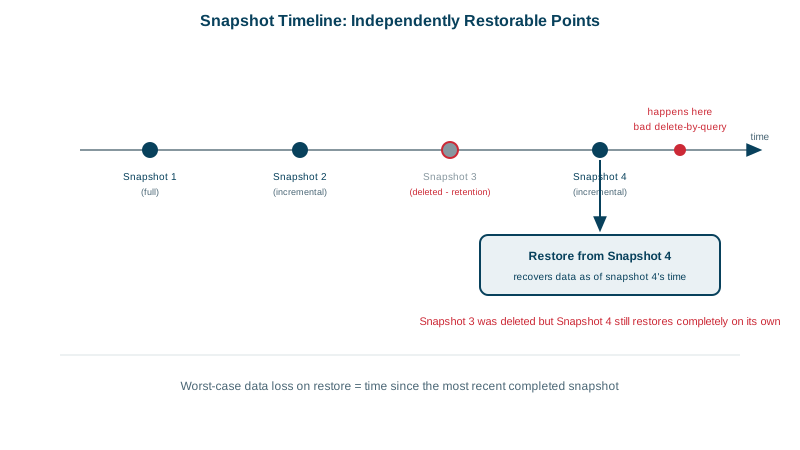
Scheduled snapshots with SLM retention
Snapshot lifecycle management (SLM) takes snapshots on a schedule and deletes old ones:
PUT /_slm/policy/nightly
{
  "schedule": "0 30 1 * * ?",
  "name": "<nightly-{now/d}>",
  "repository": "local_backups",
  "config": { "indices": ["*"], "include_global_state": true },
  "retention": { "expire_after": "30d", "min_count": 5, "max_count": 50 }
}
Every night at 01:30, kept for 30 days, with at least 5 and at most 50 snapshots. Monitor SLM failures (GET /_slm/stats) and alert on them: a backup job that quietly stopped is discovered on the worst possible day.
Elasticsearch disaster recovery
- Protect the repository: a separate account or bucket with object lock and versioning, so an attacker (or a mistaken script) with cluster credentials can't delete the backups.
- Restore to another cluster: register the same repository read-only on a second cluster in another region; that's a tested recovery path for losing the whole cluster.
- Cross-cluster replication (a paid feature) keeps a follower cluster continuously in sync for lower recovery time.
- Rebuild from the source of truth: if the index is a derived copy of a database (Day 18), reindexing from the database is also a recovery path; know how long it takes.
- Test restores regularly, and time them. An untested backup is a hope, not a plan.
Check yourself
The delete applies to every copy of the index across all nodes immediately. Only a snapshot taken before the deletion can bring the data back.
They're incremental: each snapshot stores only the segments not already in the repository, so after the first full snapshot, most later ones copy little data.
So credentials compromised on the cluster, or a careless script, can't delete the backups as well. Give the cluster write access but not delete rights where possible, and enable object lock or versioning on the bucket.
Snapshot lifecycle management takes snapshots on a schedule and deletes old ones by retention rules, so backups don't depend on someone remembering.
A snapshot is only proven when it restores. Regular restore drills catch missing indices, wrong permissions and incompatible versions, and measure how long recovery really takes, which you need to know before an outage.