Elasticsearch Mapping and Field Types Explained
On this page
Why dynamic mapping guesses wrong
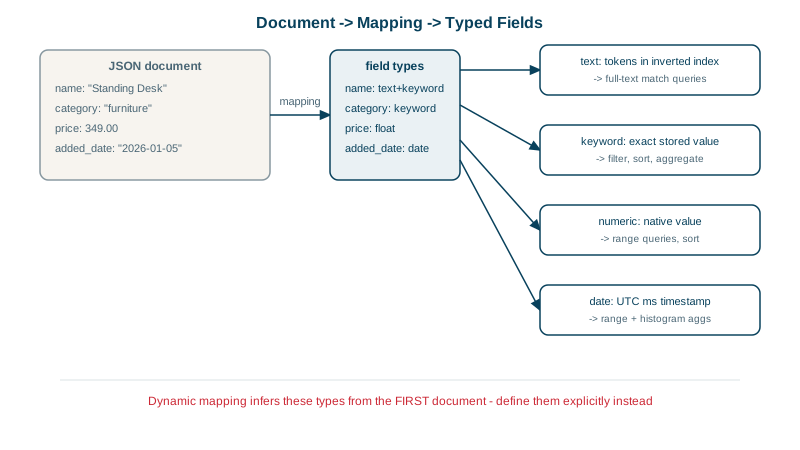
Index {"sku": "AB-1234", "price": "24.99"} into a new index and Elasticsearch guesses types: sku becomes analyzed text plus a keyword subfield, and price, sent as a string, also becomes text. Now price ranges don't work, and an exact SKU lookup on the main field fails (Day 19 shows that failure). Mappings fixed after the fact require reindexing, so define them up front.
text vs keyword fields
The most important choice:
| `text` | `keyword` | |
|---|---|---|
| Stored as | Analyzed terms (Day 6) | One exact value |
| Good for | Full-text search: names, descriptions, bodies | Exact match, filters, sorting, aggregations: IDs, SKUs, statuses, tags, emails |
"Wireless Mouse" becomes | wireless, mous (with the english analyzer) | Wireless Mouse |
A term query on a keyword field is exact and case-sensitive. In the lab, {"term": {"author": "ana"}} found two articles; "Ana" found none.
Multi-fields: index one value several ways
A product name needs full-text search, exact sorting and autocomplete. Index it three ways:
"name": {
  "type": "text", "analyzer": "english",
  "fields": {
    "keyword": { "type": "keyword" },
    "suggest": { "type": "search_as_you_type" }
  }
}
Search name, sort and aggregate on name.keyword, autocomplete on name.suggest (Day 11).
Example: a complete product index mapping
PUT /products
{
  "settings": { "number_of_shards": 1, "number_of_replicas": 0 },
  "mappings": {
    "dynamic": "strict",
    "properties": {
      "name":        { "type": "text", "analyzer": "english",
                       "fields": { "keyword": { "type": "keyword" },
                                   "suggest": { "type": "search_as_you_type" } } },
      "description": { "type": "text", "analyzer": "english" },
      "brand":       { "type": "keyword" },
      "category":    { "type": "keyword" },
      "price":       { "type": "scaled_float", "scaling_factor": 100 },
      "rating":      { "type": "half_float" },
      "sales":       { "type": "integer" },
      "in_stock":    { "type": "boolean" },
      "added":       { "type": "date" },
      "reviews":     { "type": "nested", "properties": {
                         "user": { "type": "keyword" }, "stars": { "type": "byte" }, "text": { "type": "text" } } },
      "embedding":   { "type": "dense_vector", "dims": 4, "similarity": "cosine" }
    }
  }
}scaled_floatstores prices as integers of cents internally: exact and compact.nestedkeeps each review's fields together (Day 17).dense_vectorholds embeddings for semantic search (Day 21).- Other useful types:
geo_point(Day 20),ip,date_nanos,flattenedfor arbitrary key-value maps,wildcardfor logs searched with wildcards.
Strict mappings catch mistakes
"dynamic": "strict" rejects documents with unknown fields instead of silently adding them. With the index above:
POST /products/_doc
{ "name": "Cable", "colour": "red" }strict_dynamic_mapping_exception - [1:26] mapping set to strict, dynamic introduction of [colour] within [_doc] is not allowedA typo (colour instead of color) fails loudly rather than creating a new field that every query misses. Use strict for application data; dynamic mapping (with dynamic templates to control the guesses) suits logs with unpredictable fields.
Mapping rules to remember
- You can add fields to an existing mapping, but not change a field's type. That needs a new index and a reindex (Day 19).
- Mapping explosion: every distinct field adds cluster-state overhead; the default limit is 1,000 fields per index. Use
flattenedfor open-ended key-value data. - Disable what you don't need:
"index": falsefor fields you only display,"doc_values": falsefor fields you never sort or aggregate on.
Check yourself
Keyword: it's matched exactly, filtered and aggregated, not searched as prose. As text it would be analyzed into lowercase tokens, which makes exact filters and terms aggregations behave unexpectedly.
One value can be searched as analyzed text, sorted and aggregated as a keyword, and autocompleted, each through its own subfield.
Unknown or misspelled fields silently becoming new fields with guessed types, such as a typo creating prcie as text. With strict mapping the document is rejected, so the mistake surfaces immediately.
It infers types from the first value it sees, so a numeric-looking string becomes long or a date becomes text, and mappings can't be changed in place afterwards.
Fields you never search still build index structures, and fields you never sort or aggregate on still build doc values, all costing disk and memory. Turning those off for large, display-only fields saves resources without changing what you can do.