Elasticsearch Shard Sizing and Capacity Planning
On this page
The most common cluster mistake: too many shards
Teams often create indices with many shards "for future growth", or daily indices with five shards each. A year later the cluster has 20,000 tiny shards, the master node struggles to manage cluster state, and searches fan out to far more shards than needed. Shard count is hard to change later (Day 19), so size it deliberately.
What each shard costs
Each shard is a Lucene index with its own files, memory for segment metadata, and threads to search it. A search touches one copy of every shard in its indices (Day 2):
- Too few, too large: each shard search is slow, recovery after a node failure takes long, and data can't spread across many nodes.
- Too many, too small: overhead per shard dominates, cluster state grows, and each search pays fan-out and merge costs.
Elasticsearch shard sizing guidelines
From Elastic's sizing guidance:
| Guideline | Typical value |
|---|---|
| Shard size | 10 to 50 GB; up to 50 GB is common for logs, smaller for latency-sensitive search |
| Documents per shard | Under about 200 million |
| Shards per node | Keep the total modest; recent versions estimate heap use per shard and field rather than a fixed count |
| Primaries for a small index | One is often right; the course lab's indices are a few kilobytes each |
Estimate primaries from the data volume:
Expected size in 1-2 years: 400 GB (primary data only)
Target shard size:          ~40 GB
Primary shards: 400 / 40 = 10PUT /orders
{ "settings": { "number_of_shards": 10, "number_of_replicas": 1 } }Ten primaries and ten replicas spread over, say, four data nodes. Measure real sizes with _cat/indices:
index    pri rep docs.count store.size
articles   1   1          7     17.2kb
products   1   0         36     21.2kb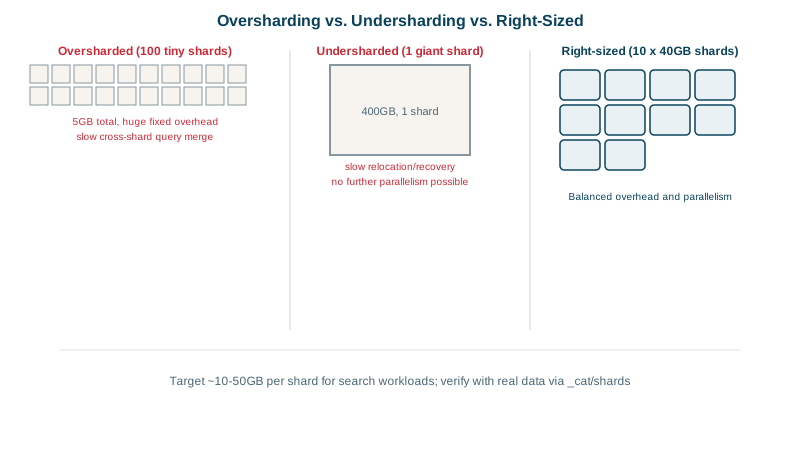
Sizing shards for time-based data
For logs and events, don't guess one index's final size: use data streams with rollover (Day 24). A new backing index starts when the current one reaches a size (max_primary_shard_size: 50gb) or age, so shards stay well sized whatever the daily volume.
Heap, memory and disk rules of thumb
- Heap: no more than half of RAM, and below about 31 GB (to keep compressed object pointers). The other half goes to the operating system's file cache, which Lucene depends on for speed.
- Disk: SSDs for hot data. Keep usage below the disk watermarks (85% low, 90% high, 95% flood stage by default); at flood stage, indices become read-only.
- CPU for search-heavy and ingest-heavy loads, and memory for vectors (Day 21) and aggregations.
Capacity planning with a load test
- Index a realistic sample (say 10% of a year's data) into one shard on hardware like production.
- Run real queries at increasing load with Rally (Elastic's benchmarking tool) or your own tool.
- Find where one shard's latency becomes unacceptable: that's your maximum shard size for this workload.
- Extrapolate shard count, nodes and replicas (replicas also add search capacity).
Fixing shard counts later: split, shrink, reindex
- Too many shards:
_shrinkto a factor of the original count, or reindex; merge small daily indices into monthly ones. - Too few:
_splitto a multiple of the original count (the index must be read-only during the split), or reindex.
Check yourself
Divide the expected primary data size over the index's lifetime by a target shard size, typically 10 to 50 GB. A 300 GB index would start around 6 to 10 primaries; then validate with a load test.
The rest is needed for the operating system's file cache, which Lucene relies on to read index files fast. Also keep heap under about 31 GB so the JVM can use compressed object pointers.
With data streams and rollover at a maximum shard size or age, instead of a fixed number of shards per day.
Each shard carries fixed memory and CPU overhead, adds entries to the cluster state the master must manage, and turns every search into many small per-shard searches. Thousands of tiny shards make a cluster slow and fragile.
At 85 percent used, new shards aren't allocated to the node; at 90 percent shards move away; at 95 percent indices become read-only.