Elasticsearch Highlighting Search Results
On this page
Why search results need snippets
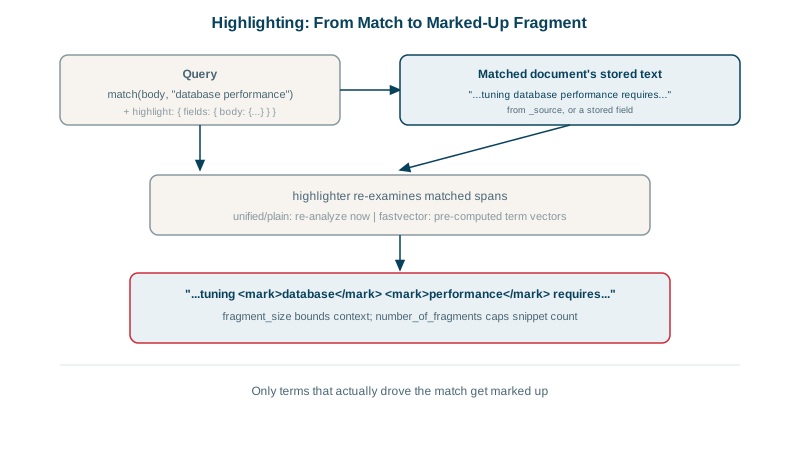
A result list of titles makes users open each one to see if it's relevant. A short excerpt with their search terms marked answers that at a glance, and makes search feel accurate.
Requesting highlights in a search
GET /articles/_search
{
  "query": { "match": { "body": "database performance" } },
  "_source": ["title"],
  "highlight": {
    "pre_tags":  ["<mark>"],
    "post_tags": ["</mark>"],
    "fields": { "body": { "fragment_size": 80, "number_of_fragments": 1 } }
  },
  "size": 2
}
Real results from the course's articles index:
5  Why Our Search Was Slow
   "The <mark>performance</mark> of the <mark>database</mark> collapsed as the table grew."
1  Tuning Databases for Performance
   "Indexes, query plans and connection pools decide <mark>database</mark> <mark>performance</mark> more than hardware"
Each hit gets a highlight object with fragments of the field around the matches. "_source": ["title"] keeps the full body out of the response: the highlight is all the UI needs.
Highlight settings that matter
| Setting | Effect |
|---|---|
fragment_size | Approximate length of each snippet in characters (default 100) |
number_of_fragments | How many snippets per field; 0 returns the whole field highlighted (good for titles) |
pre_tags / post_tags | Markup around matches (<em> by default) |
no_match_size | Return the start of the field when nothing in it matched, so every result has a snippet |
highlight_query | Highlight with a different query, such as only the user's text, not the filters |
require_field_match | Only highlight fields that matched the query (default true) |
Unified vs plain vs fast vector highlighter
unified(default): uses Lucene's unified highlighter; sentence-aware fragments, works with most queries. Use this.plain: re-analyzes the text per document; accurate but slow on large fields.fvh(fast vector highlighter): needsterm_vector: with_positions_offsetsin the mapping (more index space); fast for large documents and supports boundary scanning and multiple tag colors.
For very large fields, store offsets ("index_options": "offsets") so the unified highlighter doesn't need to re-analyze text at query time.
Rendering highlights safely without XSS
Highlighting inserts your tags into stored text, which may contain user-generated content. If that text contains <script> and you render the highlight as HTML, you've built an XSS hole (see the security fundamentals course).
- Set
"encoder": "html"in the highlight request: Elasticsearch HTML-escapes the original text and then adds your tags. - Or render fragments as text and apply marks on the client.
Check yourself
The UI only needs the snippet. Returning large article bodies for every result wastes bandwidth, memory and serialization time; the highlighter still reads the field internally.
no_match_size, which returns the beginning of the field, up to that many characters, when there are no highlighted fragments, so results matched on the title still show some body text.
It escapes HTML in the stored text before adding highlight tags, preventing stored XSS when snippets are rendered as HTML.
The unified highlighter. It handles most query types accurately, breaks text into sentence-aware fragments, and can use stored offsets or term vectors for speed on large fields, so it's a good default for nearly every case.
With fragment_size for roughly how many characters each fragment holds and number_of_fragments for how many to return per field. Setting number_of_fragments to 0 highlights the whole field, useful for short fields like titles.