Elasticsearch Security: Authentication and Access
On this page
Why open Elasticsearch clusters leak data
Elasticsearch clusters left on the internet without authentication have repeatedly exposed huge datasets: customer records, logs with personal data, health information. Security has been enabled by default since version 8; the job now is to keep it on and configure it well.
Elasticsearch authentication
With xpack.security.enabled: true, every request needs credentials. Testing the lab cluster without them:
security_exception: missing authentication credentials for REST request [/products/_count]Ways to authenticate:
- Built-in users for administration (the
elasticsuperuser: use it to set up, then avoid it). - Native users stored in Elasticsearch, for people and simple setups.
- API keys for applications: scoped, expiring, revocable.
- SSO through SAML, OpenID Connect or LDAP/Active Directory (some realms need a paid license).
TLS encrypts traffic: required between nodes in a multi-node cluster, and strongly recommended on the HTTP layer so credentials aren't sent in clear text.
Roles and users with least privilege
A role grants privileges on indices and the cluster. A read-only support role:
POST /_security/role/support_basic
{ "indices": [ { "names": ["customers"], "privileges": ["read"] } ] }

POST /_security/user/sam
{ "password": "S4m-support-pass", "roles": ["support_basic"] }
Testing it on the lab cluster:
sam reads customers  -> {"count":4,...}
sam writes           -> security_exception action [indices:data/write/index] is unauthorized for user [sam]
                        with effective roles [support_basic] on indices [customers]
sam reads products   -> security_exception action [indices:data/read/search] is unauthorized for user [sam] ...
Exactly what was granted, nothing more.
API keys for applications
POST /_security/api_key
{
  "name": "search-frontend",
  "expiration": "30d",
  "role_descriptors": {
    "products_read": { "indices": [ { "names": ["products"], "privileges": ["read"] } ] }
  }
}
The response includes an id and the key (shown once). The application sends Authorization: ApiKey <base64 of id:key>. Give each application its own key with only the indices and privileges it needs, rotate them, and invalidate a key immediately if it leaks.
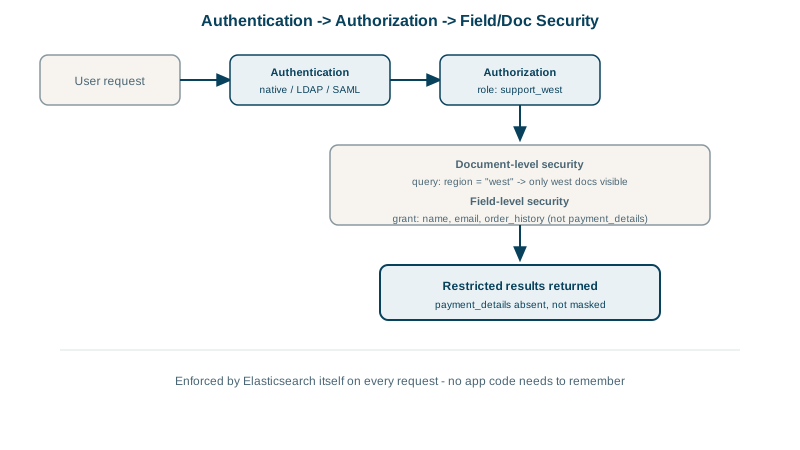
Field-level and document-level security
A support team for one region should see only that region's customers, and not their card details. Roles can restrict documents with a query and fields with a grant list:
POST /_security/role/support_eu
{ "indices": [ { "names": ["customers"], "privileges": ["read"],
    "query": { "term": { "city": "Leeds" } },
    "field_security": { "grant": ["first_name", "last_name", "city"] } } ] }
On the lab's free Basic license, Elasticsearch refused:
security_exception: current license is non-compliant for [field and document level security]Document- and field-level security require a paid subscription. On the free tier, the alternatives are separate indices per audience (with index-level roles as above), or filtering in your application layer, with the risk that one missed filter exposes everything. OpenSearch includes document- and field-level security in its open-source security plugin.
Elasticsearch security checklist
[ ] Security enabled; TLS on transport and HTTP layers
[ ] No cluster ports exposed to the internet; access through the application or a VPN
[ ] Separate least-privilege roles per application and team; no shared superuser
[ ] API keys per application, with expiry and rotation
[ ] Audit logging for sensitive clusters (a paid feature), or access logs at a proxy
[ ] Snapshots stored where cluster credentials can't delete them (Day 27)
Check yourself
Writing to the customers index and reading any other index, such as products. The role granted only read on customers, so everything else was denied by default.
Keys can be scoped to exactly the indices and privileges that application needs, audit logs show which one acted, and a leaked key can be revoked without affecting other applications.
Use separate indices per audience and grant roles access per index, since document- and field-level security need a paid license. Aliases with filters help organize access, but index-level roles are the actual boundary.
Authentication, TLS on both the HTTP and transport layers, least-privilege roles per user and application, no exposure to the public internet, and audit logging where the license allows. Missing any one of these has caused real data leaks.