Elasticsearch Analyzers and Tokenizers Explained
On this page
What an analyzer does
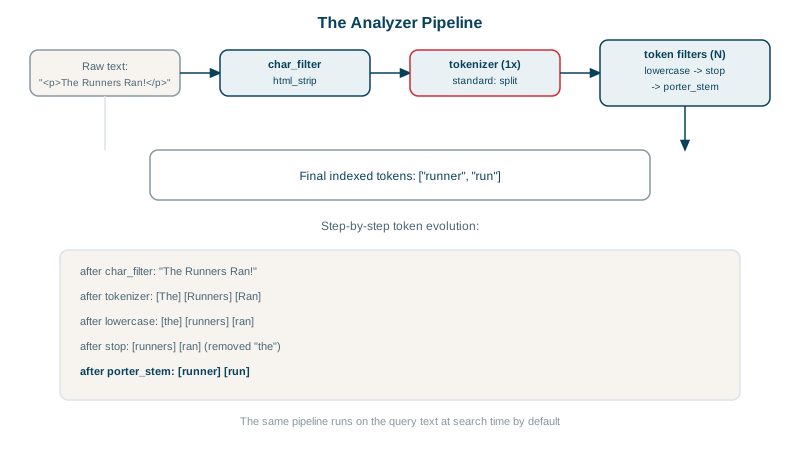
When a document is indexed, its text fields go through an analyzer that produces terms. When a query runs, the query text goes through the same analyzer. A match happens when the terms line up. Change the analyzer and you change what users can find.
Character filters, tokenizers and token filters
- Character filters clean raw text: strip HTML, map characters (
&toand). - Tokenizer splits text into tokens: on whitespace and punctuation, into n-grams, or by language rules.
- Token filters modify tokens: lowercase, remove stop words, stem (
runningtorun), add synonyms, fold accents (cafétocafe).
Standard vs english analyzer with the analyze API
The same sentence through two built-in analyzers on the lab cluster:
POST /_analyze
{ "analyzer": "standard", "text": "The Quick-Running Foxes!" }['the', 'quick', 'running', 'foxes']POST /_analyze
{ "analyzer": "english", "text": "The Quick-Running Foxes!" }['quick', 'run', 'fox']The standard analyzer splits on word boundaries and lowercases. The english analyzer also removes stop words (the) and stems, so running matches run and foxes matches fox. In the lab, a search for laptops in English-analyzed product descriptions found "Budget Laptop", while the standard-analyzed article titles kept databases and database apart.
The trade-off stemming brings
Stemming improves recall but changes words in surprising ways:
english analyzer: "wireless mouse wireles mose" -> ['wireless', 'mous', 'wirel', 'mose']mouse becomes mous, and a misspelled wireles becomes wirel. Day 11 shows how this breaks fuzzy matching on a stemmed field. A common solution: index the field twice with a multi-field, once stemmed and once with the standard analyzer, and search both.
Building a custom analyzer with synonyms
Product search that folds accents, handles synonyms and stems:
PUT /shop
{
  "settings": {
    "analysis": {
      "filter": {
        "shop_synonyms": { "type": "synonym_graph", "synonyms": ["laptop, notebook", "tv, television"] }
      },
      "analyzer": {
        "shop_index": {
          "tokenizer": "standard",
          "filter": ["lowercase", "asciifolding", "porter_stem"]
        },
        "shop_search": {
          "tokenizer": "standard",
          "filter": ["lowercase", "asciifolding", "shop_synonyms", "porter_stem"]
        }
      }
    }
  },
  "mappings": {
    "properties": {
      "name": { "type": "text", "analyzer": "shop_index", "search_analyzer": "shop_search" }
    }
  }
}
Synonyms applied at search time (search_analyzer) can be updated without reindexing, using a synonyms set and reloading analyzers. Test any analyzer against an index with POST /shop/_analyze {"analyzer": "shop_search", "text": "Café Notebook"}.
Language analyzers, edge n-grams and normalizers
- Language analyzers (
english,french,german, and about 30 more) and the ICU plugin for Unicode-aware tokenizing. edge_ngramfor prefix matching (autocomplete), andsearch_as_you_typefields that build these for you.- Normalizers for
keywordfields: lowercase and fold accents on exact values, soAnaandanamatch as keywords.
Check yourself
Matching compares terms. If a query produces different terms than indexing did, for example running at search time against run in the index, documents that should match won't. Match queries use the field's search analyzer automatically.
It split on punctuation, lowercased, removed the stop word the and stemmed the rest, producing quick, run and fox. That's why searches for fox or running now match.
Search-time synonyms can be changed by updating a synonyms set or reloading the analyzer, without reindexing every document. Index-time synonyms are baked into the index and need a full reindex to change.
An analyzer for keyword fields that can lowercase or fold accents without splitting into tokens, so exact matching becomes case-insensitive.
Indexing prefixes of each word, like l, la, lap, so search-as-you-type matches partial words quickly, at the cost of a larger index.