MongoDB CRUD Operations Tutorial
On this page
What you'll set up
A local MongoDB server, the mongosh shell connected to it, and a customers collection you've created, queried, updated and cleaned up.
Step 1: run MongoDB in Docker
The quickest route is the official container:
docker run -d --name mongo -p 27017:27017 mongo:8
docker exec -it mongo mongosh
Alternatives: install MongoDB Community Server and mongosh locally, or create a free MongoDB Atlas cluster and connect with its connection string. A mongod process serves the data; mongosh is the interactive shell; applications use a driver (pymongo, the .NET driver, the Node driver).
Transactions (Day 18) and change streams (Day 19) need a replica set, and a single node is enough for development. Start the container with a replica set name and initiate it once:
docker run -d --name mongo -p 27017:27017 mongo:8 --replSet rs0
docker exec mongo mongosh --quiet --eval 'rs.initiate({ _id: "rs0", members: [{ _id: 0, host: "localhost:27017" }] })'
Applications then connect with mongodb://localhost:27017/?replicaSet=rs0. The host: "localhost:27017" matters: without it the member registers under the container's internal host name, which an application on your machine can't resolve, and the driver fails to find the primary.
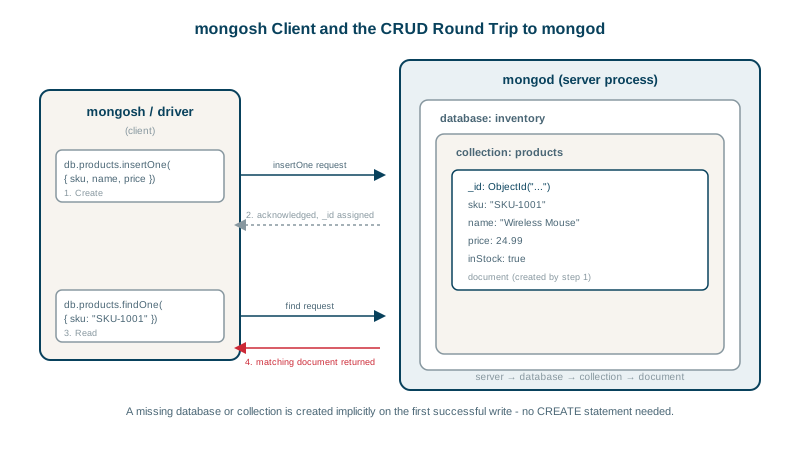
Databases and collections are created automatically on first write:
use shopStep 2: insert documents
db.customers.insertOne({ name: "Sam Lee", email: "sam@example.com", plan: "pro", tags: ["beta"] })
db.customers.insertMany([
  { name: "Kai Moe", email: "kai@example.com", plan: "starter" },
  { name: "Rey Diaz", email: "rey@example.com", plan: "pro", tags: [] }
])
Each insert returns the generated _id values (ObjectIds, which also encode a creation timestamp).
Step 3: query documents with find
db.customers.find({ plan: "pro" })                                  // all matching
db.customers.findOne({ email: "sam@example.com" })                  // first match
db.customers.find({ plan: "pro" }, { name: 1, email: 1, _id: 0 })   // projection: only some fields
db.customers.countDocuments({ plan: "pro" })
Day 6 covers query operators in depth.
Step 4: updateOne vs replaceOne, and upserts
Two operations look similar:
// updateOne with operators: change only the named fields
db.customers.updateOne({ email: "sam@example.com" }, { $set: { plan: "enterprise" }, $push: { tags: "vip" } })

// replaceOne: the WHOLE document becomes this (except _id)
db.customers.replaceOne({ email: "kai@example.com" }, { name: "Kai Moe", email: "kai@example.com", plan: "pro" })
Update operators ($set, $unset, $inc, $push, $pull, $addToSet) change parts of a document. replaceOne overwrites everything; forget a field and it's gone. Use operators for changes; use replace only when you mean "this is the new document".
Upsert inserts when nothing matches:
db.customers.updateOne(
  { email: "new@example.com" },
  { $set: { plan: "starter" }, $setOnInsert: { createdAt: new Date() } },
  { upsert: true }
)
$setOnInsert applies only when the upsert creates the document.
The same operations in C#
With the official .NET driver (the MongoDB.Driver package), a collection maps to a class, and filters and updates are written as type-checked expressions:
using MongoDB.Bson;
using MongoDB.Bson.Serialization.Conventions;
using MongoDB.Driver;

// store C# PascalCase properties as camelCase fields, matching the shell examples
ConventionRegistry.Register("camelCase", new ConventionPack { new CamelCaseElementNameConvention() }, _ => true);

var client = new MongoClient("mongodb://localhost:27017");     // create once per application and reuse
var customers = client.GetDatabase("shop").GetCollection<Customer>("customers");

await customers.InsertOneAsync(new Customer { Name = "Sam Lee", Email = "sam@example.com", Plan = "pro" });

var pro = await customers.Find(c => c.Plan == "pro").ToListAsync();

var result = await customers.UpdateOneAsync(
    c => c.Email == "sam@example.com",
    Builders<Customer>.Update.Set(c => c.Plan, "enterprise").Push(c => c.Tags, "vip"));
Console.WriteLine($"matched {result.MatchedCount}, modified {result.ModifiedCount}");

await customers.DeleteOneAsync(c => c.Email == "rey@example.com");

public class Customer
{
    public ObjectId Id { get; set; }                 // mapped to _id by convention
    public string Name { get; set; } = "";
    public string Email { get; set; } = "";
    public string Plan { get; set; } = "starter";
    public List<string> Tags { get; set; } = new();
}
Without the camelCase convention, the driver stores fields as Name and Email, and shell queries for name or email silently match nothing. Pick one convention before the first write.
Step 5: delete documents
db.customers.deleteOne({ email: "rey@example.com" })
db.customers.deleteMany({ plan: "starter" })
Safe habits for updates and deletes
- Run the filter with
findfirst, then the same filter withupdateManyordeleteMany. An empty filter{}matches every document. - Read the result:
matchedCount,modifiedCountanddeletedCounttell you what happened.matchedCount: 0usually means a typo in the filter. - Prefer
updateOne/deleteOnewith a unique key (_id, or email with a unique index) for single-record changes. - Use operators, not replace, unless you mean to replace the whole document.
Check yourself
$set changes only the fields you name and leaves everything else in the document intact. replaceOne swaps in a completely new document, keeping only _id, so any field you didn't include is gone. Use $set for partial updates unless you really mean to replace the whole document.
If no document matches the filter, it inserts one built from the filter and the update; otherwise it updates the match.
Every document in the collection is deleted, because an empty filter matches everything, and there's no undo apart from a backup. Run the same filter with find or countDocuments first to check what will be affected.
By default it's ordered, so it stops at the failing document: earlier documents are inserted and later ones aren't. With ordered: false it attempts every document and reports all failures at the end.
_id is the primary key, unique within the collection and automatically indexed. If you don't supply one, the driver generates an ObjectId, which also encodes the creation time.