MongoDB BSON and the Document Data Model
On this page
BSON vs JSON: what MongoDB really stores
You write documents in a JSON-like syntax, but MongoDB stores and transmits BSON (Binary JSON). Two reasons:
- Speed: each field carries its type and length, so the server can skip over fields and nested documents without parsing everything.
- Types: JSON has only strings, numbers, booleans, arrays, objects and null. BSON adds the types databases need.
| BSON type | Use for | JSON's closest |
|---|---|---|
Date | Timestamps (UTC milliseconds) | A string |
Decimal128 | Money and exact decimals | A floating-point number |
Int32, Int64 (Long) | Counters, ids, quantities | A number |
Double | Measurements, scientific values | A number |
ObjectId | Default _id: 12 bytes, includes a creation timestamp | A string |
BinData | Files, hashes, UUIDs | Base64 string |
Boolean, Null, arrays, embedded documents | As in JSON | Same |
Storing money: Decimal128 vs double
Floating-point numbers can't represent most decimal fractions exactly. Adding prices stored as doubles versus Decimal128 in an aggregation on MongoDB 9:
db.t.insertOne({ d1: 0.1, d2: 0.2, m1: NumberDecimal("0.10"), m2: NumberDecimal("0.20") })
db.t.aggregate([{ $project: { _id: 0,
  double_sum:  { $add: ["$d1", "$d2"] },
  decimal_sum: { $add: ["$m1", "$m2"] } } }])
// { double_sum: 0.30000000000000004, decimal_sum: Decimal128("0.30") }
Store money as Decimal128 (or as integer cents). In Python that's Decimal128. In .NET, a decimal property is stored as BSON Decimal128 by default since version 3.0 of the C# driver; 2.x versions stored it as a string, which sorts and compares as text, so check data written by older services before you sum it. The 3.0 driver also requires you to choose how Guid values are stored: register new GuidSerializer(GuidRepresentation.Standard) once at startup, or configure each property (C# driver 3.0 upgrade notes).
Why mixed types break MongoDB queries
A query matches by value and type. Store one customer's zip code as the string "02134" and another's as the number 2134, and find({ zip: "02134" }) finds only one of them. Mixed types sneak in when several services or imports write to one collection. Prevent them with schema validation (Day 5), and find them with $type:
db.customers.countDocuments({ zip: { $type: "string" } })Similarly, store dates as Date, not strings: date strings in different formats don't sort or compare correctly, and you can't use date operators on them.
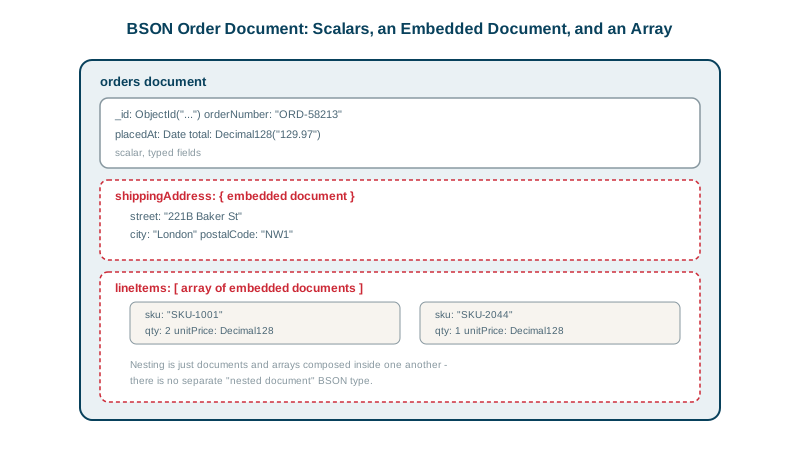
Embedded documents and arrays
A field can hold an embedded document or an array, to any depth (up to 100 levels):
{ _id: 991,
  shipTo: { city: "Berlin", country: "DE" },
  lines: [ { sku: "LAMP-1", qty: 1 }, { sku: "BULB-2", qty: 2 } ] }
Query nested fields with dot notation: { "shipTo.city": "Berlin" }, { "lines.sku": "LAMP-1" } (Day 6). Indexes work on nested fields and array elements too (Day 7).
The 16 MB document limit and field name cost
- A document can be at most 16 MB. That's large for structured data, and it's a design signal: a document approaching it usually holds an unbounded array (Day 4). Store large files in object storage or GridFS.
- Field names are stored in every document. In a collection of a billion documents, a field called
customerShippingAddressCountryCodecosts real storage; shorter names help, though compression reduces the effect. - BSON adds a little overhead for small documents: a three-field order that is 48 bytes as compact JSON is 54 bytes as BSON. The type information is what you're paying for.
Check yourself
Doubles store binary fractions, which can't represent most decimal amounts exactly, so sums drift: 0.1 + 0.2 becomes 0.30000000000000004. Decimal128 stores exact decimal values, so totals, taxes and comparisons on money come out right. Storing integer cents is another safe option.
Some documents store the zip as a number. Queries match on type, so mixed types split the data; use validation and fix the data.
Probably an unbounded array, such as every event or comment ever attached to it, or embedded data that should live in a separate collection or in object storage. Documents should stay well below the limit, since large documents also slow every read and update that touches them.
Field names are stored in every document, not once per collection like column names. Across millions of documents, long names add noticeable storage and memory, so short but clear names are worth it in large collections.
Extra types, such as dates, 64-bit integers, Decimal128, ObjectId and binary data, plus length prefixes that make documents fast to traverse. JSON alone would store dates and money as strings or doubles.