MongoDB $facet, $bucket and Window Functions
On this page
Advanced aggregation for dashboards
A sales dashboard shows the order count, a histogram of order sizes, revenue by month and a running total per customer. Running a separate query for each scans the same data several times. These stages compute them efficiently and keep the logic in the database.
$facet: several pipelines over the same input
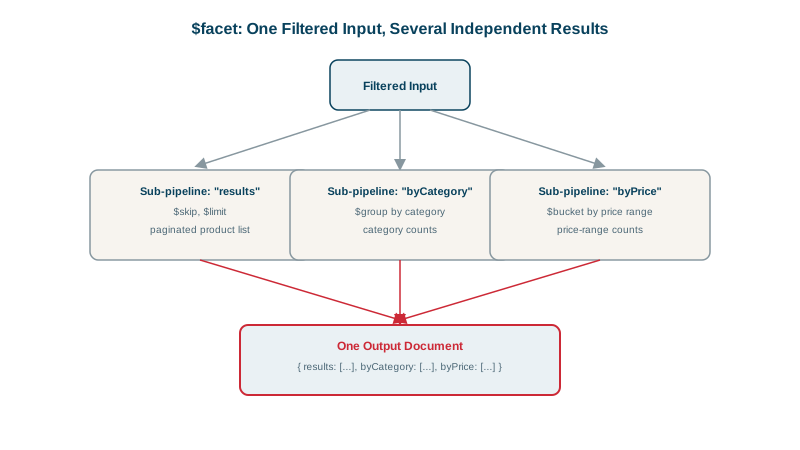
$facet runs independent sub-pipelines on the same set of documents and returns all results in one document:
db.orders.aggregate([
  { $match: { status: "paid" } },
  { $facet: {
      totalBuckets: [ { $bucket: { groupBy: "$total", boundaries: [0, 100, 250, 501],
                                   default: "other", output: { n: { $sum: 1 } } } } ],
      count:        [ { $count: "n" } ]
  } }
])
On the 200,000 test orders:
{ totalBuckets: [ { _id: 0, n: 13313 }, { _id: 100, n: 20137 }, { _id: 250, n: 33253 } ],
  count: [ { n: 66703 } ] }
Faceted search pages (filters with counts per category, price range and brand) are the classic use. The $match before $facet can use an index; stages inside each facet can't, so filter first.
$bucket and $bucketAuto: histograms
$bucket groups by ranges you define: [0, 100), [100, 250), [250, 501) above. Values outside every range go to the default bucket; without one, they cause an error. $bucketAuto picks boundaries itself to spread documents evenly across a requested number of buckets, which is handy when you don't know the distribution.
$setWindowFields: running totals and rankings
Window functions (MongoDB 5.0+) compute values across related documents without collapsing them, like SQL's OVER (PARTITION BY ... ORDER BY ...):
db.orders.aggregate([
  { $match: { customerId: 8428 } },
  { $setWindowFields: {
      partitionBy: "$customerId",
      sortBy: { createdAt: 1 },
      output: {
        running: { $sum: "$total", window: { documents: ["unbounded", "current"] } }
      }
  } },
  { $project: { _id: 0, total: 1, running: 1 } }
]){ total: 488, running: 488 }
{ total: 130, running: 618 }
{ total: 380, running: 998 }
{ total: 466, running: 1464 }Other window operators: $rank, $denseRank, $documentNumber, $shift (previous or next value), $avg over a moving window (documents: [-6, 0] for a 7-order moving average), and time-range windows (range: [-30, 0], unit: "day").
$merge: materializing aggregation results
Recomputing a heavy report on every page view wastes resources. $merge writes pipeline output into a collection, inserting or updating by key:
db.orders.aggregate([
  { $match: { status: "paid" } },
  { $group: { _id: { $dateTrunc: { date: "$createdAt", unit: "month" } }, revenue: { $sum: "$total" } } },
  { $merge: { into: "revenue_by_month", whenMatched: "replace", whenNotMatched: "insert" } }
])
Run it on a schedule (or incrementally for recent months), and the dashboard reads a small, precomputed collection: an on-demand materialized view.
Check yourself
It computes several results, such as a page of products, counts per category and a price histogram, from the same filtered input in one pipeline, so the expensive filtering runs once and the client needs one round trip. Each facet's output must fit within the 16 MB document limit.
$group collapses documents into one result per key. Window functions keep every document and add computed values to each, such as a running total, a rank within its partition, or a moving average over the previous seven days.
Precompute it with $merge into a results collection on a schedule, or incrementally for new data, and have the page read that collection. The page becomes a quick indexed read, at the cost of results being as fresh as the last run.
$bucket uses boundaries you specify, such as price ranges of 0 to 50 and 50 to 100. $bucketAuto chooses boundaries to split documents into a given number of roughly equal groups.
$out replaces the whole target collection. $merge can insert, replace or merge individual documents into an existing collection, which supports incremental updates.