MongoDB Backup, Restore and Disaster Recovery
On this page
A replica set isn't a backup
A script with a wrong filter runs deleteMany on the production orders collection. Within a second, every secondary has applied the same delete (Day 20). Three copies, all equally empty. Backups protect against mistakes, corruption, ransomware and losing a whole region; replication doesn't.
MongoDB backup methods: mongodump, snapshots and managed backups
| Method | How | Good for | Limits |
|---|---|---|---|
mongodump / mongorestore | Exports documents as BSON, re-inserts them | Small databases, single collections, moving data | Slow for large data; indexes rebuilt on restore; needs care for consistency |
| Filesystem snapshots | Snapshot of the data volume (cloud disk snapshots, LVM) | Large databases; fast restore | Must capture data and journal consistently |
| Managed backups | Atlas backup, Ops Manager, Cloud Manager | Production; includes point-in-time recovery | Tied to the platform |
mongodump and mongorestore ship in the separate MongoDB Database Tools package:
mongodump --uri "mongodb://backup:***@db1,db2,db3/?replicaSet=rs0" --readPreference secondary \
          --oplog --gzip --archive=/backups/shop-2026-10-10.gz

mongorestore --uri "mongodb://restore-target/?replicaSet=rs1" --oplogReplay --gzip \
             --archive=/backups/shop-2026-10-10.gz
--oplog also captures writes that happened during the dump, and --oplogReplay applies them on restore, giving a consistent point-in-time copy of the whole deployment. Run dumps against a secondary to keep load off the primary.
--oplog only works against a replica set; it isn't available through mongos. So mongodump can't take a consistent backup of a sharded cluster that's taking writes, because each shard is dumped at a different moment. For sharded clusters, use filesystem snapshots coordinated across all shards and the config servers, with the balancer stopped (Day 24), or a managed backup service that does this for you.
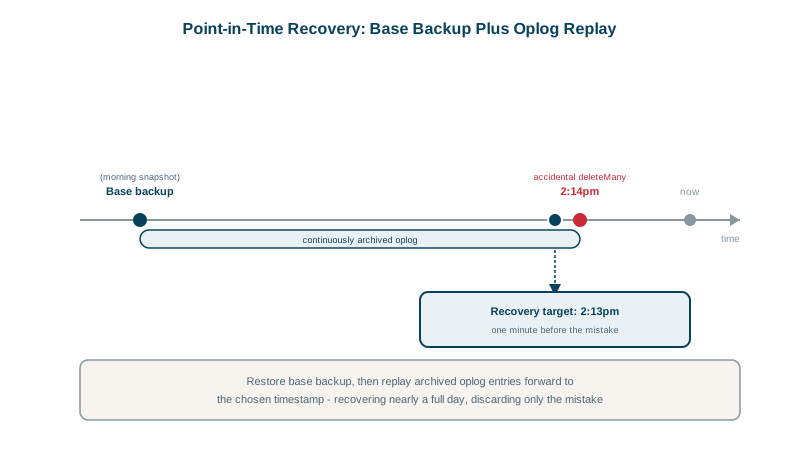
Point-in-time recovery from the oplog
For the accidental deleteMany at 14:32:10, you want the database as it was at 14:32:09. Point-in-time recovery (PITR) combines a snapshot with continuously captured oplog: restore the last snapshot before the incident, then replay oplog entries up to just before the bad operation. Atlas and Ops Manager do this with a few clicks; self-managed setups need continuous oplog backup (archiving oplog entries before they roll off) and tooling to replay up to a timestamp (mongorestore --oplogReplay --oplogLimit).
Your RPO (how much data you can lose) is decided by how often you snapshot and whether oplog is captured continuously. Your RTO (how long recovery takes) is decided by data size and method; restoring terabytes from mongodump can take many hours.
Disaster recovery across regions
For losing a whole region:
- Run replica set members in another region (for example 2 + 2 + 1 across three regions) so a region outage still leaves a majority and failover is automatic.
- Keep backups in a different region and account, ideally immutable, so a compromised account can't delete them.
- Document and rehearse the failover and restore runbooks.
Test your restores
A backup that has never been restored is a hope. Schedule restore tests: restore into an isolated environment, run checks (document counts, a few known records, application smoke tests), and record how long it took. Compare with your RTO. The first test always finds something.
Check yourself
Replication copies every write, including mistakes, to all members within moments, so all three copies lose the data together. Replicas protect against hardware failure; you need a backup taken before the mistake to recover from it.
It also captures the writes made while the dump runs, so mongorestore --oplogReplay applies them and produces a consistent copy as of the moment the dump finished. Without it, each collection is copied at a slightly different time.
Point-in-time recovery: restore the last snapshot before the incident, then replay the oplog up to just before the delete's timestamp.
A backup is only proven when it restores. Regular drills catch missing collections, corrupt files and missing credentials, and measure how long a restore actually takes.
It reads every document through the database, which is slow, loads the cache and takes long to restore. Filesystem snapshots or managed cloud backups scale better.