MongoDB Balancer and Chunk Migration
On this page
Why the balancer moves chunks
Even with a good shard key, data doesn't stay perfectly even: some ranges grow faster, new shards are added empty, old data is deleted unevenly. The balancer, a background process run by the config server primary, watches how much data each shard holds for each collection and moves chunks from fuller shards to emptier ones.
Since MongoDB 6.0.3 and 7.0, the balancer decides by data size per shard rather than by chunk count, and chunks are no longer split automatically on a fixed size threshold as in older versions. Data is moved when the difference between the largest and smallest shard exceeds a threshold based on the configured range size.
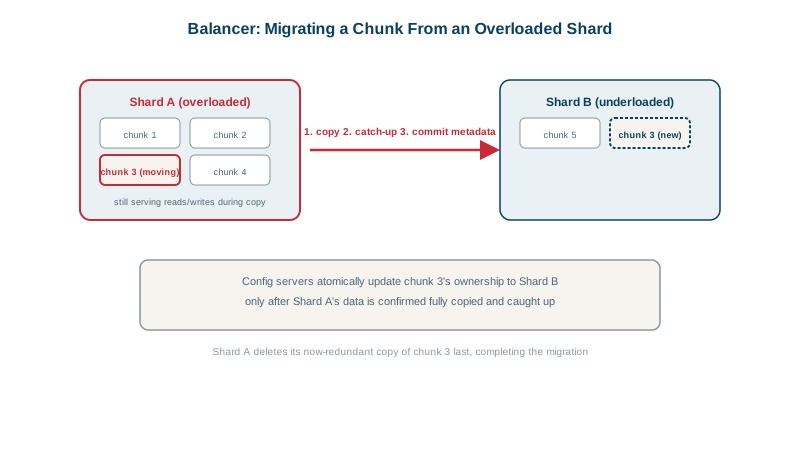
How a chunk migration works
Moving a chunk while the application keeps reading and writing:
- Clone: the destination shard copies the chunk's documents from the source.
- Catch up: writes to that range during the copy are captured and applied to the destination.
- Commit: in a short critical section, writes to the range pause briefly, the last changes are applied, and the config servers record the new owner.
- Cleanup: the source deletes its copy of the range in the background (the old documents are orphans until then; normal reads filter them out).
Applications don't need to do anything; mongos learns the new location and routes accordingly.
The cost of migrations: balancing windows
Migrations read from one shard, write to another, and replicate on both. On a busy cluster that competes with production traffic. Options:
- Balancing window: restrict migrations to quiet hours.
use config
db.settings.updateOne({ _id: "balancer" },
{ $set: { activeWindow: { start: "01:00", stop: "05:00" } } }, { upsert: true })- Pause temporarily during critical periods or backups:
sh.stopBalancer()/sh.startBalancer(), and check withsh.getBalancerState()andsh.isBalancerRunning(). - Add shards ahead of peak periods, so data moves before it's needed.
Jumbo chunks
A chunk whose documents all share one shard key value can't be split, because there's no boundary inside a single value. If it's large, it becomes a jumbo chunk that the balancer can't move normally. The cause is almost always a low-cardinality or skewed key (Day 23). The fix is a better key: refine it with a suffix field (refineCollectionShardKey) or reshard.
Zone sharding: placing data on purpose
Zones pin key ranges to specific shards:
sh.addShardToZone("shard-eu-1", "EU")
sh.addShardToZone("shard-us-1", "US")
sh.updateZoneKeyRange("shop.orders", { region: "EU", customerId: MinKey }, { region: "EU", customerId: MaxKey }, "EU")
With a shard key starting with region, EU customers' data stays on EU shards, useful for data residency rules and for keeping data near users. Zones also tier data: recent orders on fast shards, old orders on cheaper hardware.
Check yourself
They continue on the source; changes are captured and applied to the destination, with only a brief pause at commit while ownership switches.
Many documents sharing one shard key value, so the range can't be split. Refine the shard key with a high-cardinality suffix or reshard.
Use zones: assign EU shards to an "EU" zone and map the EU key range to it, with a shard key that begins with the region.
Migrations copy data between shards and add load. Restricting the balancer to quiet hours keeps that load away from peak traffic.
Use sh.status() and sh.isBalancerRunning(), and sh.balancerCollectionStatus() to see whether a collection still needs balancing.