MongoDB Query Optimization and Query Planner
On this page
Symptom: a query that was fast yesterday
The same query, unchanged code, went from 5 ms to 900 ms overnight. No deploy, no index dropped. A likely explanation is that MongoDB picked a different plan, and kept using it.
How the MongoDB query planner chooses a plan
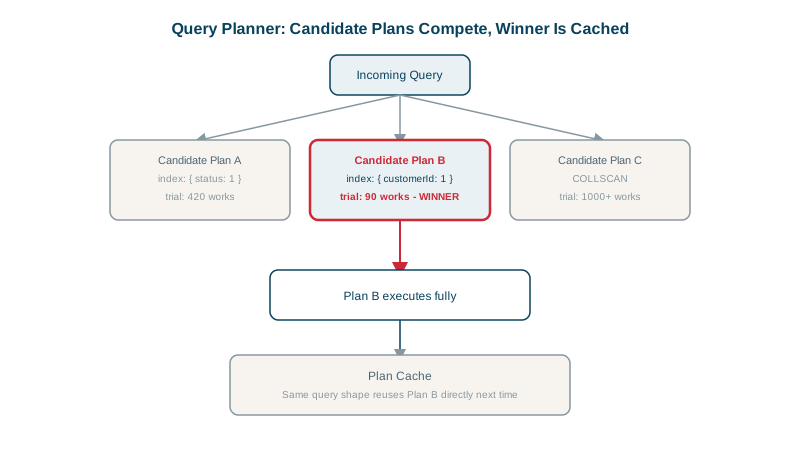
For a query that several indexes could serve, MongoDB doesn't estimate costs from statistics the way relational databases do. It runs a trial:
- Generate candidate plans, one per usable index (and some combinations).
- Run them in parallel for a short period, counting "works" (units of progress).
- The plan that returns results most efficiently in the trial wins, typically the first to return 101 documents or reach the end.
The winner is then stored in the plan cache for that query shape: the combination of filter fields, sort and projection, ignoring the specific values. Later queries with the same shape reuse it without another trial.
Why a cached query plan goes bad
The trial uses whatever values the first query of that shape had. A plan that was great for customerId: 4021 (a customer with 3 orders) may be terrible for customerId: 17 (a marketplace seller with 2 million). Data distribution changes over time too.
MongoDB re-evaluates cached plans when one performs much worse than it did in the trial, and clears a collection's cache when indexes are created or dropped, and on restart. Usually that's enough. Sometimes a bad plan sticks around long enough to hurt.
Diagnosing plan cache problems
db.orders.find({ customerId: 17, status: "paid" }).sort({ placedAt: -1 }).explain("allPlansExecution")
db.orders.getPlanCache().list()            // cached shapes and their plans
allPlansExecution shows every candidate's trial results, so you can see how close the race was. The profiler and slow query logs show planSummary (which index was used) and planCacheKey for each slow operation, which helps spot a shape that sometimes uses a bad index.
Fixing bad query plans, best option first
- Design one clearly better index. Usually the race was close because several indexes are each partly right. An ESR index that matches filter and sort (Day 8) wins every trial decisively. Drop indexes that are now redundant.
- Clear the cache for that collection as a stopgap:
db.orders.getPlanCache().clear(). - Hint a specific index for a known-problem query:
db.orders.find({ customerId: 17, status: "paid" }).sort({ placedAt: -1 })
         .hint({ customerId: 1, status: 1, placedAt: -1 })
Hints are brittle: renaming or dropping the index breaks the query. Use them sparingly and document why.
- Persistent query settings. Recent MongoDB versions let administrators attach settings such as allowed indexes to a query shape (
setQuerySettings), without changing application code. It replaced the older index filters.
Habits that keep plans healthy
- Few, well-designed compound indexes rather than many overlapping ones; fewer candidates means fewer bad races.
- Check
explainfor important queries in CI or staging with production-like data volumes and distributions. - Watch slow query logs for the same query shape flipping between plans.
Check yourself
It runs both briefly in parallel, picks the one that makes the most progress, and caches that choice for the query shape.
The trial ran with one set of values; a different value with a very different data distribution can make the cached plan inefficient.
Create an index that matches the query's filter and sort clearly better than the alternatives, following the ESR rule, and drop redundant indexes that tempt the planner. Hints and plan cache filters work but break silently when queries or indexes change.
It removes cached plans so the next query re-plans. If the same skewed first query runs again, the bad plan gets cached again, so it relieves symptoms without fixing the cause.
Run explain("allPlansExecution") to see the winning plan and the candidates, and use $planCacheStats to inspect cached plans for that query shape.