MongoDB $lookup and $group: Joining Data
On this page
Joining collections in MongoDB
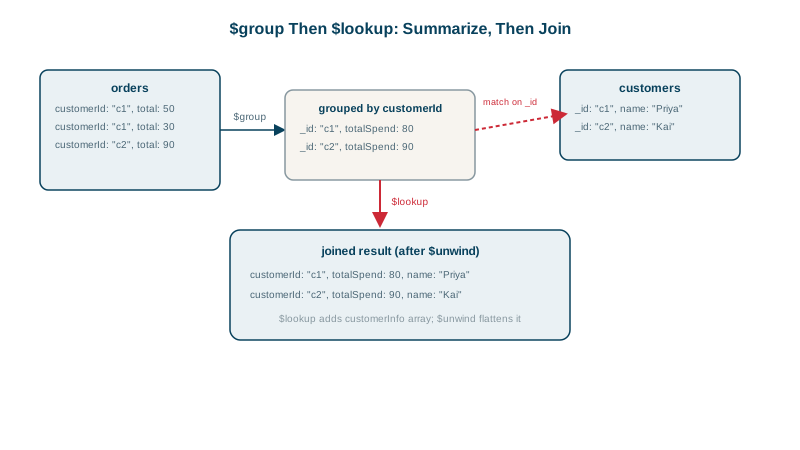
Revenue per customer lives in orders; customer names and countries live in customers (they're referenced, not embedded, Day 4). The report needs both. In MongoDB that's $group to summarize and $lookup to join.
$group accumulators
$group collapses documents that share a key into one, computing values with accumulators:
| Accumulator | Result |
|---|---|
$sum | Sum, or count with $sum: 1 |
$avg, $min, $max | Average, minimum, maximum |
$first, $last | First or last value in the current order (sort first) |
$push, $addToSet | Array of values, or of unique values |
$top, $bottom, $topN | The top or bottom document(s) by a sort, per group |
Group by several fields with a compound key: _id: { customer: "$customerId", month: { $month: "$createdAt" } }. _id: null groups everything into one document.
$lookup: a left outer join
db.orders.aggregate([
  { $match: { customerId: { $in: [8428, 48028] }, status: "paid" } },
  { $group: { _id: "$customerId", revenue: { $sum: "$total" } } },
  { $lookup: { from: "customers", localField: "_id", foreignField: "_id", as: "customer" } },
  { $unwind: "$customer" },
  { $project: { _id: 0, name: "$customer.name", country: "$customer.country", revenue: 1 } },
  { $sort: { revenue: -1 } }
])
Against test data on MongoDB 9:
{ revenue: 2595, name: "Sam Lee", country: "DE" }
{ revenue: 2184, name: "Kai Moe", country: "NO" }
$lookup adds an array field (customer) with all matching documents, empty if none: a left outer join. $unwind turns the one-element array into a plain sub-document; add preserveNullAndEmptyArrays: true to keep rows without a match.
$lookup with a pipeline
The pipeline form lets you filter or reshape the joined documents:
{ $lookup: {
    from: "orders",
    localField: "_id", foreignField: "customerId",      // the join condition
    pipeline: [ { $match: { status: "paid" } }, { $sort: { createdAt: -1 } }, { $limit: 3 } ],
    as: "recentPaidOrders"
} }
Keeping $lookup fast
- Index the foreign field.
$lookupruns a query onforeignFieldfor each input document. Without an index there (for example onorders.customerId), each lookup is a collection scan. - Reduce rows before joining.
$matchand$groupfirst, as above: join 2 grouped rows, not 66,000 orders. - Limit what you pull in with the pipeline form or a
$projectafterwards. $lookupinto a sharded collection works in recent versions but crosses shards, so it costs more.
When a $lookup is a schema design smell
An occasional $lookup in a report is normal. If the application's hot path needs $lookup on every request, the model probably doesn't match the access pattern. Consider embedding a snapshot or an extended reference (Day 4): store customerName on the order if order lists always show it.
Check yourself
An empty array in the as field. $lookup is a left outer join, so the input document is always kept. Follow it with $match on a non-empty array if you only want documents that have a match.
That the foreignField in payments is indexed, since each order otherwise triggers a full scan of payments, and that the pipeline filters or groups orders before the lookup so it runs for fewer documents.
Use $lookup with a pipeline: match orders for that customer with status: "paid", sort by date descending, and $limit to 3. An index on { customerId: 1, status: 1, createdAt: -1 } makes each inner lookup fast.
When a common page needs a join on every request, the data that's read together is stored apart. Embedding or copying the needed fields usually serves that access pattern better.
$sum, $avg, $min, $max, $count, $push to collect values into an array, and $first or $last after sorting.