MongoDB Security: Authentication and Encryption
On this page
- Why unsecured MongoDB gets ransomed
- 1. Network exposure: never on the public internet
- 2. Authentication with SCRAM, x.509 and OIDC
- 3. Least-privilege roles per application
- 4. TLS and encryption at rest
- 5. Client-side field level encryption and Queryable Encryption
- 6. Auditing and security hygiene
- Check yourself
Why unsecured MongoDB gets ransomed
For years, automated scanners found MongoDB servers listening on the internet without authentication, copied the data, dropped the databases and left a ransom note. Tens of thousands of databases were hit this way. Modern defaults are safer (MongoDB binds to localhost by default), but every deployment still needs the basics configured deliberately.
1. Network exposure: never on the public internet
- Never expose port 27017 to the internet. Bind to private interfaces (
net.bindIp) and restrict access with firewalls or security groups to the application hosts that need it. - In the cloud, use private networking (VPC peering, Private Link).
2. Authentication with SCRAM, x.509 and OIDC
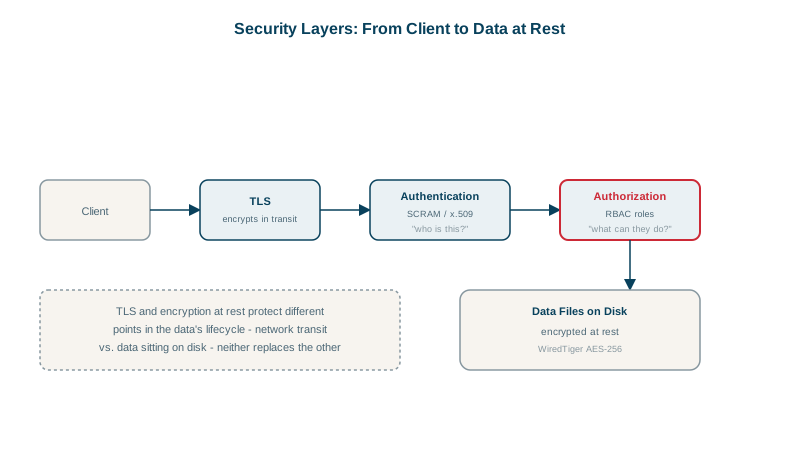
Enable access control (security.authorization: enabled) so every client must authenticate. SCRAM-SHA-256 (username and salted password) is the default mechanism. Alternatives: x.509 client certificates, and on Enterprise or Atlas, LDAP, Kerberos, and OIDC for workforce identity. Members of a replica set or sharded cluster authenticate to each other with a keyfile or x.509 certificates.
3. Least-privilege roles per application
Create one user per application, with only the roles it needs:
use admin
db.createUser({
  user: "orders-api",
  pwd: passwordPrompt(),
  roles: [ { role: "readWrite", db: "shop" } ]
})

db.createUser({
  user: "reporting",
  pwd: passwordPrompt(),
  roles: [ { role: "read", db: "shop" } ]
})
For narrower access, define a custom role with specific actions on specific collections:
db.createRole({
  role: "ordersWriter",
  privileges: [ { resource: { db: "shop", collection: "orders" }, actions: ["find", "insert", "update"] } ],
  roles: []
})
Never give applications root, dbOwner on everything, or clusterAdmin. Store credentials in a secret manager, not in code (Docker and Kubernetes course, Day 10).
4. TLS and encryption at rest
- TLS for all client and member connections (
net.tls.mode: requireTLS). - At rest: encrypt the storage, either with disk or volume encryption from your cloud or OS, or with WiredTiger's encrypted storage engine (Enterprise and Atlas, with keys in a KMS).
5. Client-side field level encryption and Queryable Encryption
Disk encryption doesn't protect against someone with database access, a DBA, a leaked backup that's decrypted, or a compromised admin account. Client-side field level encryption (CSFLE) and Queryable Encryption encrypt sensitive fields (national ids, card data, health data) in the driver, before they reach the server, with keys in a KMS. The server only ever stores ciphertext. Queryable Encryption (GA since MongoDB 7.0, with range queries added in 8.0, and prefix, suffix and substring queries generally available in 9.0) still allows equality and range queries on encrypted fields.
6. Auditing and security hygiene
- Enable auditing (Enterprise, Atlas) to log authentication, authorization failures and schema changes.
- Keep MongoDB patched; subscribe to security advisories.
- Rotate passwords and certificates; remove users who've left.
- Restrict who can run
mongodumpand access backups; a backup is a full copy of your data.
Check yourself
Not exposing MongoDB to the internet, by binding to private interfaces and firewalling the port, and enabling authentication with access control. Attackers scan for open MongoDB instances without passwords, copy the data, delete it and leave a ransom note.
So each gets only the roles it needs, actions are attributable, and one compromised credential can be revoked without affecting others.
Disk encryption doesn't protect data from anyone who can query the database; field-level encryption keeps sensitive fields unreadable to the server and its administrators.
A record of who authenticated and which administrative or data operations they ran. It helps investigate incidents and is often required for compliance.
Private networks aren't automatically trusted; TLS stops anyone with network access from reading credentials and data in transit, and can verify the server's identity.