MongoDB Aggregation Pipeline Tutorial
On this page
Why use the aggregation pipeline
"Top customers by revenue since June" needs filtering, grouping, summing and sorting. find() filters and returns documents; it doesn't compute. The aggregation pipeline does: documents flow through stages, each transforming the stream and passing it on, like a Unix pipe.
Core aggregation stages
| Stage | Does |
|---|---|
$match | Filters, with the same syntax as find() |
$project / $set ($addFields) / $unset | Reshape: choose, compute, rename or remove fields |
$group | Groups by a key and computes accumulators: $sum, $avg, $min, $max, $push, $addToSet, $count |
$sort, $limit, $skip | Order and trim |
$unwind | Turns an array into one document per element |
$count | Counts documents reaching it |
$lookup | Joins another collection (Day 15) |
Example: top customers by revenue
db.orders.aggregate([
  { $match: { status: "paid", createdAt: { $gte: ISODate("2026-06-01") } } },   // 1. filter early
  { $group: { _id: "$customerId", orders: { $sum: 1 }, revenue: { $sum: "$total" } } },   // 2. per customer
  { $sort: { revenue: -1 } },                                                    // 3. biggest first
  { $limit: 3 },                                                                 // 4. top 3
  { $project: { _id: 0, customerId: "$_id", orders: 1, revenue: 1 } }           // 5. tidy output
])
Run against the 200,000 test orders on MongoDB 9:
{ orders: 5, revenue: 2107, customerId: 8428 }
{ orders: 6, revenue: 1723, customerId: 48028 }
{ orders: 5, revenue: 1568, customerId: 15780 }$group's _id is the grouping key; "$customerId" with a dollar sign means "the value of this field".
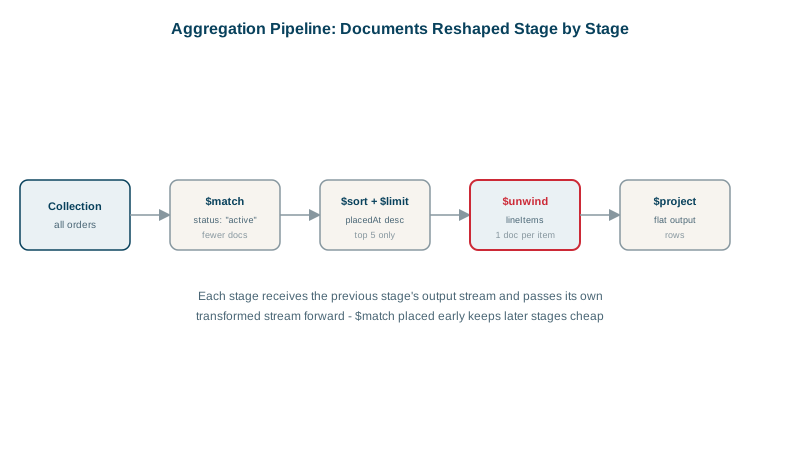
Using $unwind on arrays
To total sales per product from embedded order lines, unwind the array first:
db.orders.aggregate([
  { $match: { status: "paid" } },
  { $unwind: "$lines" },                                    // one document per line
  { $group: { _id: "$lines.sku",
              units: { $sum: "$lines.qty" },
              revenue: { $sum: { $multiply: ["$lines.qty", "$lines.price"] } } } },
  { $sort: { revenue: -1 } }
])
Aggregation performance: stage order and indexes
$matchand$sortat the start can use indexes. After a$groupor$projectreshapes documents, later stages can't. Filter as early as possible.- The optimizer reorders some stages for you (for example moving a
$matchbefore a$projectwhen safe, and combining$sort+$limitinto a top-N sort), but don't rely on it for clarity. - Each stage can use up to 100 MB of memory; larger
$groupor$sortstages spill to disk (allowDiskUse, on by default in recent versions), which is slower. Reduce data early. MongoDB 9.0 also caps a single operation at 1 GB or 20 percent of server memory, whichever is greater, so a pipeline that tries to hold too much at once is stopped rather than allowed to exhaust the server. - Check plans with
db.orders.explain("executionStats").aggregate([...]): the first stage should showIXSCAN, notCOLLSCAN, for selective matches.
Running reports without hurting production
Heavy aggregations compete with application traffic. Run them on a secondary with a read preference (Day 20), on an analytics node, or materialize results periodically with $merge into a reporting collection (Day 16) instead of recomputing on every page view.
Check yourself
It reduces the documents every later stage processes, and at the start of the pipeline it can use an index.
It outputs one document per element of the lines array, each a copy of the original with lines replaced by that single element. Each line can then be grouped, filtered or summed on its own, for example to compute revenue per product.
Without the dollar sign it's the literal string "customerId", so every document falls into one group with that name. With the dollar sign it refers to the value of the customerId field in each document, which is almost always what you want.
They're dropped by default. Use preserveNullAndEmptyArrays: true to keep them, for example to still count orders with no lines.
Large aggregations compete for CPU and cache with production traffic. Running them on a secondary, or an analytics node, protects the primary's latency.