MongoDB Query Language Tutorial
On this page
MongoDB query operators
A filter is a document of conditions. Each field either matches a value exactly or holds operators:
db.orders.find({ status: "paid" })                                   // equality
db.orders.find({ total: { $gte: 100, $lt: 500 } })                   // range
db.orders.find({ status: { $in: ["paid", "shipped"] } })             // one of several values
db.orders.find({ status: "paid", customerId: 42 })                   // implicit AND
db.orders.find({ $or: [ { status: "refunded" }, { total: { $gt: 1000 } } ] })
db.orders.find({ coupon: { $exists: true } }) // field present| Operator group | Operators |
|---|---|
| Comparison | $eq, $ne, $gt, $gte, $lt, $lte, $in, $nin |
| Logical | $and, $or, $nor, $not |
| Element | $exists, $type |
| Array | $elemMatch, $all, $size |
| Evaluation | $regex, $expr (compare fields within a document), $text |
Querying nested fields with dot notation
db.orders.find({ "shipTo.city": "Berlin" })        // field inside an embedded document
db.orders.find({ "lines.sku": "LAMP-1" })          // any element of the lines array has this sku
Quote dotted paths. Note the second query: on an array of documents, a condition on lines.sku matches if any element matches.
Querying arrays: why you need $elemMatch
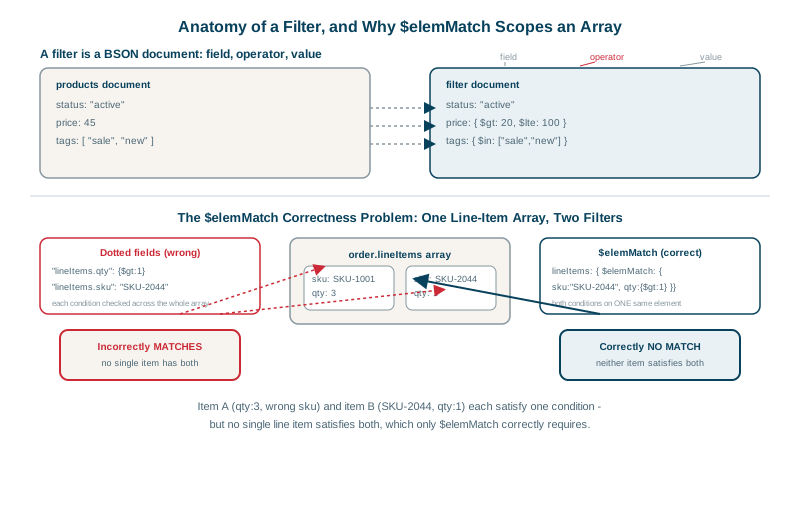
Find orders containing at least 5 lamps. Two orders:
{ _id: 1, items: [ { sku: "LAMP", qty: 1 }, { sku: "DESK", qty: 5 } ] }   // one lamp, five desks
{ _id: 2, items: [ { sku: "LAMP", qty: 5 } ] }                            // five lamps
The natural-looking query:
db.orders.find({ "items.sku": "LAMP", "items.qty": { $gte: 5 } })
// returns orders 1 and 2
Order 1 matches because some element has sku: "LAMP" and some (other) element has qty >= 5. The conditions are checked independently across the array. To require both on the same element, use $elemMatch:
db.orders.find({ items: { $elemMatch: { sku: "LAMP", qty: { $gte: 5 } } } })
// returns only order 2
Both results above were checked against MongoDB 9. This is one of the most common correctness bugs in MongoDB code, because the wrong query returns plausible results.
Array operators: $all and $size
db.posts.find({ tags: "mongodb" })                      // array contains the value
db.posts.find({ tags: { $all: ["mongodb", "indexes"] } })   // contains all of these
db.posts.find({ tags: { $size: 3 } })                   // exactly 3 elements
Projection, sorting and range-based pagination
db.orders.find({ customerId: 42 }, { status: 1, total: 1, placedAt: 1 })   // return only these (+ _id)
         .sort({ placedAt: -1 })
         .limit(20)
For deep pages, avoid large skip() values: the server still walks past every skipped document. Use range-based paging instead: remember the last placedAt (and _id as a tie-breaker) and query placedAt < lastSeen for the next page. With an index (Day 8), every page is equally fast.
Comparing fields with $expr
db.orders.find({ $expr: { $gt: ["$refunded", "$total"] } }) // refunded more than the total$expr lets you use aggregation expressions in queries, at the cost that it often can't use indexes efficiently.
$regex follows similar logic. An anchored, case-sensitive prefix such as { sku: /^LAMP-/ } can use an index on sku, because matching values sit next to each other in sorted order. A case-insensitive pattern like /lamp/i, or one without a ^ anchor, has to check every index key or document. For searching words in text, use a text index or a search engine (Day 10).
Check yourself
Each condition is satisfied by a different array element; without $elemMatch, conditions on an array aren't tied to the same element.
Use dot notation in quotes: { "shipTo.city": "Berlin" }. Querying { shipTo: { city: "Berlin" } } instead matches only documents whose whole shipTo object is exactly { city: "Berlin" }, with no other fields, in that order.
The server still walks past all the skipped documents or index entries before returning results, so each later page gets slower. Range-based paging, find({ _id: { $gt: lastSeenId } }).limit(20) on an indexed field, jumps straight to the right place and stays fast.
$in matches if the field equals any value in the list, or for arrays, if any element does. $all requires an array field to contain every listed value.
When a condition compares two fields in the same document, such as finding orders where paid is less than total. Standard query operators only compare a field with a constant.