How AI Coding Agents Work: Tools, Loop and Permissions
On this page
Learning Objective
Understand what happens inside a coding agent such as Claude Code, Cursor's agent or Codex: the loop of reading, searching, editing and running commands, the tools it uses, how permissions gate those tools, and why agents are strongest on tasks with fast, objective feedback.
Concept Explanation
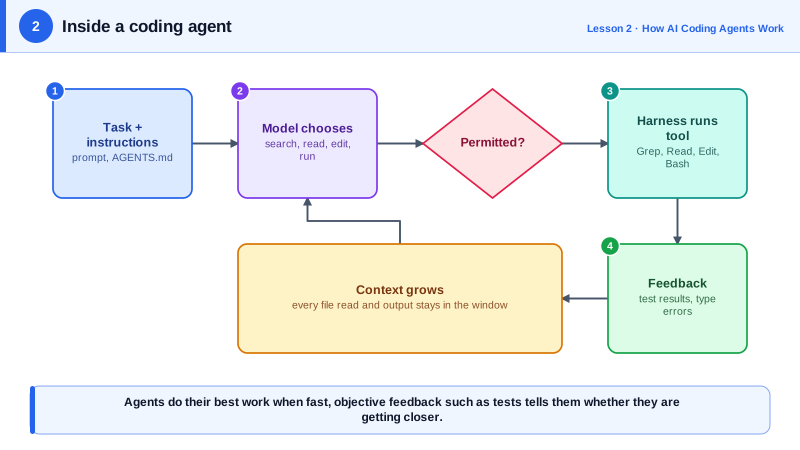
A coding agent is a language model running in a loop with tools. You give it a task. The model decides on an action, such as reading a file, searching the codebase, editing a file or running a shell command. The harness, the program around the model, executes that action and returns the result. The model reads the result and decides the next action. It repeats until it believes the task is done or it needs your input. Everything an agent knows about your project comes from what it reads during that loop and from the instructions you provide.
The tools are ordinary developer actions. Read opens a file. Grep and Glob search by content and file name, which is how agents find their way around large codebases without reading everything. Edit replaces a specific piece of text in a file, and Write creates or overwrites a file. Bash runs a command: the test suite, a build, git, a linter. Many agents also fetch web pages, spawn subagents for side tasks and call tools from MCP servers. The quality of an agent depends heavily on how well its harness implements these tools, which is why the same model can behave differently in different products.
Permissions sit between the model and the tools. A careful setup lets the agent read freely but asks you before it edits files or runs commands, at least until you have expressed trust. Most tools offer modes ranging from asking about everything, to auto-accepting edits, to classifier-assisted modes that approve routine actions and stop on risky ones, to fully unattended modes meant only for isolated sandboxes. You will configure these properly on Day 20.
The most important property of agent work is feedback. An agent that can run the tests after each change knows whether it succeeded; one that cannot is guessing. Type checkers, linters, test suites, build commands and even screenshots of a running app give the model objective signals it can act on. That is why agents excel at fixing a failing test, migrating code under a compiler's guidance or implementing a function to a clear specification, and struggle with vague goals such as "make the UI nicer", where nothing tells them whether they are getting closer.
Finally, agents have no memory between sessions except what is written down. A new session starts from scratch, reads your project instruction file, and explores again. Day 3 explains how context limits shape agent behavior, and Days 6 and 7 cover how to give agents the context they need without filling their window with noise.
| Tool | What it does | Typical use in a task |
|---|---|---|
| Glob and Grep | Find files by name and content | Locate where a function is defined and used |
| Read | Read a file or part of one | Understand the code before changing it |
| Edit and Write | Change or create files | Implement the fix or feature |
| Bash | Run commands | Tests, type checks, builds, git |
| Web fetch and search | Read documentation | Check an API the model is unsure about |
| Subagents and MCP tools | Delegate or reach external systems | Parallel research, issue trackers, databases |
Worked Example: Reading an Agent's Trajectory
This is a condensed, typical trajectory of a coding agent fixing a failing test. Learning to read trajectories like this, in your tool's transcript view, is how you understand and debug agent behavior.
User: The test test_invoice_total_rounding is failing. Fix it.

1. Bash    pytest tests/test_invoice.py::test_invoice_total_rounding -q
           -> FAILED  assert 10.0 == 9.99  (expected 9.99, got 10.0)
2. Grep    "def invoice_total"            -> src/billing/invoice.py:41
3. Read    src/billing/invoice.py (lines 30-70)
           -> total = round(sum(line.amount for line in lines), 2) after converting to float
4. Grep    "Decimal"                       -> src/billing/money.py uses Decimal and quantize
5. Read    src/billing/money.py
6. Edit    src/billing/invoice.py: sum Decimals, quantize with ROUND_HALF_EVEN via money.to_cents
7. Bash    pytest tests/test_invoice.py -q          -> 14 passed
8. Bash    pytest -q                                -> 412 passed
9. Answer  "invoice_total converted amounts to float before rounding, which produced 10.0.
           It now uses the existing money.to_cents helper with Decimal. All 412 tests pass."
Notice the shape: reproduce the failure, locate the code, read before editing, look for existing conventions, make a focused change, verify locally, then verify globally. When an agent skips the reproduction or the final full test run, its confident summary deserves less trust.
Real-World Examples
- Anthropic's documentation describes Claude Code's built-in tools, including Read, Edit, Write, Bash, Grep and Glob, and notes that the agent works best when it can verify its own work, for example by running tests or comparing screenshots.
- Research such as SWE-agent (Princeton, 2024) showed that the design of the interface between the model and the repository, including how files are viewed and how search results are summarized, has a large effect on how often a model fixes real GitHub issues.
Review Questions & Answers
The program around the model that executes its chosen actions, such as reading files or running commands, returns results to the model, enforces permissions and manages the context. Different harnesses with the same model can behave differently.
A failing test gives fast, objective feedback: the agent can run it after each change and know whether it succeeded. A vague goal provides no signal about whether the agent is getting closer.
Reading everything would fill the context window and waste time. Searching by name and content lets the agent find the relevant code quickly and read only what it needs.
Reproducing the failure first, reading existing conventions and reusing the money helper, rerunning the specific test, and finally running the full suite with all tests passing.