Claude Code Hooks Tutorial: PreToolUse, PostToolUse, Stop
On this page
Learning Objective
Use hooks to make certain things always happen, or never happen, regardless of what the model decides: format and lint after every edit, block dangerous commands and protected files, and keep the agent working until the checks pass, with correct handling of exit codes and loop guards.
Concept Explanation
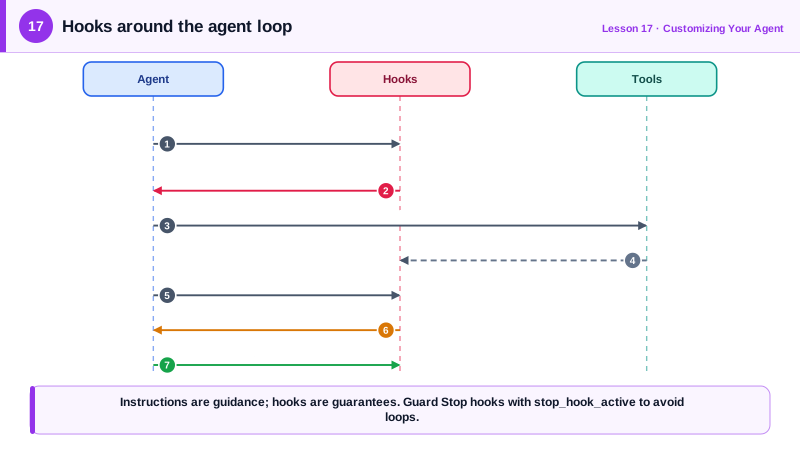
Instructions in a CLAUDE.md file are guidance. The model follows them most of the time, but under a long task, a confusing context or a prompt injection it may not. Some rules are too important for most of the time: never edit the migrations that already ran in production, always format code, never read the secrets file, never finish while tests are failing. Hooks turn such rules into code that the agent's harness runs at fixed points in its lifecycle, every time.
Claude Code defines many hook events. The most useful for coding are PreToolUse, which runs before a tool executes and can block it; PostToolUse, which runs after a tool succeeds, ideal for formatting and linting; UserPromptSubmit, which runs when you send a prompt and can add context; Stop, which runs when the agent is about to finish its turn and can send it back to work; and SessionStart, which can load context at the beginning of a session. Other agents have similar mechanisms: Cursor added hooks in 2025, and GitHub Copilot's coding agent runs setup steps and checks in its environment.
Hooks are configured in settings files: .claude/settings.json for project hooks shared with the team, settings.local.json for personal ones, or your user settings. Each entry names an event, an optional matcher such as Edit|Write or Bash, and a command. The command receives a JSON description of the event on standard input, including the tool name and its input, such as the file path or the shell command.
The exit code is the protocol. Exit 0 means proceed. Exit 2 means block: for PreToolUse the tool call is refused and the message on standard error is shown to the agent so it can adjust; for Stop, the agent is told to continue with the message as its instruction. Other non-zero codes are non-blocking errors. For finer control a hook can print a JSON decision instead, for example allow, deny or ask for a PreToolUse event.
Two cautions. First, a Stop hook that blocks must guard against infinite loops: the event input includes stop_hook_active, which is true when the agent is already continuing because of a stop hook, and Claude Code also caps consecutive blocks. Second, hooks run arbitrary commands with your permissions, so review hooks in shared settings as carefully as any other code, and keep them fast, because slow hooks slow every action.
| Event | Runs | Typical use |
|---|---|---|
| PreToolUse | Before a tool executes | Block rm -rf, protected files, secret reads |
| PostToolUse | After a tool succeeds | Format and lint the edited file |
| Stop | When the agent tries to finish | Require tests to pass before finishing |
| UserPromptSubmit | When you send a prompt | Add context, block prompts containing secrets |
| SessionStart | At session start or resume | Load current branch status or ticket details |
Worked Example: Format on Edit, Protect Files, Finish Only When Green
This project configuration formats every edited file, blocks edits to applied migrations and the environment file, and sends the agent back to work if tests fail when it tries to stop.
{
  "hooks": {
    "PostToolUse": [
      { "matcher": "Edit|Write",
        "hooks": [{ "type": "command",
                    "command": "jq -r '.tool_input.file_path' | xargs npx prettier --write --ignore-unknown" }] }
    ],
    "PreToolUse": [
      { "matcher": "Edit|Write",
        "hooks": [{ "type": "command", "command": "\"$CLAUDE_PROJECT_DIR\"/.claude/hooks/protect-files.sh" }] }
    ],
    "Stop": [
      { "hooks": [{ "type": "command", "command": "\"$CLAUDE_PROJECT_DIR\"/.claude/hooks/require-green.sh" }] }
    ]
  }
}#!/usr/bin/env bash
# .claude/hooks/protect-files.sh: exit 2 blocks the edit and tells the agent why.
FILE=$(jq -r '.tool_input.file_path')
for pattern in "db/migrations/applied/" ".env" "package-lock.json"; do
if [[ "$FILE" == *"$pattern"* ]]; then
echo "Blocked: $FILE is protected ($pattern). Create a new migration or ask the user." >&2
exit 2
fi
done
exit 0#!/usr/bin/env bash
# .claude/hooks/require-green.sh: do not let the agent finish while tests fail.
INPUT=$(cat)
[ "$(jq -r '.stop_hook_active' <<<"$INPUT")" = "true" ] && exit 0 # already continued once: allow stop
if ! OUT=$(npm test --silent 2>&1); then
echo "Tests are failing. Fix them before finishing:" >&2
echo "$OUT" | tail -40 >&2 # only the tail, to save context
exit 2
fi
exit 0The protect hook's message tells the agent what to do instead, so a block becomes guidance rather than a dead end. The stop hook sends only the last forty lines of test output back, keeping the agent's context lean.
Real-World Examples
- Claude Code's hooks guide documents formatting with Prettier on PostToolUse, blocking protected files with a PreToolUse script that exits with code 2, and checking stop_hook_active in Stop hooks to prevent endless continuation loops.
- Cursor introduced hooks in late 2025 for observing and controlling its agent loop, and GitHub Copilot's coding agent supports repository-defined setup steps, reflecting a broad move toward deterministic controls around coding agents.
Review Questions & Answers
Instructions are guidance the model usually follows but may not under pressure or manipulation. A hook is code the harness runs every time, so the rule holds regardless of the model's decisions.
For PreToolUse it blocks the tool call and shows the stderr message to the agent. For Stop it prevents the agent from finishing and tells it to continue, using the stderr message as guidance.
Without the check, a hook that keeps failing would send the agent back to work indefinitely. The flag shows the agent is already continuing because of a stop hook, so the hook can allow it to stop.
The agent reads the message and adjusts. A message such as "create a new migration instead" turns the block into guidance, while a bare refusal leaves the agent guessing or retrying.