Claude Code Skills Tutorial: SKILL.md and Slash Commands
On this page
Learning Objective
Package repeatable workflows as skills: write a SKILL.md with a description that triggers it at the right time, inject live context with commands, pre-approve the tools it needs, add supporting files, and decide when a workflow belongs in a skill rather than in the project instruction file.
Concept Explanation
Every team repeats certain agent tasks: write release notes, add an API endpoint the house way, prepare a database migration, triage a bug report, review a pull request against the team's checklist. Typing the same detailed instructions each time is slow and inconsistent. Putting them all in the project instruction file bloats every session with instructions that are irrelevant most of the time. Skills solve both problems.
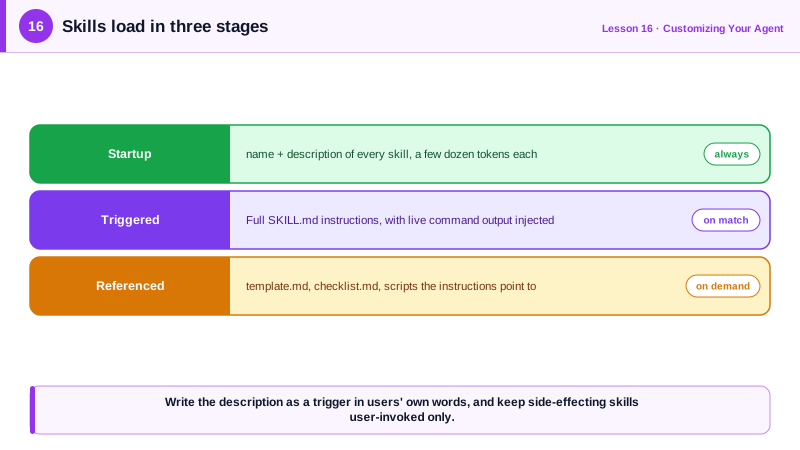
A skill is a folder containing a SKILL.md file and, optionally, supporting files such as reference documents, templates and scripts. The file starts with a short YAML header, most importantly a name and a description, followed by markdown instructions. Agents load skills with progressive disclosure: at startup they see only each skill's name and description, a few dozen tokens; when a task matches the description, or the user invokes the skill directly with a slash command, the agent loads the full instructions; supporting files load only if the instructions point to them. You can have dozens of skills without crowding the context window.
Skills started in Claude Code and Claude apps and became an open standard, Agent Skills, in December 2025. By early 2026 OpenAI Codex, GitHub Copilot, Cursor, Gemini CLI, VS Code and many other tools supported the same SKILL.md format, so a skill written once works across a team's tools. In Claude Code, project skills live in .claude/skills/name/SKILL.md and are shared through the repository; personal skills live in your home directory. Older custom slash commands in .claude/commands still work, and skills supersede them.
The description is the most important line, because it decides when the agent uses the skill on its own. Write it like a trigger: what the skill does and when to use it, with the words users actually say. "Generate release notes from merged commits. Use when asked for release notes, a changelog or what shipped" works; "Release helper" does not. For workflows with side effects, such as deploying, set the skill so that only you can invoke it, never the model on its own initiative.
Claude Code skills add useful features on top of the standard. Lines written as an exclamation mark followed by a command in backticks run before the agent sees the skill and insert their output, so a review skill can include the current diff, and a release-notes skill can include the commit log. An allowed-tools field pre-approves specific commands for the duration of the skill so it runs without permission prompts. Arguments let users pass values such as an issue number. A skill can also run in a forked subagent so its exploration stays out of the main conversation.
Use the instruction file for facts that apply to every task, and skills for procedures that apply to some tasks. If a section of your CLAUDE.md or AGENTS.md starts with "when doing X, follow these steps", it probably wants to be a skill.
| Field or feature | Purpose | Example |
|---|---|---|
| name | Command name, defaults to the folder name | release-notes |
| description | When the agent should use the skill | Generate release notes. Use when asked for a changelog. |
| disable-model-invocation | Only the user can trigger it | true for deploy or publish skills |
| allowed-tools | Pre-approve tools while the skill runs | Bash(git log *) |
| Live context injection | Insert command output into the skill | Exclamation mark and a backticked command |
| Supporting files | Templates and references loaded on demand | template.md, checklist.md |
Worked Example: A Release Notes Skill
This project skill gathers merged commits since the last tag before the agent reads it, pre-approves only the git commands it needs, and points to a template for the output format.
<!-- .claude/skills/release-notes/SKILL.md -->
---
name: release-notes
description: Draft release notes from commits merged since the last tag. Use when asked for release notes, a changelog, or "what shipped".
allowed-tools: Bash(git log *) Bash(git describe *)
argument-hint: "[version]"
---

## Commits since the last release
!`git log $(git describe --tags --abbrev=0)..HEAD --no-merges --pretty=format:'%h %s (%an)'`

## Instructions
1. Group commits into Features, Fixes and Internal using their conventional-commit prefixes.
2. Rewrite each entry for customers: what changed for them, not how it was implemented.
3. Omit Internal entries unless they affect performance or security.
4. Format the result exactly like [template.md](template.md), titled with version $ARGUMENTS.
5. Flag any commit you could not classify instead of guessing.<!-- .claude/skills/release-notes/template.md -->
## Version X.Y.Z (YYYY-MM-DD)
### New
- Customer-facing description. (#PR)
### Fixed
- What was broken and is now fixed. (#PR)Typing /release-notes 4.13.0 runs it directly, and asking "what shipped since the last release?" triggers it through the description. Because the commit log is injected up front, the agent does not spend turns discovering it, and the template keeps every release consistent.
Real-World Examples
- Anthropic published Agent Skills as an open standard on 18 December 2025, and within about three months OpenAI Codex, GitHub Copilot, Cursor, Gemini CLI, JetBrains and more than twenty other agent products had shipped compatible support for SKILL.md folders.
- Claude Code's documentation describes skills as superseding the older .claude/commands files, adding supporting files, automatic triggering from the description, dynamic context injection and tool pre-approval, while keeping existing commands working.
Review Questions & Answers
Through progressive disclosure: only each skill's name and description load at startup, the full instructions load when the skill is triggered, and supporting files load only when the instructions reference them.
The agent decides whether to use the skill automatically by matching the task against the description, so it must state what the skill does and when to use it in the words users actually use.
It runs the shell command before the agent sees the skill and inserts the command's output, such as a git log or diff, so the agent starts with live context instead of spending turns gathering it.
When it is a procedure needed only for some tasks, such as "when writing release notes, do these steps", rather than a fact relevant to every task.