Claude Code GitHub Actions: Headless Agents in CI
On this page
Learning Objective
Run coding agents without a terminal session: invoke them non-interactively from scripts, get structured output, wire them into GitHub Actions to respond to issues and comments or run on a schedule, and secure those workflows against runaway cost and untrusted triggers.
Concept Explanation
Interactive sessions are where most developers start, but many valuable agent tasks need no conversation: turn a well-written issue into a pull request, summarize why the nightly build failed, update dependencies weekly, write release notes on tag, label incoming issues. Running agents headless, inside scripts and CI, turns them into automation you can schedule, trigger and audit.
Most terminal agents have a non-interactive mode. In Claude Code, claude -p followed by a prompt runs the task and exits, printing the result. Useful flags include --output-format json, which returns the result together with metadata such as the session id and estimated cost; --json-schema, which forces the result into a structure your script can parse; --allowedTools, which pre-approves exactly the tools the task needs; --permission-mode dontAsk, which denies anything not pre-approved instead of waiting for a person; and --bare, which skips local configuration such as personal hooks and MCP servers so runs are reproducible. Codex and Gemini CLI offer comparable modes.
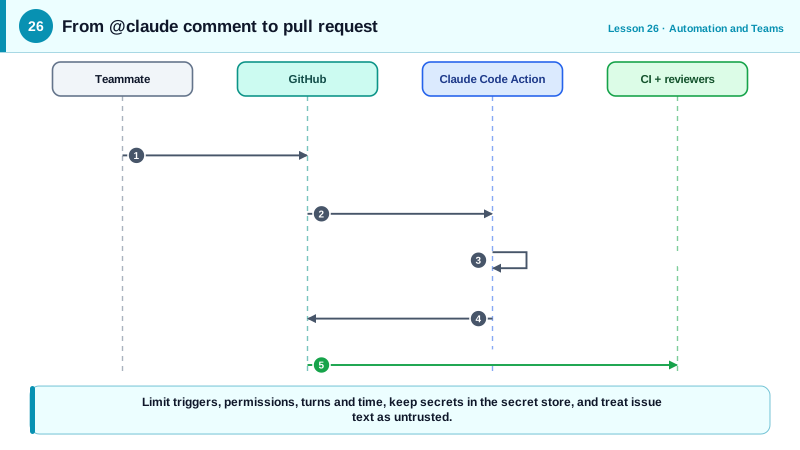
On GitHub, the official Claude Code action, anthropics/claude-code-action, packages this for workflows. With no prompt input it runs in interactive mode: anyone with write access can mention @claude in an issue or pull request comment, and the agent reads the thread, works in the checked-out repository, pushes commits and replies with its progress. With a prompt input it runs in automation mode on any event, such as a schedule or a newly opened pull request. GitHub's Copilot coding agent offers a similar experience natively: assign an issue to Copilot and it opens a pull request.
Automation needs guardrails, because nobody watches each run. Limit what can trigger the agent: the action by default requires write access for the triggering user and rejects bots, to prevent loops and abuse. Grant the workflow only the permissions it needs. Cap work with turn limits and job timeouts, and use concurrency controls so a burst of comments does not start twenty runs. Keep secrets in GitHub secrets, never in the workflow, and remember that public repositories do not pass secrets to workflows triggered from forks. Treat issue and comment text as untrusted input (Day 23): an agent triggered by a public issue should not hold credentials beyond the repository it works in.
Finally, every agent-created change still goes through your normal process: required checks, code review and branch protection (Day 24). Headless agents produce pull requests, not merges.
| Building block | Purpose | Example |
|---|---|---|
| claude -p "prompt" | Run a task non-interactively | Summarize a build log from a script |
| --output-format json and --json-schema | Machine-readable results | Parse a triage label from the result |
| --allowedTools, --permission-mode dontAsk | Exact, non-interactive permissions | Allow only test and git commands |
| --bare | Reproducible runs without local config | CI and scheduled scripts |
| claude-code-action, interactive mode | Respond to @claude mentions | Implement the feature described in an issue |
| claude-code-action, automation mode | Run on events and schedules | Weekly dependency update pull request |
Worked Example: @claude in Issues and Structured Triage of Failed Builds
The first workflow lets team members ask the agent to implement or fix things from issues and pull request comments. The second script runs after a failed CI job and asks for a structured diagnosis.
# .github/workflows/claude.yml
name: Claude Code
on:
  issue_comment:
    types: [created]
  pull_request_review_comment:
    types: [created]
concurrency:
  group: claude-${{ github.event.issue.number || github.event.pull_request.number }}
  cancel-in-progress: false
jobs:
  claude:
    if: contains(github.event.comment.body, '@claude')
    runs-on: ubuntu-latest
    timeout-minutes: 30
    permissions:
      contents: write
      pull-requests: write
      issues: write
      id-token: write
      actions: read
    steps:
      - uses: actions/checkout@v6
        with:
          fetch-depth: 1
      - uses: anthropics/claude-code-action@v1
        with:
          anthropic_api_key: ${{ secrets.ANTHROPIC_API_KEY }}
claude_args: "--max-turns 30"# ci/diagnose.sh: run after a failed test job; prints a structured diagnosis.
tail -200 test-output.log | claude -p --bare \
"Diagnose this CI failure. Classify it and identify the most likely root cause." \
--output-format json \
--json-schema '{"type":"object","required":["category","summary","suspect_files"],
"properties":{"category":{"enum":["test-bug","product-bug","flaky","infra","dependency"]},
"summary":{"type":"string"},
"suspect_files":{"type":"array","items":{"type":"string"}}}}' \
| jq '.structured_output'A teammate can now comment "@claude please implement this, following specs/user-export/tasks.md" on an issue and receive a pull request that must still pass CI and review. The diagnosis script turns a wall of logs into a category and a short summary that a bot can post to the team channel, and the schema guarantees the output is parseable.
Real-World Examples
- Anthropic's Claude Code GitHub Actions documentation describes interactive mode triggered by @claude mentions and automation mode driven by a prompt input, and notes that by default only users with write access can trigger runs and bot actors are rejected to prevent loops.
- GitHub made its Copilot coding agent generally available in 2025, letting teams assign issues to Copilot, which works in a GitHub Actions powered environment and opens draft pull requests that go through the repository's normal checks and review.
Review Questions & Answers
It forces the agent's final result into a structure that matches a JSON Schema, returned in a structured output field, so scripts can parse it reliably instead of interpreting free text.
Interactive mode, with no prompt input, waits for an @claude mention in an issue or pull request and responds to that request. Automation mode, with a prompt input, runs the given task on any configured event or schedule without a mention.
Nobody is present to answer permission prompts. dontAsk denies anything not pre-approved instead of waiting, so the run either completes within its allowed tools or fails predictably.
Restricting who can trigger runs, granting minimal workflow permissions, capping turns and job time, using concurrency limits, keeping secrets in the secret store, and treating issue and comment text as untrusted input.