Git Worktrees for Parallel AI Agents and Checkpoints
On this page
Learning Objective
Use version control as the safety net and coordination layer for agent work: commit in small verified steps, rewind with checkpoints and git when an agent goes wrong, isolate work on branches, and run several agents in parallel with git worktrees.
Concept Explanation
Agents change many files quickly, and occasionally they go badly wrong: a refactor that breaks everything, an approach that turns out to be a dead end, edits in files you did not expect. Version control is what makes that cheap. The habits are familiar from good engineering practice, but they matter more when the author types at machine speed.
Commit small and often. After each verified step, tests passing, commit with a clear message. Small commits give you precise rollback points and make the history readable, and they let reviewers follow the change step by step. Ask the agent to commit at the end of each step of the plan, and to write messages that explain why, not just what.
Use checkpoints for quick undo inside a session. Claude Code records a checkpoint before each edit, and you can rewind the code, the conversation or both to an earlier point, which is ideal for "that last approach was wrong, go back and try the other one". Checkpoints are a convenience, not a substitute for git: they track the agent's file edits, not every side effect of commands it ran, such as database migrations or deleted files outside the project.
Keep agent work on branches. Never let an agent work directly on your main branch; create a branch per task so the work can be reviewed as a pull request and discarded cleanly if needed. When an agent's attempt fails badly, it is often faster to delete the branch and start a fresh session with a better prompt than to repair a confused result.
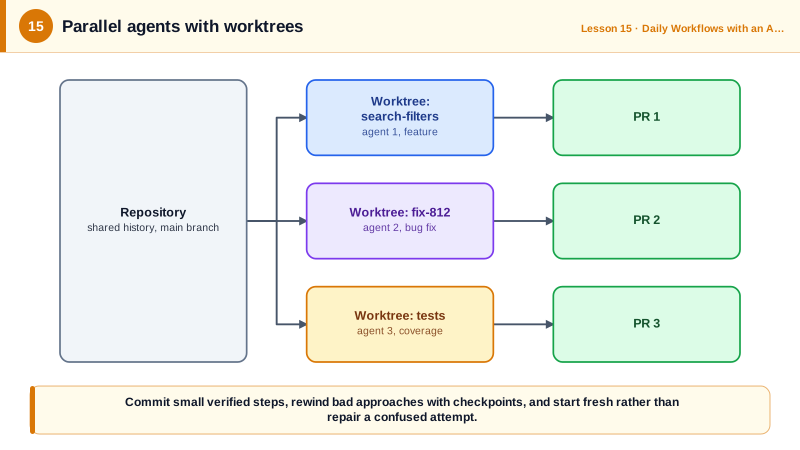
Run agents in parallel with worktrees. A git worktree is an additional working directory attached to the same repository, with its own checked-out branch. Because each worktree has its own files, several agents can work at the same time without overwriting each other: one implements a feature, another fixes a bug, a third writes tests for a third area. Claude Code can create one for you with claude --worktree name, which places it under .claude/worktrees and creates a matching branch; you can also use git worktree add directly with any tool. Each worktree needs its own dependency install and environment files, and parallel agents still meet at merge time, so give them separate areas of the codebase where possible.
| Practice | Protects against | How |
|---|---|---|
| Small verified commits | Losing good work, unreadable history | Commit after each passing step |
| Checkpoints and rewind | A bad approach within a session | Rewind code and conversation |
| Branch per task | Agent damage to main, unreviewable changes | One branch and PR per task |
| Fresh start | Repairing a confused attempt | Delete the branch, re-prompt |
| Worktrees | Parallel agents overwriting each other | One worktree and branch per agent |
Worked Example: Three Agents in Parallel with Worktrees
This sequence runs three Claude Code sessions on separate tasks at the same time, each in its own worktree and branch, then reviews and cleans up.
# One-time: keep worktree folders out of git status
echo ".claude/worktrees/" >> .gitignore

# Terminal 1: feature work in its own worktree and branch (worktree-search-filters)
claude --worktree search-filters
#   > Implement the filters described in specs/search-filters/tasks.md, task by task, committing each.

# Terminal 2: an unrelated bug fix, isolated from terminal 1
claude --worktree fix-812
#   > Fix issue #812 (soft-deleted projects in search). Failing test first.

# Terminal 3: the same idea with plain git, usable with any agent
git worktree add ../shop-tests -b tests/checkout-coverage
cd ../shop-tests && pnpm install && cp ../shop/.env.local .
#   start your agent here and ask for tests covering src/checkout

# Later, from the main checkout: review each branch as a pull request
git worktree list
gh pr create --head worktree-fix-812 --title "Fix #812: exclude soft-deleted projects from search"

# Clean up when merged
git worktree remove ../shop-tests
git branch -d tests/checkout-coverage
The three tasks touch different areas, so they merge cleanly. Had two agents edited the same module, the second pull request would need a rebase, which is why splitting parallel work by area is part of planning it.
Real-World Examples
- Claude Code introduced checkpoints with rewind in its 2.0 release in September 2025, letting users restore code and conversation to an earlier point, and documents that checkpoints do not track changes made by shell commands such as deleting files.
- Claude Code's worktree documentation describes running parallel sessions with claude --worktree, creating worktrees under .claude/worktrees with a branch per session, and isolating subagents in their own worktrees so parallel edits do not conflict.
Review Questions & Answers
Small commits give precise rollback points if a later step goes wrong, make the history readable, and let reviewers follow the change step by step.
Side effects outside the agent's file edits, such as database changes, deleted files or other effects of shell commands, which is why git branches and caution with commands remain necessary.
Each worktree is a separate working directory with its own checked-out branch, so the agents edit different copies of the files. In one checkout they would overwrite each other's changes.
Often the fastest path is to discard the branch, start a fresh session and give a better prompt, rather than piling corrections on top of a confused context and diff.